

PRODUCT REVIEW: Swivel Tilt TV Wall Mount for 26-60 Inch TVs
In-Depth U.S. Market Review
The Swivel Tilt TV Wall Mount for 26-60 Inch TVs is a widely appealing and versatile product in the U.S. wall-mount market, designed for medium-to-large televisions. It is the go-to solution for consumers who need a secure, flexible mounting option for their primary living room, media room, or budget monitor choice for a large gaming setup. Its range covers a huge portion of the TV sales spectrum, from the 26-inch bedroom TV to the popular 60-inch living room model.
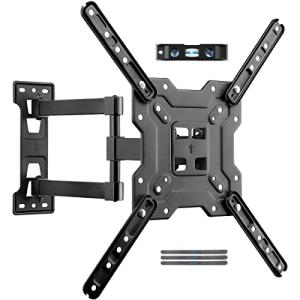
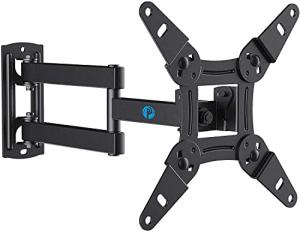
This full-motion mount provides the ability to angle the TV to overcome glare, accommodate multiple seating areas, or access ports for cable management. This level of versatility is a significant upgrade over basic fixed or tilting mounts.
Compared to smaller mounts, this one is built with beefier steel and a more complex articulating arm to handle the increased load of a 60-inch screen, providing necessary peace of mind. You are getting a highly flexible mount that is securely engineered for the larger, more substantial screens that are the standard for main viewing in American homes.
Technical Analysis
| Specification | Detail & U.S. Context | Analysis |
| TV Size Range | 26 to 60 Inches | Accommodates the most common primary living room and large bedroom TV sizes currently sold across the U.S. market. |
| Max Weight Capacity | Typically 88-100 lbs (High-Grade Steel) | Offers an exceptionally high margin of safety, securely holding modern, lightweight screens well below this maximum load. |
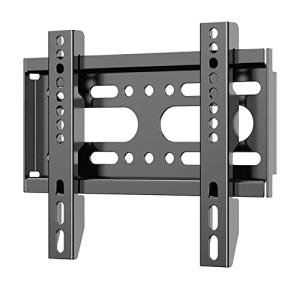
| VESA Compatibility | Up to 400x400mm / 600x400mm (Varies) | Essential for ensuring compatibility with larger VESA patterns often found on 55- and 60-inch screens from all major manufacturers. |
| Motion Range | Swivel, Tilt, and Extension (Full Motion) | Provides the flexibility needed for multi-purpose rooms to reduce glare from windows or accommodate off-center seating. |
| Extension Distance | Up to 18 Inches (Long Arm Reach) | The extended reach is vital for turning a 60-inch TV to a significant angle or for making it perpendicular to the wall in a corner. |
| Construction | Dual Articulating Arm Design | Necessary for stability and to prevent sag when the heavier 60-inch screens are fully extended from the wall. |
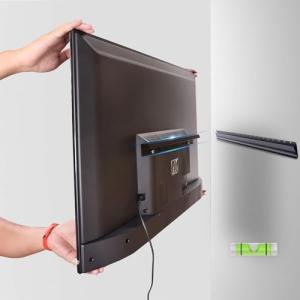
| Installation | Dual-Stud Mounting Required | For a screen this size and weight, securing the wall plate to two structural wood or metal studs is necessary for safe, long-term stability. |
1. Heavy-Duty Articulation and Load Bearing
To safely support a 60-inch TV that might weigh 50-70 pounds, this mount utilizes a robust, often dual-arm articulating system. This dual-arm design provides necessary lateral stability and prevents the screen from sagging or tipping when fully extended from the wall. This structural integrity is critical for the safety and longevity of your expensive TV.
The full-motion capability—swivel, tilt, and extension—is its core value proposition. The extended reach (often up to 18 inches) allows for maximum turning, making corner installations or multi-room viewing (e.g., from the living room to the kitchen) entirely feasible.
2. Dual-Stud Security and VESA Standards
For the weight and leverage of a TV in this size range, safe mounting in a typical U.S. home requires securing the wall plate to two wall studs. This mount's wall plate is specifically designed to span the standard 16-inch or 24-inch stud spacing, distributing the substantial load over the strongest parts of the wall structure.
You will find that the mount supports a wide range of VESA patterns, generally up to 600x400mm. Since VESA is the industry-standard bolt pattern, checking your TV's specific pattern against the mount's specifications is the only compatibility check you need to make before purchase.
3. Managing Glare and Cable Access
The tilt function, typically providing a small downward angle (e.g., -15 degrees), is highly effective for glare reduction. If your TV is mounted high (like over a fireplace), tilting it down ensures you don't have to crane your neck and that the image is perpendicular to your line of sight.
The ability to pull the TV out from the wall on the articulating arm simplifies cable management immensely. This extension gives you easy access to the TV's rear ports for connecting streaming sticks, soundbars, or gaming gear , without having to awkwardly feel around in a tight space.
User Profiles
1. Dedicated Living Room Host
You frequently host friends and family for movie nights, sports games, and holiday events in your main living room.
-
Use Case: You need your 60-inch TV to be perfectly viewable from the main couch, but also swiveled to face a temporary seating arrangement or the kitchen bar during a party.
-
The Fit: The robust dual-arm structure safely handles your large TV, and the deep extension and wide swivel range ensure that everyone in your large living space has an optimal, glare-free view of the action, making it a great budget monitor choice for a casual group.
2. Corner or Fireplace Installer
You have a specific, immovable spot for your primary TV, such as above a mantel or in a room corner, which requires major viewing angle adjustment.
-
Use Case: Your only spot is above the fireplace, requiring a significant downward tilt, or in a corner that requires the TV to be fully extended and angled into the room.
-
The Fit: The downward tilt compensates for the height of the fireplace, correcting your viewing angle and eliminating neck strain. The long articulating arm ensures the TV can be safely pulled out and angled perfectly from a corner.
3. Serious Multi-Monitor User
You use a 50-inch TV as a primary, large-scale monitor for professional tasks or immersive gaming .
-
Use Case: You need the screen pulled close to your desk and perfectly angled for deep work during the day and then pushed back flat against the wall and tilted for casual viewing in the evening.
-
The Fit: The solid, full-motion control allows you to quickly adjust the screen's distance and angle for ergonomic work, minimizing eye strain. The mount's stability ensures the screen doesn't wobble during intense typing or gaming sessions.
"Complementary HomeTechCorner Category Recommendations"
| Recommended Products | Why This Category Is Useful Specifically for This Product | Short Usage Scenario |
| Dolby Atmos Soundbars | To ensure the audio experience matches the massive 60-inch visual, which is essential for modern movie viewing. | You mount your heavy 60-inch TV and then easily attach a premium soundbar, knowing the mount can safely handle both for a unified cinematic experience. |
| In Wall Usb Smart Outlets | To completely hide the TV's power and charging cables, which is vital for a clean look on a full-motion mount that is often visible. | You manage to hide every single cord because the smart in-wall outlet is perfectly positioned behind the retracted TV, leading to a flawless, cordless look. |
| Hdmi Switches With Smart Features | To simplify switching between multiple input sources (console, PC, streaming box) which are now harder to access behind the mounted TV. | You’re done playing on your console; a smart switch automatically changes the input back to your streaming stick without you having to reach behind the swiveled TV. |
| Multi Protocol Hubs Matter Thread | To control the lights, the AV receiver, and the TV's power via a single hub, creating cohesive "Movie Mode" scenes. | You hit the "Movie Time" button on your smart remote, and the 60-inch TV swivels to your favorite viewing angle, the soundbar powers on, and the lights dim. |
| Gaming Monitor Accessories | To add bias lighting or camera equipment to the TV when it’s used as a massive gaming display. | You are playing a competitive game, and the gaming accessories you've attached to the screen's VESA bolts enhance the experience without interfering with the mount's motion. |