

PRODUCT REVIEW
In-Depth U.S. Market Review
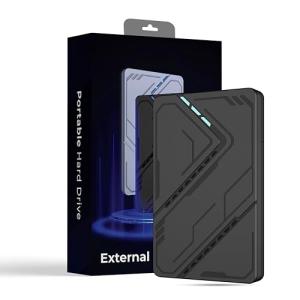
The STARLA 1TB USB 3.2 Portable Hard Drive enters the U.S. market as a pure budget storage solution, designed for the cost-conscious consumer who values capacity over speed. This is a traditional spinning disk (HDD) drive that competes directly against similar offerings from Toshiba Canvio or Seagate Basic, targeting students, home users, and small businesses needing simple archival storage. Its primary niche is providing 1TB of dependable space at a low price point, making it an excellent budget portable hard drive choice.
You should consider this drive if your main task is cold storage, such as backing up old files or keeping a static media library. Compared to a portable SSD, you will sacrifice significant speed, as this HDD is generally limited to around 100-140 MB/s transfer rates. However, compared to other 1TB portable HDDs, you get a clean, no-frills design and the assurance of basic plug-and-play functionality. It perfectly serves the mass consumer looking for an affordable, straightforward way to expand their digital space without the premium price tag of solid-state technology.
If you are just looking for a simple, reliable digital overflow bin, the STARLA 1TB USB 3.2 Portable Hard Drive provides the best value per gigabyte for non-mission-critical data. Its compatibility and ease of use are key advantages for the average U.S. consumer.
Technical Analysis
| Specification | Detail & U.S. Context | Analysis |
| Capacity | 1TB (Terabytes) of spinning disk storage. A common and useful minimum size for general backup needs. | Ideal for backing up personal documents, photo libraries, and standard application data. A practical size for most consumer needs. |
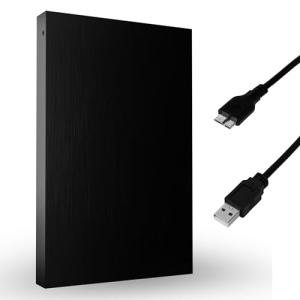
| Interface | USB 3.2 Gen 1 (5Gbps theoretical throughput). Uses the older Micro-B connector on the drive side. | This interface is much faster than old USB 2.0. The Micro-B connector is slightly outdated but ensures broad compatibility with existing USB 3.0 cables. |
| Sequential Speed | Typical 5400 RPM performance, yielding 100–140 MB/s Read/Write. | Significantly slower than any SSD, but more than sufficient for large sequential file transfers and basic archival storage. |
| Drive Type | Mechanical Hard Disk Drive (HDD). Features spinning platters and moving read/write heads. | This is the source of its low cost, but it makes the drive susceptible to physical shock or vibration while operating. Handle with care during use. |
| Power | Fully bus-powered via the USB cable. No external adapter required. | Simplifies portability and setup dramatically, a major convenience for users who travel with their laptops or switch between devices frequently. |
| Physical Profile | Slim and lightweight plastic enclosure, maximizing portability for an HDD. | Designed to be highly portable, but the enclosure offers minimal shock protection, reinforcing the need for careful handling compared to ruggedized drives. |
1. Performance Profile and Mechanical Design
The STARLA 1TB USB 3.2 Portable Hard Drive is built around a standard 5400 RPM mechanical hard disk drive. This speed is the benchmark for portable HDDs, delivering reliable, consistent transfer rates between 100 MB/s and 140 MB/s. While slow by modern SSD standards, this is plenty fast for moving documents, music collections, or backing up a full C: drive overnight.
You should understand that its performance is sequential—it's fast when copying one large file but slows down considerably when dealing with thousands of tiny files due to the physical movement required by the read/write head. For simple, infrequent data dumps, this mechanical performance is a non-issue and saves you money.
2. Connectivity and Universal Compatibility
This portable hard drive connects via the ubiquitous USB 3.2 Gen 1 standard, which guarantees easy connection to virtually any desktop or laptop computer. The drive side uses the older USB 3.0 Micro-B connector, which is a bit bulkier than USB-C but is extremely common and reliable. A simple USB-A cable is typically included for out-of-the-box use.
The great advantage of this older, simpler interface is its universal compatibility. Whether you have an older Windows PC, a modern Mac, or even a Linux machine, you can plug in the STARLA 1TB USB 3.2 Portable Hard Drive and begin transferring files immediately. Its basic design minimizes the risk of compatibility issues that sometimes plague newer, more complex interface standards.
3. Physical Handling and Longevity Considerations
As a traditional HDD, the physical structure is the most critical factor. The drive contains moving parts, which makes it vulnerable to physical shock, especially while it's actively reading or writing data. It's crucial for you to handle this drive carefully and avoid dropping it or shaking it. It is not designed to be a rugged field drive.
While the slim profile is great for slipping into a backpack, the plastic casing provides only basic protection. For long-term archival, this drive is excellent, but you should always handle it with the care appropriate for mechanical storage. Its longevity, if treated well, can rival SSDs, making it a great low-cost option for long-term archival storage .
User Profiles
1. The College Student Backup Plan
You are a student needing a reliable, low-cost way to back up all your academic papers, research, and lecture notes before graduation. You don't need speed; you need peace of mind and affordability.
-
Use Case: Once a semester, you connect the drive to your laptop to create a full system image and dump your entire Documents and Photo folder onto it for an off-site safety copy.
-
The Fit: The 1TB capacity is more than enough for several years' worth of academic work and personal media. Its low price point means you can acquire reliable external storage without stressing your student budget, and the simple USB-A connectivity works with nearly all campus computers.
2. The Budget-Conscious Small Business Owner
You run a small retail operation and need a cost-effective solution for backing up Point-of-Sale (POS) data, quarterly financial records, and employee files. The data is sensitive but archived infrequently.
-
Use Case: You perform a weekly backup of your POS system’s database (around 200GB) and physically lock the drive in a safe until the next backup rotation.
-
The Fit: The STARLA 1TB USB 3.2 Portable Hard Drive is perfectly suited for this archival role. Since the backup is sequential and only happens once a week, the HDD speed is perfectly acceptable, and the cost savings over an SSD can be allocated to other critical business expenses.
3. The Classic Movie Collector
You have a large library of digital movies and TV shows (ripped from DVDs/Blu-rays or legally purchased) and need a reliable place to store them that connects easily to a media center PC or smart TV.
-
Use Case: You connect the drive to your home theater PC (HTPC) and leave it plugged in permanently, streaming media files directly from the drive to your TV.
-
The Fit: The 1TB capacity is substantial for holding hundreds of hours of HD content. Since video streaming is a highly sequential read task, the HDD’s speed is ideal for this purpose, providing smooth, uninterrupted playback of even high-bitrate media.
"Complementary HomeTechCorner Category Recommendations"
| Recommended Products | Why This Category Is Useful Specifically for This Product | Short Usage Scenario |
| Nas Drives For Media | The STARLA can be a secondary, portable backup or an initial transfer drive to ingest media onto a more robust, centralized NAS system. | You bring your newly digitized photo album to your parents' house, plug the STARLA drive into their network, and use it to upload the files to their permanent NAS for shared access. |
| Uninterruptible Power Supplies Ups | HDDs are extremely vulnerable to data corruption if power is lost during a write operation due to the movement of the read/write arm. | A summer thunderstorm hits while you’re copying thousands of photos and the power goes out, but the UPS prevents the STARLA drive from abruptly shutting down and potentially corrupting the file system. |
| Power Backup Solutions | Useful for keeping a laptop or host device powered during a transfer, ensuring the HDD isn't abruptly dismounted due to a dead battery. | You are backing up your laptop at a coffee shop, and the battery unexpectedly dies; a portable power bank or station keeps the system alive long enough to safely disconnect the drive. |
| Cable Management For Entertainment Centers | Since this drive may live next to a smart TV or HTPC, proper cable management keeps the bulky USB 3.0 Micro-B connector organized and secure. | You tuck the STARLA neatly behind your media console, using cable ties to secure its cord to prevent it from dangling and being accidentally yanked, which would damage the mechanical drive. |
| Laptop Stands | Elevating your laptop helps keep it cool and provides a stable surface next to it to ensure the STARLA HDD is not moved or shaken during use. | You place your laptop on the stand and gently lay the STARLA drive flat on the desk next to it, ensuring it stays perfectly still and vibration-free while you work on your files. |