PRODUCT REVIEW
In-Depth U.S. Market Review
The 1TB Slim Portable External Hard Drive for All Devices is positioned firmly in the entry-level consumer space, competing purely on value and universal compatibility. This traditional HDD product serves the massive U.S. market segment that needs basic, reliable capacity expansion without any focus on high-speed data access. It's the quintessential "plug-and-play" device, making it an excellent straightforward budget external hard drive for everyday home and office use.
Its primary strength lies in its ability to connect to almost any device—from older desktop PCs to gaming consoles—without requiring specialized drivers or high-speed ports. Compared to the faster SSD alternatives, you'll be dealing with speeds of about 100-120 MB/s, which is perfectly acceptable for archival and media streaming but too slow for modern video editing. When compared to other slim 1TB hard drives, this model often emphasizes its wide device support, including Macs, Windows, and gaming consoles, with simple, non-proprietary formatting.
If you simply need a cost-effective digital bin to store photos, documents, and backups that you access infrequently, this 1TB Slim Portable External Hard Drive is a perfectly sensible and economically sound choice. You are paying for capacity and reliability in archival storage, not cutting-edge speed.
Technical Analysis
| Specification | Detail & U.S. Context | Analysis |
| Capacity | 1TB Mechanical Hard Disk Drive (HDD) storage. A solid capacity for general consumer backup needs. | Ample space for an average user's entire document and photo library. Represents a very high value-per-gigabyte in the current market. |
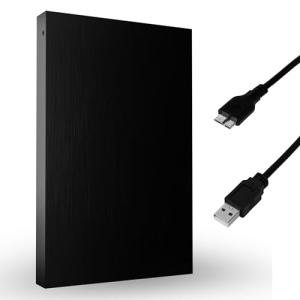
| Interface | USB 3.0/3.2 Gen 1 Standard. Typically uses the USB 3.0 Micro-B connector. | Ensures fast enough transfers for an HDD and universal compatibility with all recent U.S. computers. The Micro-B plug is highly secure. |
| Sequential Speed | Typical 5400 RPM performance, approximately 100–120 MB/s Read/Write. | The standard performance for portable HDDs. Suitable for large sequential file copies but struggles with high-performance random I/O. |
| Compatibility | Pre-formatted for broad compatibility (often exFAT or NTFS). Works across Windows, macOS, and Linux without reformatting. | Its main selling point for the U.S. home user: it can be shared easily among different computers and operating systems in a single household. |
| Power Method | Fully bus-powered. Draw power directly from the single USB connection. | Eliminates the need for a separate wall adapter, making it highly portable and convenient to use anywhere you have a laptop or computer. |
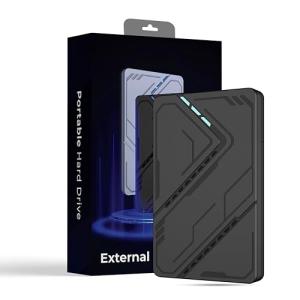
| Physical Design | Ultra-slim and lightweight plastic case. One of the slimmest profiles for a mechanical drive. | Excellent for portability, easily pocketable. Caveat : The slim plastic offers minimal drop/shock protection, requiring careful handling. |
1. Mechanical Core and Speed Profile
At its heart, this is a traditional mechanical drive, which means it uses spinning platters and a moving arm to read and write data. This fundamental design is what makes the 1TB Slim Portable External Hard Drive so cost-effective. You can expect reliable sequential speeds around 100-120 MB/s, which translates to moving a 10GB folder in about a minute and a half.
You should be aware that the drive's speed is dictated by the 5400 RPM rotation of the platters. While this is fast enough for storing and playing back most media, it is not suitable for running power-intensive applications directly from the drive. Its primary function is to be an archival repository, not a speed demon.
2. Cross-Platform Plug-and-Play Readiness
The major benefit of this drive for multi-device households is its superb compatibility, earning its "for All Devices" claim. It often ships pre-formatted in a universal format like exFAT, which is instantly recognized by Windows, Macs, and most modern gaming consoles (for archival use). This means you don't have to spend time dealing with file system formats like NTFS or HFS+ to start using it.
Connectivity is handled by the stable USB 3.0 standard. While you'll need the relatively common USB 3.0 Micro-B cable, this port style is known for a secure, tight fit, which is a desirable trait for a drive that might be moved or plugged into shared family systems.
3. Handling and Longevity of the Slim Form Factor
The ultra-slim profile is a key feature, making this 1TB Slim Portable External Hard Drive extremely easy to carry. However, the slim plastic enclosure necessitates careful handling. Unlike rugged SSDs, the internal moving parts of this drive are vulnerable to sudden shocks or drops, especially when active.
For longevity, you should always treat this drive as a piece of sensitive electronics. It’s best used as a static backup solution—plug it in for a transfer, safely eject it, and store it securely. If you prioritize portability and cost, this trade-off in physical resilience is worth considering.
User Profiles
1. The Multi-Generational Home User
You are managing the digital lives of a multi-generational family, where different members use various devices (Windows PC, Mac laptop, older game consoles). You need a common storage pool.
-
Use Case: You consolidate a grandmother's photo albums from her old Windows machine and a child's school projects from a new MacBook onto one central, universally readable drive.
-
The Fit: The drive's simple, "for All Devices" compatibility ensures that you can plug it into any computer in the house without worrying about complex formatting or driver installation, making the data accessible to everyone.
2. The Budget-Conscious Console Gamer
You own an older PS4 or Xbox One and are constantly running out of space due to large game updates and installations. You need cheap, reliable storage for installing and running your existing game library.
-
Use Case: You plug the drive into your console, use the console's built-in formatting tool, and install all your non-current, but frequently played, games directly onto the 1TB drive.
-
The Fit: While this is an HDD, it is fast enough to smoothly run games from the previous console generation. The 1TB is a significant storage boost at a fraction of the cost of an SSD, which is a major win for the gamer on a tight budget.
3. The Annual Backup Executor
You follow best practices by performing a full, once-a-year snapshot of your primary computer and then storing the drive off-site, requiring a basic, long-term archival solution.
-
Use Case: You dedicate a day each January to running a full system backup (around 500GB) onto the drive, then place the drive in a fireproof safe or off-site storage box until the next year.
-
The Fit: The 1TB capacity is perfect for a full annual snapshot, and the drive's low cost makes it an ideal candidate for this type of "set it and forget it" archival function, maximizing the cost-efficiency of your backup strategy.
"Complementary HomeTechCorner Category Recommendations"
| Recommended Products | Why This Category Is Useful Specifically for This Product | Short Usage Scenario |
| Uninterruptible Power Supplies Ups | HDDs are extremely vulnerable to data corruption if power is lost during a write operation due to the movement of the read/write arm. | A summer thunderstorm hits while you’re copying thousands of photos and the power goes out, but the UPS prevents the STARLA drive from abruptly shutting down and potentially corrupting the file system. |
| Nas Drives For Media | The 1TB drive can serve as a secondary, portable backup or an initial transfer drive to ingest media onto a more robust, centralized NAS system. | You fill the portable drive with vacation photos and then use it as the source to upload the high-resolution files to your centralized NAS for permanent, redundant storage. |
| Cable Management For Entertainment Centers | Helps secure the connection and prevent the drive from being accidentally dropped, which is catastrophic for a mechanical HDD. | You neatly secure the USB cable behind your TV cabinet so the drive, which is plugged into your media center, cannot be pulled off the shelf by a curious pet or child. |
| Power Backup Solutions | Useful for mobile users who want to guarantee the host device (laptop) has enough power to complete large file transfers without interruption. | You are running a long data transfer on a plane or train, and the portable power bank keeps your laptop charged, ensuring the drive is safely ejected once the copy is complete. |
| Laptop Stands | Provides a stable, flat surface for the mechanical drive, ensuring it remains stationary and vibration-free during crucial read/write operations. | You set up a mobile workspace in the kitchen, using the laptop stand for your computer, and placing the slim HDD gently on the flat counter surface next to it for stability. |