PRODUCT REVIEW
In-Depth U.S. Market Review
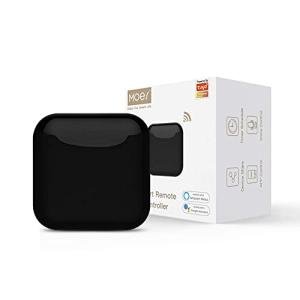
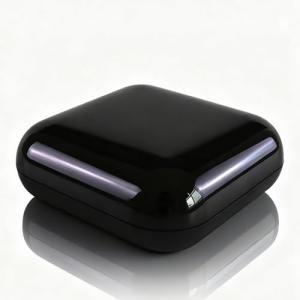
The MOES Smart Home Universal Remote with Voice Control enters the U.S. market as a dedicated bridge for simplifying control over a wide array of legacy Infrared (IR) devices. It is explicitly an IR blaster for home automation , designed to centralize the operation of your TV, air conditioner, fan, and other appliances under a single, user-friendly mobile application and voice command interface. Its selling proposition is its straightforward, no-fuss integration into the existing smart home ecosystems prevalent in American homes, namely Amazon Alexa and Google Assistant.
This remote hub is a practical choice for consumers seeking a cost-effective alternative to more complex, multi-protocol hubs that may include Z-Wave or Zigbee. By focusing solely on IR, it offers a simplified setup process and a lower barrier to entry for smart home newbies. This makes it an excellent budget-friendly voice control solution for non-smart devices.
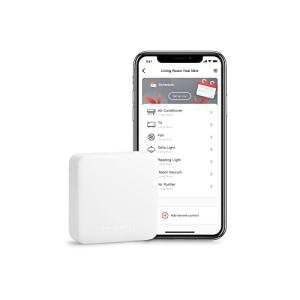
Compared to a traditional universal remote that controls just one room, the MOES hub provides remote access and scheduling features. You can adjust your living room climate while you are miles away, a significant upgrade over a basic handheld controller. For those with a collection of non-smart appliances they want to modernize, the MOES hub is a direct and powerful solution.
Technical Analysis
| Specification | Detail & U.S. Context | Analysis |
| Control Type | Infrared (IR) control, 360° hemispherical coverage. | Wide-angle IR emission ensures control over multiple devices within a single, standard-sized U.S. room. |
| Platform | Operates on the Tuya Smart or Smart Life app platform. | Tuya/Smart Life is a widely supported platform in the U.S., ensuring easy integration with third-party automation tools and services. |
| Voice Compatibility | Works with Amazon Alexa and Google Assistant. | Essential compatibility that allows for hands-free voice control over your non-smart TV, AC, and fan units. |
| Device Database | Large pre-programmed library of common U.S. appliance brands (LG, Samsung, VIZIO, Carrier, etc.). | High chance of plug-and-play setup for popular U.S. entertainment and climate devices, reducing manual configuration. |
| Learning Function | Included for adding non-standard or older IR remote codes. | Necessary feature to ensure niche or legacy devices, like older stereos or unique space heaters, can be controlled. |
| Power Input | Micro-USB (5V/1A) powered. | Low power draw, making it easy to power via a small USB adapter or a spare USB port on a TV/monitor. |
| Wi-Fi Requirement | 2.4 GHz network only. | Standard for most low-power IoT devices, ensuring stable connection but may require network configuration if your router prioritizes 5GHz. |
1. Integration into the Smart Life Ecosystem
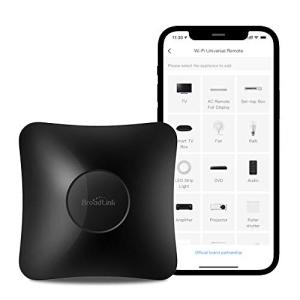
This universal remote hub is built on the robust and widely-used Tuya/Smart Life platform, a significant factor in the U.S. market. This ecosystem is known for its stability and broad compatibility with various smart devices, meaning this remote hub can easily work alongside other Smart Life-enabled products like smart plugs, security sensors, and lighting.
This unified app experience is a major benefit, allowing you to manage your entire smart home—both your Wi-Fi devices and your newly smart IR devices—from one consistent interface. This avoids the frustration of having multiple single-purpose apps for different hardware.
2. Advanced Climate Control Capabilities
Beyond simple TV control, this device excels as a smart climate controller. By learning the full function set of your air conditioner or heat pump remote, you can control not just the on/off state, but also the temperature setting, fan speed, and mode (e.g., Cool, Heat, Auto) directly from your smartphone or with your voice.
This functionality is hugely valuable for American homes with window AC units or ductless mini-splits that are otherwise non-smart. You can create complex routines like "Cool the Master Bedroom" that can be triggered when you leave the office, offering superior energy efficiency and comfort.
3. Voice Command Implementation
The voice control feature is the main draw for many users. The integration with Amazon and Google is deep enough to allow for granular commands. You aren't limited to just "turn on the AC"; you can execute specific instructions like, "Alexa, set the living room fan to medium speed" or "Hey Google, change the TV channel to 5."
This level of detail dramatically enhances the hands-free experience. The ability to bake these commands into multi-step routines (e.g., one voice command to turn on the TV and dim the IR-controlled lights) makes this a powerful and highly personalized smart home addition.
User Profiles
1. The Appliance Modernizer
You own a perfectly functional but non-smart TV, an older but reliable sound system, and a window air conditioner unit. You want to bring all these "dumb" devices into the modern, voice-controlled era without replacing them.
-
Use Case: You need a simple, single device that can capture the IR codes from all your legacy remotes and make them controllable via a smartphone and voice.
-
The Fit: The MOES hub's robust IR learning capability and broad brand database are ideal. It acts as a universal remote hub for all your legacy electronics, instantly modernizing your entire entertainment and climate setup with minimal cost.
2. The Smart Life Platform User
Your home is already equipped with Tuya/Smart Life smart plugs and sensors, and you are comfortable operating within that app ecosystem. You want to avoid adding a new, separate platform for a new device.
-
Use Case: You need an IR blaster that plugs directly into your existing Smart Life framework to enable cross-device automation and maintain a unified control app.
-
The Fit: Because this hub uses the Smart Life platform, you get seamless integration. You can create a routine where a motion sensor (Smart Life) detects you entering a room and automatically turns on the TV (via the MOES hub).
3. The Energy-Saving Scheduler
You frequently forget to turn off your fan or AC when you leave a room, leading to wasted electricity and higher utility bills. You want to automate your devices based on a consistent schedule.
-
Use Case: You need to set a precise schedule, such as turning the TV off at midnight on weekdays or setting the AC to cycle off 30 minutes after you normally go to sleep.
-
The Fit: The comprehensive scheduling and timer functions within the mobile app allow you to set custom power-off and on times for any IR device. This transforms the remote hub into an efficient energy management tool for your non-smart appliances.
"Complementary HomeTechCorner Category Recommendations"
| Recommended Products | Why This Category Is Useful Specifically for This Product | Short Usage Scenario |
| Voice Assistants | This hub relies on your voice assistant device to receive and execute spoken commands for your IR devices. | You finish cooking dinner and simply tell your assistant, "Turn on the kitchen AC," which the hub immediately does, without you needing to touch the wall unit. |
| Energy Monitoring Smart Plugs | You can use a smart plug to completely cut power to devices like a TV (which the hub controls) to eliminate phantom power draw. | You check your app and see that the smart plug has cut all standby power to the entertainment center after the hub turned the TV off, knowing you're saving on your electric bill. |
| Wireless Programmable Buttons | A programmable button can instantly trigger the complex scenes you've built using the hub and other devices in the app. | You stick a programmable button on your coffee table; one press triggers the "Gaming Scene," which turns on the console (via the button), the TV (via the hub), and the lights (via the smart lighting system). |
| Smart Thermostats | While the hub controls local, IR-based climate devices, a smart thermostat can manage the central HVAC, creating a complete environment control system. | You set your central heat with the smart thermostat, but use the hub to ensure the gas fireplace's IR remote-controlled fan only comes on when the room is truly cold. |
| Smart Lighting | You can integrate your IR-controlled lights (if applicable) or other Wi-Fi smart lights into the same Scenes controlled by this hub. | Your "Relax" scene uses the hub to turn on the IR-controlled sound system and uses your smart lighting system to dim the bedroom lights to 10% brightness. |