PRODUCT REVIEW
In-Depth U.S. Market Review
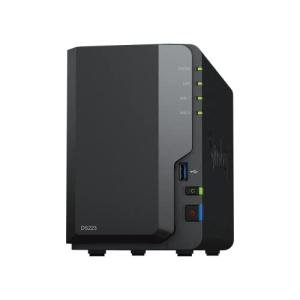
The Synology DS223j 2-Bay DiskStation is the quintessential entry-level private cloud solution for the U.S. consumer. This model is Synology’s offering for the budget-conscious user who still wants the reliability and extensive feature set of the DiskStation Manager (DSM) operating system, which is widely regarded as the most user-friendly and feature-rich NAS software platform.
Its niche is providing a robust foundation for a personal cloud (Synology Drive), photo management (Synology Photos), and secure file backup, all wrapped in a simple, low-power, and quiet package. While it uses a less powerful ARM processor, its value is entirely in the software ecosystem, which simplifies complex tasks for the novice user.
Compared to other entry-level 2-bay diskless NAS units, the Synology DS223j offers a vastly superior software experience, making it much easier to set up remote access, data synchronization, and camera surveillance (via Surveillance Station) than its budget competitors. If you are looking for home office use storage where ease-of-use trumps raw speed, the DS223j is a top choice.
Technical Analysis
| Specification | Detail & U.S. Context | Analysis |
| CPU | Realtek RTD1619B Quad-Core (1.7 GHz) | An efficient, modern ARM-based CPU. Excellent for basic file serving, managing backups, and running core Synology apps, but not suited for heavy 4K transcoding. |
| RAM | 1 GB DDR4 (Non-Expandable) | Minimal memory capacity, making it strictly a file/backup server. It is the primary bottleneck for advanced features like Docker or multiple simultaneous apps. |
| Drive Bays | 2 x 3.5" or 2.5" SATA HDD/SSD | Standard dual-bay for implementing a RAID 1 mirrored volume, which is the essential data protection standard for the average U.S. home user. |
| Networking | 1 x 1GbE RJ-45 Port | Standard gigabit networking, providing enough speed for typical home backup and file streaming. Consistent with its entry-level positioning. |
| File System | EXT4 Only | Unlike the non-j models, this one does not support the advanced Btrfs file system, meaning it lacks data scrubbing and snapshot protection. |
| USB Ports | 2 x USB 3.2 Gen 1 | Fast USB ports are great for quickly ingesting data from external drives or backing up the entire NAS to a large external hard drive. |
| OS | DiskStation Manager (DSM) | The main selling point. DSM is an award-winning OS that makes the complexity of a NAS incredibly easy for the novice user. |
1. Software Ecosystem and User Experience
The primary technical asset of the DS223j is the DiskStation Manager (DSM) operating system. DSM is highly polished and intuitive, featuring a desktop-like environment that makes configuring users, setting up backups, and managing network access surprisingly easy for non-technical users.
Crucially, DSM includes a suite of powerful, free applications like Synology Photos (a great Google Photos alternative), Synology Drive (a private Dropbox alternative), and Surveillance Station. The value of this software suite greatly exceeds the hardware limitations, offering a comprehensive personal cloud solution .
2. Hardware Limitations and Trade-offs
The Synology DS223j is built on a very frugal hardware platform: a basic ARM CPU and only 1 GB of non-expandable RAM. This decision keeps the price low, the noise to a minimum, and the power consumption very low.
However, users must be aware of the trade-offs. The low RAM means performance will suffer if you try to run multiple background tasks or heavy third-party applications. Furthermore, the exclusion of the Btrfs file system means you lose out on the advanced data integrity and instant rollback features (snapshots) found in the non-j models, limiting the degree of data security.
3. Physical Yapı ve Installation
The physical chassis of the DS223j is lightweight plastic, designed for easy, screw-less access to the drive bays for 3.5-inch drives. This ease of installation is important for the entry-level user who may be setting up a NAS for the first time.
Its compact and whisper-quiet operation makes it an ideal fit for any U.S. household where the NAS needs to be placed in a living area, bedroom, or home office. The overall physical design reflects its role as a simple, low-key, and reliable always-on appliance.
User Profiles
1. The First-Time NAS Buyer
You are moving away from paying for Dropbox or Google Drive subscriptions and want a reliable, easy-to-use device to manage your family’s digital assets and handle basic computer backups.
-
Use Case: You load two high-capacity drives into the DS223j, configure RAID 1 for mirroring protection, and use Synology Drive to sync your computer files and Synology Photos to back up everyone's mobile photos.
-
The Fit: The DS223j is specifically designed to be the best starter NAS for the U.S. market. The simplicity of DSM and the high quality of the Synology applications ensure you get a powerful private cloud experience without the technical headache.
2. The Smart Home Security Implementer
You want a private, secure, and subscription-free way to record and manage your home security camera footage. You need a stable platform that is always on and easy to monitor.
-
Use Case: You connect a few IP cameras to your home network and install Synology Surveillance Station on the DS223j. You use the application to manage motion-activated recording and monitor live feeds, keeping all video stored locally and privately.
-
The Fit: Surveillance Station is one of Synology’s most powerful applications, and the DS223j provides the necessary 24/7 stable platform for it. While storage is limited, it’s a cost-effective way to get off the monthly camera subscription treadmill.
3. The Grandparent or Simple Archivist
You need a simple, centralized location to store years of digital photos and scanned documents, and you need a method to access these files easily from a tablet or phone without having to leave a PC on 24/7.
-
Use Case: You configure the NAS and use the mobile app to browse and share photos with family. You use the low-power consumption to justify leaving the NAS on all the time without worrying about your electricity bill.
-
The Fit: Its very low power draw, low noise profile, and easy remote access via the mobile app make it a perfect, non-intrusive appliance for centralized home archiving and media viewing .
"Complementary HomeTechCorner Category Recommendations"
| Recommended Products | Why This Category Is Useful Specifically for This Product | Short Usage Scenario |
| Nas Drives For Media | You must purchase two drives to enable the critical RAID 1 mirroring capability for your home and family data. | You complete the simple drive installation and wait for the DiskStation Manager to finish initializing the mirrored volume, confirming your data now has physical redundancy. |
| Uninterruptible Power Supplies Ups | The reliability of your data depends on a clean power source; a UPS is necessary to protect the RAID array from unexpected shutdowns. | Your house experiences a brief power flicker, but the UPS keeps the Synology running long enough for the system to safely shut down, preventing any data corruption. |
| Security Cams | To utilize the excellent Surveillance Station feature, you will need compatible IP cameras to manage and store video footage locally. | You install a new IP camera outside and add it to the Surveillance Station manager, immediately starting secure, private video recording on your new NAS. |
| Wireless Programmable Buttons | You can use a smart button to trigger simple DSM functions, like running a custom backup script or toggling a Surveillance Station recording. | You place a wireless button by the front door to press when you leave, triggering a custom script on the NAS to begin recording all home security cameras immediately. |