PRODUCT REVIEW: SofaBaton X1S Smart Universal Remote and Hub
In-Depth U.S. Market Review
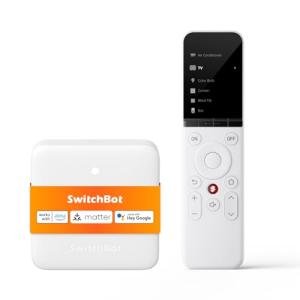
The SofaBaton X1S Smart Universal Remote and Hub sits firmly at the high-end of the U.S. home control market, designed for the "power user" or dedicated home theater enthusiast. It is not just a remote; it’s a full ecosystem replacement that leverages an RF-based physical remote communicating with a central Wi-Fi/IR hub. This two-part design allows for complex, multi-device control that doesn't rely on line-of-sight. Its niche is creating seamless, "one-button-press" Activities for a multi-component home theater or an entire smart home environment.
Compared to simple IR remotes, the X1S provides complete RF control, smart home integration, and sophisticated Activity -based automation. While it competes with the legacy of the Logitech Harmony, it offers a modern, app-driven setup that excels at controlling both legacy IR devices and modern, network-connected components. If you are building a dedicated home theater or want a single device to control all your smart devices and A/V equipment , the SofaBaton X1S is a premium choice.
Technical Analysis
| Specification | Detail & U.S. Context | Analysis |
| Control Architecture | RF Remote communicates with Wi-Fi Hub (Hub has IR Blasters) | The physical remote doesn't need line-of-sight, greatly improving reliability. The Hub translates commands into IR, Wi-Fi, and Bluetooth signals. |
| Connectivity | 2.4/5 GHz Wi-Fi on Hub, Bluetooth for App/Some Devices | The dual-band Wi-Fi ensures robust network connection for controlling smart devices and receiving commands from the mobile app. |
| "Activities" Feature | One-touch sequence programming (e.g., "Watch a Movie") | The core selling point. A single button press can execute a macro: turn on TV, turn on A/V Receiver, switch both to HDMI 2, and start a streaming device. |
| Device Compatibility | 500,000+ IR Codes, Wi-Fi, and Bluetooth devices | Extensive code database for legacy U.S. equipment and direct API control for popular smart home brands (Philips Hue, Sonos, Roku). |
| Display | High-resolution, Scrollable Screen on Remote | Allows for the display of custom-labeled buttons and device names, eliminating the need for dozens of physical buttons on the remote itself. |
| Learning Function | Key-by-key IR learning on the Hub | Guarantees compatibility by allowing the user to copy any command from an original remote if the code is not pre-loaded. |
| Battery/Charging | Remote uses a rechargeable lithium-ion battery and charging base | Ensures the remote is always ready to use, addressing a major pain point of traditional universal remotes that constantly need new AA/AAA batteries. |
1. The RF-to-IR/Wi-Fi Bridging Hub
The SofaBaton X1S Smart Universal Remote and Hub is defined by its two-part architecture. The physical remote uses Radio Frequency (RF) to send commands to the small central hub, which can be tucked away inside a cabinet or media center. This eliminates the frustrating need to aim the remote, making it incredibly reliable.
The Hub is the true brain, housing multiple, powerful IR blasters to control legacy A/V devices and using Wi-Fi and Bluetooth to communicate with modern smart devices. This is essential for a U.S. home theater that often mixes new and old equipment, all without cluttering the visible space with multiple control devices.
2. Seamless Activity-Based Automation
The primary function for the home theater enthusiast is the "Activity" feature. You use the mobile app to set up a sequence of events (a macro) for a single button press. For example, the "Play Game" activity can power on the TV, switch the input to the correct HDMI port, turn on the gaming console, and then activate the smart lighting behind the screen.
The remote’s scrollable display allows you to select the Activity with a clear, custom-labeled icon. Once the Activity is running, the remote automatically maps the volume and directional keys to the devices most logically needed (e.g., volume always controls the A/V receiver, regardless of which device is being used).
3. Integration and Customization
This is where the X1S truly excels as a smart universal remote . It integrates with popular smart home platforms like Amazon Alexa, Google Home, and specific brand APIs (e.g., Philips Hue). This means your Activities can include actions like dimming your smart lights or closing smart blinds, offering total room control.
The remote's customization is deep. You can fully customize the button layout on the scrollable screen, creating digital buttons for rare functions (like a TV's "Picture Mode") that you don't want taking up space on the physical remote. The use of a rechargeable battery and a charging cradle further cements its high-end, dedicated controller status.
User Profiles
1. The Home Theater Enthusiast
You have a complex A/V setup with a TV, a separate A/V receiver, a multi-channel speaker system, and two streaming devices. Your current coffee table is a mess of five different remotes.
-
Use Case: You want to switch from watching a Blu-ray player to playing a game console, requiring three separate power/input changes on two different devices, all without confusion.
-
The Fit: The X1S is your ideal solution. You create a "Game Time" activity and a "Movie Time" activity. One press switches everything perfectly, and the remote ensures the volume buttons always control the A/V receiver, no matter what. It is the best universal remote for complex A/V setups .
2. The Full Smart Home Automator
You are deeply invested in a voice or app-based smart home system (lights, blinds, thermostats) and need a physical remote to act as a fallback and an integrated scene controller.
-
Use Case: You are settled in for the night and want to power down the whole house, not just the TV, using a single physical button without having to issue a voice command.
-
The Fit: You set up a "Good Night" activity on the X1S that turns off the TV (IR), powers down the smart soundbar (Wi-Fi), dims the Philips Hue lights (API), and lowers the thermostat (API). The X1S acts as a centralized, powerful, physical universal remote and hub for your entire connected environment.
3. The Clutter-Free Minimalist
You hate having visible technology and prefer to keep all your A/V equipment neatly hidden inside a closed media cabinet. You need a remote that can reliably command devices you can't see.
-
Use Case: You want to change the channel on your cable box, which is completely hidden behind solid wood cabinet doors.
-
The Fit: Since the physical remote communicates with the Hub via RF, you don't need line-of-sight. The Hub itself, which is hidden inside the cabinet with the A/V equipment, sends out the IR signals. This makes the X1S the ultimate remote for hidden A/V equipment .
"Complementary HomeTechCorner Category Recommendations"
| Recommended Products | Why This Category Is Useful Specifically for This Product | Short Usage Scenario |
| Dedicated Home Automation Controllers | The X1S complements a central controller by adding a dedicated physical interface for executing complex scenes and automations. | You program the X1S to run a "Party Mode" scene that simultaneously starts the multi-room audio controller and sets the lighting sequence. |
| Dolby Atmos Soundbars | The X1S is essential for consolidating control of your high-end soundbar and all its multi-channel functions into one remote. | You use the X1S's custom screen to access the soundbar's "Dialogue Mode" setting without needing to dig out the original tiny remote. |
| Color White Ambiance Bulbs | Integrating smart lighting into your Activities makes your home theater scenes truly immersive. | Your "Movie Night" Activity not only turns on the TV but also dims your color-changing bulbs to a warm, low cinema glow. |
| Motorized Roller Blind Kits | Control of smart blinds is a key feature of the X1S, allowing you to manage daylight with your entertainment. | You press the "Sun Out" button on the X1S's screen, and the smart hub instantly closes the motorized blinds before the movie starts. |
| Media Servers | The X1S can be programmed to launch and navigate media server interfaces (like Plex or Kodi) on your streaming device. | You select the "Plex" Activity on the X1S, and it automatically launches the app on your Fire TV and maps the remote's directional pad for navigation. |