PRODUCT REVIEW
In-Depth U.S. Market Review
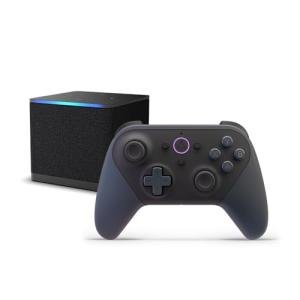
The Fire TV Cube - 4K Streaming with Alexa positions itself as the flagship, most powerful streaming media player in the Amazon ecosystem, carving out a unique niche in the competitive U.S. market. It’s not just a standard streaming box; it's a cube-shaped hub that blends hands-free Alexa voice control, fast app processing, and IR-blasting for AV control. This makes it an ideal choice for the home theater enthusiast looking for the best Fire TV experience or a powerful smart home control center.
The device competes directly with premium streamers like the Apple TV 4K and top-tier Roku Ultras. Compared to standard streaming sticks, you get substantially faster performance, a dedicated Ethernet port for reliable streaming, and a far more capable processor for app and game loading. If you are looking for the absolute best 4K streaming experience that doubles as an integrated smart home brain, this is a strong contender.
Technical Analysis
| Specification | Detail & U.S. Context | Analysis |
| Processor & RAM | Octa-core processor (2.2 GHz) with 2GB of RAM. | This powerful chip ensures lightning-fast app launch times and seamless navigation, crucial for U.S. users who constantly jump between streaming services. |
| Video Output | Supports 4K Ultra HD up to 60 fps, HDR, HDR10+, HLG, and Dolby Vision. | Provides cinematic quality viewing, ensuring you can take full advantage of premium U.S. streaming subscriptions like Netflix and Max. |
| Audio Format | Dolby Atmos support (passthrough). | Delivers immersive, three-dimensional audio, a must-have feature for modern home theater setups equipped with compatible soundbars or receivers. |
| Connectivity | Built-in HDMI input, Ethernet port, Wi-Fi 6E support. | The HDMI-in is unique, allowing passthrough and cable box integration. Wi-Fi 6E provides the fastest, most stable wireless link for 4K streaming. |
| Control Feature | Integrated far-field microphones and IR emitter. | Enables hands-free Alexa commands from across the room and allows the Cube to control your TV, soundbar, and receiver without additional remotes. |
| Operating System | Fire OS (Amazon's Android-based platform). | Provides a media-centric, highly visual interface that pushes Amazon's content, which is a key platform consideration for American consumers. |
1. Processing Power and Streaming Fidelity
The Fire TV Cube is built around a potent octa-core processor, giving it significant horsepower over its smaller, stick-form siblings. This is crucial for maintaining a snappy user interface and for handling the demanding decoding required for 4K HDR content. You will notice much quicker loading times when launching apps like Hulu, YouTube TV, or Prime Video.
Beyond raw speed, the Cube offers comprehensive video format support, including Dolby Vision, HDR10+, and HLG. This ensures you are watching content with the highest possible visual quality on compatible 4K HDR displays. Its ability to maintain a steady 60 frames per second at 4K resolution is vital for high-action viewing and a better overall user experience.
2. Advanced Connectivity and A/V Integration
Connectivity is where the Fire TV Cube truly distinguishes itself as a premium option. You get a built-in Ethernet port, which is invaluable for ensuring a rock-solid, buffer-free connection, especially when streaming large 4K files or engaging in cloud gaming. The inclusion of Wi-Fi 6E is also future-proofing, providing access to the fastest wireless band available today.
Perhaps its most unique technical feature is the integrated HDMI input port, which allows you to pass a signal from a third-party device, like a cable box or game console, through the Cube. More importantly, the integrated IR (infrared) blaster allows the Cube to control your entire AV stack—TV volume, soundbar power, and receiver switching—all through a single Alexa voice command or the included remote.
3. Hands-Free Alexa and Smart Home Control
The Fire TV Cube is designed to be the ultimate smart home control center in your living room. It features far-field microphones, allowing you to use hands-free Alexa commands just as you would a dedicated smart speaker. You can say, "Alexa, turn on the TV" or "Alexa, open Peacock" without ever touching the remote.
This integration extends deep into smart home capabilities. Since the Cube can control your TV and sound system via IR, and also control smart devices via Wi-Fi and Zigbee (in older generations), it acts as a central hub. You can use it to view live video doorbells, adjust smart lighting, or execute complex routines, all from the comfort of your couch.
User Profiles
1. The Home Theater Power User
This user demands the fastest performance, highest video/audio quality, and seamless integration into a complex AV system involving a separate TV, soundbar, and receiver.
-
Use Case: You want to consolidate all your media controls into one device, switching inputs and adjusting volume using only voice commands, all while streaming 4K Dolby Vision content with no buffering or lag. You need the speed for quick app navigation.
-
The Fit: The Fire TV Cube is the perfect choice, delivering superior processing speed and essential features like Dolby Vision/Atmos. The integrated IR blaster and hands-free Alexa functionality mean you can control your entire AV stack without ever reaching for multiple remotes, achieving true home theater simplicity.
2. The Smart Home Enthusiast
This user already relies heavily on Alexa for routines, lighting, and security and wants the most powerful, screen-based hub available for their main living area.
-
Use Case: You are hosting a party and want to display your video doorbell feed on the TV with a voice command, then adjust the overhead smart lights and start a playlist, all without picking up a phone or remote.
-
The Fit: With its far-field mics and dual role as a dedicated smart speaker and streamer, the Cube serves as the central brain. It lets you interact with your entire smart home visually on the big screen, making it one of the most powerful dedicated control panels available in the U.S. market.
3. The Cloud Gamer
This user leverages services like Amazon Luna, GeForce Now, or Xbox Cloud Gaming and needs a device with top-tier processing, low latency, and rock-solid wired internet for a responsive gaming experience.
-
Use Case: You want to jump straight into a high-demand cloud game after work, requiring a fast processor to handle the streaming client and a wired connection to minimize input lag and connection drops during intense play sessions.
-
The Fit: The Fire TV Cube is the best Fire TV for gaming because its high-speed processor loads the Luna or other gaming clients swiftly. The crucial integrated Ethernet port provides a dedicated, low-latency connection, which is absolutely essential for a smooth and competitive cloud gaming experience.
"Complementary HomeTechCorner Category Recommendations"
| Recommended Products | Why This Category Is Useful Specifically for This Product | Short Usage Scenario |
| Dolby Atmos Soundbars | The Cube supports Dolby Atmos, but you need a compatible soundbar to hear the premium audio it provides. | You queue up a blockbuster movie and the rich, three-dimensional sound from your new Dolby Atmos soundbar completely fills the room, thanks to the Cube's passthrough. |
| Multi Protocol Hubs Matter Thread | To broaden your smart home ecosystem beyond just Alexa/Zigbee devices. | You integrate a new Matter-compatible smart lock into your home and use the Cube’s power to manage it alongside your existing Alexa lighting setup. |
| High End Gaming Routers | Essential for providing the Wi-Fi 6E speeds that the Fire TV Cube is capable of utilizing for 4K streaming and cloud gaming. | Your whole family is streaming simultaneously, but the Wi-Fi 6E router keeps your Cube's connection pristine, letting you watch 4K content without a single buffer. |
| Dedicated Control Panels | The Cube itself is an excellent screen-based controller, but a dedicated panel can add secondary control near a doorway. | You glance at the small wall-mounted panel by your door to see that the TV powered by the Cube is off, confirming your voice command worked perfectly. |
| Speaker Stands 290 | To position your audio components correctly for maximum Dolby Atmos and surround sound performance. | You place your surround speakers on their stands, optimizing the soundstage so the audio the Cube processes is delivered with perfect fidelity. |