PRODUCT REVIEW
In-Depth U.S. Market Review
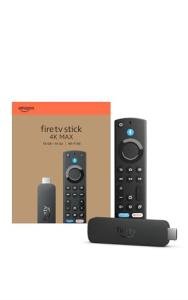
The Amazon Fire TV Stick HD with Alexa Remote is designed to be the entry-level gateway into the world of smart streaming, focused on affordability and simplicity. It occupies the highly competitive budget segment of the U.S. streaming market, offering core functionality to modernize older non-smart TVs or provide secondary streaming access in a bedroom or guest room. This device excels at delivering reliable high-definition (HD) streaming for major services without the premium price tag.
Its niche is the budget-conscious consumer who does not own a 4K TV or primarily streams on a smaller screen where 4K resolution is unnecessary. Compared to 4K streaming devices, you save money while still getting the essential features: access to all major U.S. streaming apps and the convenience of voice control via the included Alexa remote. If you are looking for the most affordable and simplest Fire TV Stick experience, this is the go-to option.
Technical Analysis
| Specification | Detail & U.S. Context | Analysis |
| Video Resolution | 1080p Full HD support. | Perfectly suited for older HDTVs or smaller secondary displays where 4K capability would offer no benefit, keeping the cost down for the consumer. |
| Processor | Quad-core CPU (1.7 GHz). | Provides sufficient power for smooth HD streaming and snappy app navigation, ensuring you won't experience significant lag on basic apps like Netflix and Hulu. |
| Audio Support | Dolby Digital Plus with audio passthrough. | Capable of delivering enhanced stereo and surround sound quality to compatible home audio systems, improving the overall entertainment experience. |
| Remote Control | Alexa Voice Remote (includes TV power and volume controls). | A key U.S. market feature; you can control your TV’s basic functions (power and volume) and launch apps with your voice, consolidating remotes. |
| Networking | Dual-band, dual-antenna Wi-Fi (2.4 GHz and 5 GHz). | Essential for reliable HD streaming. The 5 GHz band helps you avoid interference in densely populated U.S. environments like apartment buildings. |
| OS Interface | Fire OS. | An easy-to-use, media-forward interface that prioritizes content discoverability, making it simple for casual users to find what they want to watch. |
1. HD Performance and User Experience
The Amazon Fire TV Stick HD with Alexa Remote is optimized entirely for 1080p resolution, which remains the standard for many televisions in the U.S. household. Its internal quad-core processor is perfectly capable of handling the decoding of high-definition streams and ensuring a smooth user interface. While it won't be as blazing fast as its 4K siblings, it offers reliable performance for basic streaming needs.
You will find the interface to be intuitive and easy to navigate. The focus of the operating system is on making content readily available, which is ideal for a secondary TV or for users who are new to streaming. The speed is more than adequate for accessing your favorite cable-cutter services and quickly jumping between live TV and on-demand content.
2. The Versatile Alexa Voice Remote
The most crucial feature that elevates this budget streaming stick is the updated Alexa Voice Remote. This is a game-changer for simplifying your living room setup. The remote includes dedicated power and volume buttons that can control your television and, in many cases, a connected soundbar.
This means you can finally retire two separate remotes, using only the Alexa remote to turn on the TV, launch an app with your voice, and adjust the volume. The integration of Alexa itself allows you to search for content, check the weather, or even control basic smart home devices, all with the press of a button.
3. Simplicity and Portability for Travel
This device is designed for ultimate simplicity—you just plug it into an available HDMI port, connect the power, and follow the on-screen setup. Its small, stick form factor makes it an excellent choice for an affordable streaming device. It disappears neatly behind the television, avoiding the need for a bulky box on your entertainment stand.
Furthermore, its compact size makes it an excellent companion for the traveling student or frequent business traveler. You can easily slip the Fire TV Stick HD into a bag, bringing your entire streaming library with you to hotels or temporary living situations. It’s the easiest way to turn any HDTV into your personal home entertainment center on the go.
User Profiles
1. The Budget Secondary TV User
This user needs an inexpensive, reliable streaming solution for a second or third TV in the house (e.g., in the kitchen, garage, or a guest room) that is not 4K-enabled.
-
Use Case: You have an older 1080p TV in your spare bedroom and want guests to have easy access to streaming services without spending money on an overpowered 4K device. Simplicity and the ability to control the TV volume are key.
-
The Fit: The Amazon Fire TV Stick HD is the perfect budget monitor choice, offering all the necessary features (HD streaming, Alexa remote control) at the lowest price point. It ensures your guests can easily navigate and watch content without having to learn a complex new system.
2. The New-to-Streaming User
This user is transitioning away from cable or buying their first smart device and needs the most straightforward, non-intimidating way to access Netflix, Disney+, and live TV apps.
-
Use Case: You are tired of paying for cable and want a simple-to-install device that lets you search for movies and shows using your voice, minimizing the confusing navigation of traditional smart TV menus.
-
The Fit: The plug-and-play installation and the intuitive, voice-activated Alexa remote make this device incredibly accessible. You can simply say the name of the show you want, and the device will find it, which dramatically lowers the barrier to entry for the new streaming experience.
3. The College Student/Dorm Resident
This user needs a highly portable streaming device that can be easily moved, works well on low-bandwidth dorm Wi-Fi, and is cheap enough that replacing it won't break the bank.
-
Use Case: You are moving into your dorm room and need a compact device that provides access to all your subscribed services on your monitor or small TV, and can easily be packed away when you move out for the summer.
-
The Fit: Its small form factor and simple connection requirements make it the ideal best portable monitor companion for dorm life. It reliably handles 1080p streams, which is suitable for shared or weaker college network connections, giving you your entertainment fix without constant buffering.
"Complementary HomeTechCorner Category Recommendations"
| Recommended Products | Why This Category Is Useful Specifically for This Product | Short Usage Scenario |
| Portable Bluetooth Speakers | To instantly upgrade the often-poor audio from a secondary or older TV without needing a full soundbar setup. | You plug the Stick into the kitchen TV and pair it with a portable Bluetooth speaker, finally hearing the news clearly over the sound of your dishwasher. |
| Streaming Accessories | For extending the HDMI reach or using a power bank for portable use cases. | You realize the stick doesn't fit behind your wall-mounted TV, so you use a short HDMI extender cable to position it perfectly out of sight. |
| Usb C Hubs | To potentially add an Ethernet port or more reliable power in a pinch, though the HD Stick is primarily Wi-Fi. | You are using the Stick in a remote cabin and plug a basic USB hub with an Ethernet adapter into the micro-USB port to secure a more stable connection. |
| Compact Budget Speakers | If you want a slight, permanent audio upgrade for a small room without buying a large, expensive sound system. | You install a pair of small, compact budget speakers next to your secondary TV, turning your simple HD streaming into a surprisingly rich viewing experience. |
| Office Floor Lamps | To easily adjust the viewing ambiance in a bedroom or guest room where the HD Stick is typically used. | You use your Alexa remote to say, "Alexa, dim the floor lamp," creating the perfect soft-light mood for movie night without needing to get up. |