Creating a professional broadcast environment requires more than just a camera and a microphone. The right streaming accessories act as a central command center, allowing creators to manage complex software, adjust audio levels, and trigger transitions with a single touch. This guide explores the most reliable tools available to help streamline any digital production workflow.
Streaming Accessories
Upgrade your streaming game with must-have accessories for the ultimate viewing experience
Product List
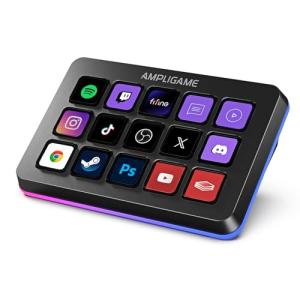
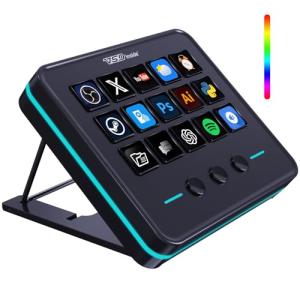
Fifine Game Streaming Keyboard
Ampligame
Product Review Score
4.43 out of 5 stars
92 reviews$64.99 $55.24
💡 Practical Usage Tips
- Connecting these controllers directly to a USB Motherboard Port ensures the device receives a steady flow of power to keep displays bright and responsive.
- Utilizing nested folders allows a user to store hundreds of commands on a small device by grouping similar actions together under a single button.
- Organizing buttons by color or custom icons helps with muscle memory, making it easier to find the right command during a high-energy broadcast.
- Regularly backing up the software configuration prevents the loss of complex Multi-action Macros in the event of a computer upgrade or system failure.
✅ What to Look For & ⚠️ What to Avoid
MUST-HAVES:
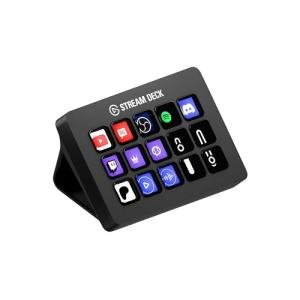
- Devices with a Detachable USB-C Cable, such as the Elgato Stream Deck MK.2, provide better longevity because a damaged wire can be easily replaced.
- Look for Native API Support for popular apps like OBS Studio to ensure the controller talks directly to the software without lag.
- High-quality visual feedback through LCD Keys makes it much easier to identify what a button does at a quick glance compared to static labels.
RED FLAGS:
- Be cautious of devices that lack Onboard Memory or reliable software, as they may lose all your programmed settings when the computer goes to sleep.
- Avoid controllers with fixed, thin cables that offer no strain relief, as these are often the first part of the hardware to break over time.
- Watch out for mechanical dials that feel "mushy" or skip increments, as this can make precise adjustments like volume control very frustrating.
🛡️ Build Quality & Performance
The physical feel of a controller significantly impacts the daily user experience. Premium models often feature a weighted base to ensure the unit doesn't slide across the desk during a heated moment. While some users prefer the satisfying click of a Mechanical Tactile Switch found on the Fifine AmpliGame, others prioritize the versatility of membrane-based LCD screens that change their appearance based on the active app.
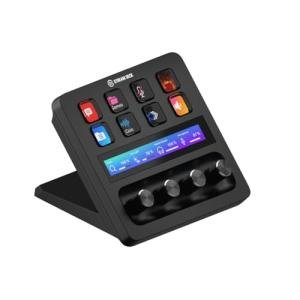
Advanced units like the Elgato Stream Deck + introduce professional-grade Rotary Encoders and touch strips. These components are built to handle repetitive rotations and swipes, providing a more tactile way to manage audio levels or lighting brightness. In contrast, entry-level plastic injection-molded devices may feel lighter and less durable, but they serve as an effective starting point for those with limited space or specific budget requirements.
🏆 Top Recommendations
| Best For | Model Name | Key Feature | Why It Wins |
|---|---|---|---|
| Professional Creators | Stream Deck MK.2 | 15 LCD Keys | Excellent software and modular faceplates. |
| Audio Control | Stream Deck + | Tactile Dials | Dials and touch strip offer precise mixing. |
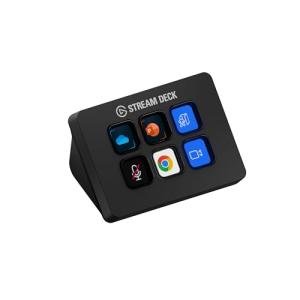
| Small Desks | Stream Deck Mini | 6-Key Grid | Compact footprint with full software power. |
| Tactile Feedback | Fifine AmpliGame | Mechanical Switches | Offers a physical "click" with low latency. |
❓ Frequently Asked Questions
Do these devices work without a computer?
Most streaming controllers require a host computer and specific software running in the background to function. They act as a "remote control" for your PC, so if the software is closed, the buttons generally will not perform any actions.
Can I use a streaming controller for things other than streaming?
Absolutely. These tools are excellent for productivity, allowing users to launch apps, mute microphones during work meetings, or control smart home devices like Philips Hue lights with a single press.
What happens if the USB cable breaks?
On models with a detachable cable, the wire can simply be replaced with any compatible USB-C cord. On models with a fixed cable, a break usually requires technical repair or a full replacement of the unit.