PRODUCT REVIEW
In-Depth U.S. Market Review
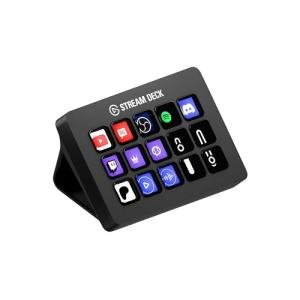
The Elgato Stream Deck Mini – Boost Your Productivity Effortlessly, is the compact entry point into the world of hardware-based macro control for the U.S. market. It maintains the core functionality and vast software ecosystem of its larger sibling but shrinks the physical footprint, making it ideal for users with limited desk space, laptop users on the go, or those who only need quick access to a handful of essential functions. This is not just a streaming tool; it’s a powerful productivity enhancer for any serious computer user.
Its niche is providing a streamlined, high-quality, and visually intuitive control surface with just six LCD keys. Compared to the 15-key model, the Stream Deck Mini is more focused and portable, serving as an excellent budget macro controller or a discreet desk tool. While you get fewer immediate keys, you still benefit from the exact same powerful Elgato software, including Multi-Actions and the massive plugin library, making it far superior to simple, generic macro keyboards in terms of software depth and seamless integration.
Technical Analysis
| Specification | Detail & U.S. Context | Analysis |
| Keys | 6 Programmable LCD Keys | The perfect "starter" count; provides essential, dedicated control over a small set of primary functions without overwhelming the user or desk space. |
| Visual Feedback | Fully Customizable LCD Icons | Allows you to instantly see and identify the function of each key, which is crucial for quick, error-free operation in live environments. |
| Functionality | Multi-Action Capability | The most valuable feature: one keypress can execute an unlimited sequence of commands (e.g., launch three apps, start a timer, set system volume). |
| Ecosystem | Full Elgato Plugin Access | Unlocks native integration with major U.S. streaming (OBS, Twitch) and productivity (Zoom, Slack) software, vastly simplifying complex tasks. |
| Profiles | Smart Profile Switching | Automatically changes the function of the 6 keys based on the application currently active, effectively multiplying the utility of the keys. |
| Physical Design | Compact, Fixed-Angle Stand | Extremely small footprint makes it highly suitable for crowded desks or laptop bags, prioritizing portability and desk stability. |
| Connectivity | Wired USB-A Connection | Ensures a reliable, instant, and zero-latency connection for critical, split-second actions during live calls or streaming. |
1. The Core Power in a Mini Form
The Elgato Stream Deck Mini distills the most important features of the full-sized model into a highly efficient package. The six LCD keys provide the perfect amount of dedicated real estate for your absolute essential functions: think "Mute Mic," "Switch Scene," "Launch Email," or "Copy/Paste." By forcing you to prioritize only the most critical actions, it actually helps to declutter your workflow and make your key actions more instinctive.
Crucially, you don't lose the advanced features with the Mini. You still have access to the powerful Multi-Action feature, which allows you to program an entire sequence of complex actions into a single tap. This means those six keys punch well above their weight, providing automation power that rivals much larger, more expensive controllers.
2. Ecosystem and Software Versatility
The shared software platform is the biggest advantage of the Stream Deck Mini. In the U.S. market, the demand for third-party integrations is high, and Elgato delivers with native support for everything from OBS and Spotify to Zoom and Philips Hue. This means your setup is essentially plug-and-play with the software you already use daily.
Smart Profile switching is another game-changing feature for maximizing the Mini’s six keys. When you switch from your streaming software to your video editor, the Stream Deck Mini automatically updates the key functions to display your editing shortcuts. This dynamic functionality turns the small device into a versatile control center for any major application on your computer.
3. Ergonomics for the Modern Work Space
Designed with a fixed, low-profile angle, the Stream Deck Mini fits seamlessly onto any desk or even tucked between a monitor and keyboard. Its small size makes it an ideal companion for a laptop user—you can easily throw it into a backpack and have your personalized macros available at the coffee shop or a remote office. This portability makes it a standout choice for the modern, flexible professional.
The wired USB-A connection is a necessity for a controller that manages critical, live functions. While a wireless option might seem convenient, the guaranteed, zero-latency response of a wired connection ensures that your "End Stream" or "Mute Call" command executes instantly, without any risk of a Bluetooth connection delay.
User Profiles
1. The Starter Streamer or Podcaster
You are entering the world of content creation and need a reliable, affordable way to control your broadcasting software (OBS/Streamlabs) and audio without having to alt-tab or memorize complex hotkeys.
-
Use Case: You are running a live podcast and need to instantly trigger an intro sound clip, switch to a "Waiting" screen, and fade out the music with three dedicated, labeled keys.
-
The Fit: The Stream Deck Mini is the perfect entry-level stream controller . Its six keys provide enough real estate for the most critical actions (Start/Stop Stream, Mute, Scene Switch), and the LCD keys ensure you always hit the right button, instantly improving the professionalism of your production.
2. The Space-Constrained Laptop Professional
You primarily work from a laptop, a small desk, or are frequently on the move. You need to boost your daily productivity with macros but simply do not have the desk space for a large peripheral.
-
Use Case: You are setting up at a temporary workspace and need a dedicated tool to manage your multi-tasking: a key to launch your email, another to toggle your camera/mic in a Teams meeting, and another to post a status update.
-
The Fit: Its minimal footprint makes it an excellent portable productivity booster . You can keep it discreetly on your desk while still leveraging the full power of Multi-Actions to automate repetitive office tasks, essentially giving you a hyper-efficient virtual assistant in a tiny package.
3. The Digital Audio/Video Hobbyist
You spend time editing videos, photos, or music and constantly use the same 4-6 difficult keyboard shortcuts (e.g., cropping, trimming, saving a custom preset) in your creative software.
-
Use Case: You are deep into an editing session and need to execute a complex sequence (e.g., apply a custom color grade, render a preview, and save the project) with a single, immediate button tap.
-
The Fit: For creative software workflow enhancement , you can map your most complex and frequently used shortcuts to the six keys. This drastically reduces the physical strain and mental overhead of remembering obscure shortcut combinations, allowing you to focus purely on the creative task at hand.
"Complementary HomeTechCorner Category Recommendations"
| Recommended Products | Why This Category Is Useful Specifically for This Product | Short Usage Scenario |
| Laptop Stands | The Mini is highly portable; a good laptop stand will improve your ergonomic setup, complementing the Mini's desktop function. | You set up your laptop on a comfortable standing desk, elevating the screen, and the Stream Deck Mini sits perfectly at the base for easy access to your work macros. |
| Wireless Charging Deskmats | Using a deskmat provides a clean, unified surface for the Mini and your other peripherals. | The Stream Deck Mini sits securely on the corner of your large deskmat, and you tap a key to launch your workday while your phone is charging on the integrated pad. |
| Smart Lighting For Video Calls | You can use the Stream Deck Mini to control your key video call and streaming lighting, simplifying your on-camera setup. | You start a virtual client meeting and tap one of your six keys, instantly turning on your key light and confirming your mic is unmuted. |
| Studio Usb Microphones | Direct control of your microphone's mute and gain features via the Mini's macro keys is a cornerstone of professional communication. | You are in a call and need to cough; you tap the dedicated "Cough Mute" key on the Mini, and the visual feedback confirms your mic is instantly silent. |
| Usb C Hubs | A hub is often needed by laptop users to expand port availability, making the Mini easier to integrate into a travel setup. | You connect the Stream Deck Mini, your external drive, and your webcam all into a single, compact USB-C hub that plugs into your laptop for a quick, full setup. |