PRODUCT REVIEW
In-Depth U.S. Market Review
The Elgato Stream Deck MK.2 with 15 Macro Keys has become the quintessential productivity tool and broadcast controller for content creators, streamers, and advanced home office users across the U.S. It doesn't just launch apps; it automates complex, multi-step actions with a single tap of its vibrant LCD keys. The MK.2 version improves on the original with a detachable USB-C cable and a better, more stable desktop stand, cementing its position as the market leader in the hardware macro controller category.
Its niche is providing a seamless, professional-grade interface for live production, simplifying everything from scene switching in OBS to muting your mic in a Zoom call. Compared to software-based macro solutions, the tactile, visual feedback of the 15 customizable LCD buttons is unparalleled for live, high-pressure environments. While cheaper macro pads exist, they generally lack the deep, robust ecosystem and the sheer number of native plugins that Elgato has cultivated, making the Stream Deck MK.2 the definitive choice for anyone serious about boosting streaming quality and workflow efficiency .
Technical Analysis
| Specification | Detail & U.S. Context | Analysis |
| Keys | 15 Programmable LCD Keys | The core feature; each key can be customized with an icon to visually confirm its function, which is critical for live production when speed matters. |
| Interface/Cable | USB-C Connection, Detachable Cable | A significant upgrade for U.S. users, offering a faster, more reliable connection and the flexibility to use a custom-length cable. |
| Action Types | Multi-Actions, Hotkeys, System Actions | Far beyond simple key presses, it can trigger sequences of actions (e.g., "Start Stream, Tweet, Open Chat") with one keypress, saving crucial time. |
| Ecosystem | Deep Plugin Integration (e.g., OBS, Spotify, Philips Hue) | The strength of the Stream Deck; extensive native support for the most popular streaming, video conferencing, and smart home software used in the U.S. |
| Profiles | Smart Profiles for Different Applications | Allows the keys to automatically switch configurations when you switch between, say, Zoom, OBS, and Photoshop, vastly increasing the utility of the 15 keys. |
| Ergonomics | Non-slip Magnetic Stand | Provides a sturdy, optimal viewing angle on the desk; the stability is important to prevent movement during rapid button presses on stream. |
| Compatibility | macOS and Windows | Supports the dominant operating systems for content creation, ensuring broad market accessibility for all creators. |
1. The Power of 15 Programmable LCD Keys
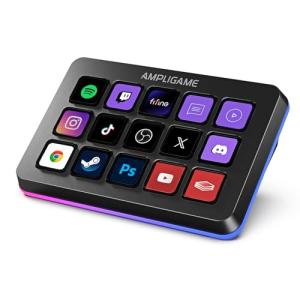
The 15 LCD keys on the Stream Deck MK.2 are the centerpiece of the device, offering both tactile control and immediate visual feedback. Unlike standard keyboards, you can assign custom icons to each key, instantly showing you its current function. This visual clarity is absolutely essential when you are live on stream or in a critical meeting and need to make a quick, correct decision—no more guessing what F12 does.
Furthermore, you are not limited to just 15 functions. You can create 'folders' on the keys, effectively nesting additional layers of actions, exponentially increasing the total number of accessible macros. This is key for professional content creation , allowing you to organize hundreds of commands for different games, software, or streaming scenarios on one compact device.
2. Software Ecosystem and Automation Depth
Elgato's robust software and third-party plugin ecosystem is arguably the device's greatest competitive advantage in the U.S. market. The sheer number of native integrations with popular platforms is huge: you can directly control OBS, Twitch, YouTube, Spotify, and even your Philips Hue lighting without writing a single line of code. This plug-and-play simplicity is a major time-saver.
The concept of a "Multi-Action" is where the automation truly shines. With a single press of a key, you can execute an entire sequence: dim your office lights, switch your camera scene to "Starting Soon," launch your streaming software, and post an announcement to your Discord server. This level of automation streamlines pre-show setup and minimizes distractions during live content.
3. Physical Design and Desktop Integration
The physical design of the MK.2 is a subtle yet important upgrade. The magnetic faceplate allows for easy customization if you want to swap out the aesthetics, a trend popular with desk setup enthusiasts. More crucially, the detachable USB-C cable significantly improves cable management; if your cable ever frays or you need a longer or shorter run, you can simply swap it out without replacing the whole unit.
The included non-slip stand provides an optimal, fixed viewing angle on your desk. This ergonomic stability is vital; when you are rapidly pressing buttons during an intense moment, you need the controller to stay perfectly in place. Its compact but functional footprint makes it an easy addition to even the most crowded home office or battle station.
User Profiles
1. The Dedicated Live Streamer
You are a content creator streaming regularly on Twitch or YouTube. You constantly need to switch scenes, play sound effects, manage your mic and camera, and interact with chat, all while focusing on your game or presentation.
-
Use Case: You are transitioning from a gaming scene to a "Be Right Back" screen, muting your mic, and posting a quick chat message to your audience to explain the break, all within two seconds.
-
The Fit: This is the quintessential stream control surface . The 15 LCD keys allow for instant, dedicated, and visually confirmed control over OBS/Streamlabs and Twitch functions. The Multi-Action feature is indispensable for complex, coordinated scene and audio changes, elevating your stream's production value.
2. The Remote Work Power User
Your job requires constant movement between video conferencing (Zoom, Teams), productivity apps (Slack, Notion), and communication tools. You want a way to automate repetitive tasks and manage your audio/video controls discreetly.
-
Use Case: You are in a video call and need a single, silent button press to mute your mic (and confirm it visually) while quickly launching your note-taking app on a different monitor.
-
The Fit: The Stream Deck MK.2 excels as a home office productivity booster . You can program dedicated keys for "Mute All," "Launch Daily Standup," or "Paste Boilerplate Email Response." Smart Profiles automatically change the key functions based on the active application, making it a dynamic, time-saving assistant for the modern professional.
3. The Graphic Designer/Video Editor
You spend hours in creative applications like Adobe Photoshop, Premiere Pro, or DaVinci Resolve, relying heavily on keyboard shortcuts and complex macro sequences to speed up your workflow.
-
Use Case: You need to execute a complex, four-step action in Photoshop—select layer, merge visible, save to web, and close document—with a single, physical button press.
-
The Fit: Its customization allows you to create highly specific, multi-step macros that replace repetitive mouse clicks and hard-to-remember keyboard combinations. For creative software workflow enhancement , you can map your most-used tools to a dedicated, clearly labeled key, leading to significantly faster and less fatiguing editing sessions.
"Complementary HomeTechCorner Category Recommendations"
| Recommended Products | Why This Category Is Useful Specifically for This Product | Short Usage Scenario |
| Smart Monitor Light Bars | Integrating lighting control into the Stream Deck allows you to instantly change your webcam lighting for stream/call quality. | You are about to go live and you tap one Stream Deck key to switch your scene, and a second key to turn on your monitor light bar and set it to a professional-looking cool white. |
| Studio Usb Microphones | The Stream Deck integrates directly with the control software of many popular studio mics, allowing for instant muting or gain adjustments. | You are talking to a viewer and realize your mic is too loud, so you tap a key on the Stream Deck that instantly reduces your microphone gain by 5dB. |
| Ergonomic Monitor Arms | Maximizing your desk space is crucial when adding a device like the Stream Deck; an arm gets the monitor out of the way. | You install a monitor arm to free up the space right in front of your keyboard, allowing you to perfectly position the Stream Deck MK.2 for quick, natural access. |
| Smart Lighting | The extensive smart home plugin support allows you to control the environment around your stream or workspace. | You are ready to start your stream and press a "GO LIVE" multi-action key that simultaneously switches your OBS scene and changes your room's smart lighting to your signature color. |
| 4K Webcams | Directly control your webcam's settings (zoom, pan, focus) via the Stream Deck to maintain a high level of production quality. | A key press on the Stream Deck instantly zooms in on a specific part of your desk for a product demonstration, then zooms back out when you tap the key again. |