PRODUCT REVIEW
In-Depth U.S. Market Review
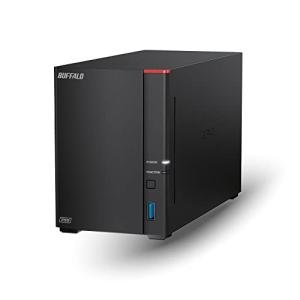
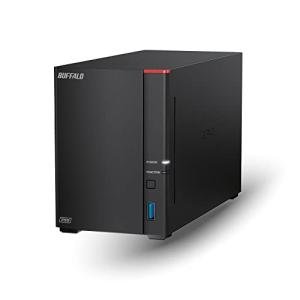
The BUFFALO LinkStation 720 8TB NAS for Home Office is squarely aimed at the user who needs reliable, centralized storage without the complexity and deep feature sets of a full-blown server. It occupies the sweet spot for the budget-conscious home office or family seeking a dedicated, always-on backup and file-sharing solution. This 2-bay NAS is pre-configured with 8TB of storage, meaning it's ready to go right out of the box, which is a major convenience factor for the non-technical U.S. consumer.
This model is an excellent budget NAS choice for home use that prioritizes simplicity and data integrity. Compared to advanced multi-bay units from Synology or QNAP, the LinkStation 720 offers a much simpler user interface and setup process, making it highly accessible. Unlike a single external hard drive that offers no protection, this 2-bay NAS comes with data mirroring (RAID 1) enabled by default, giving you immediate, automatic protection against a single drive failure, which is its most competitive advantage for the everyday user.
Technical Analysis
| Specification | Detail & U.S. Context | Analysis |
| Drive Bays & Capacity | 2-Bay NAS with 8TB total storage pre-installed. | Provides a good starting point for family photo/video archives and document backup. 2 bays typically run in RAID 1, meaning the usable capacity is 4TB (mirroring the other 4TB for protection). |
| Processor | Dual-Core CPU (Designed for network throughput). | Sufficient power for file serving, backing up multiple computers, and light media streaming. It's not designed for heavy tasks like 4K transcoding or running virtual machines. |
| RAID Support | RAID 0, 1, and JBOD. Factory set to RAID 1 (Mirroring). | RAID 1 is the most sensible choice for home users, offering immediate protection where all data is duplicated across both drives. This is a critical security layer missing from standard external drives. |
| Networking | 2.5 Gigabit Ethernet Port. | A major competitive advantage, as 2.5Gbe is much faster than standard Gigabit Ethernet (1Gbps). This is perfect for quickly backing up modern laptops and desktops with compatible ports. |
| Physical Security | Kensington Lock Slot. | Standard physical security feature for small business/home office environments where the device might be visible or accessible to others, allowing you to secure it to a desk. |
| Installation | Tool-less Drive Access. | Simplifies the initial setup and any future maintenance, such as replacing a failed drive. Designed to be user-friendly, not requiring specialized tools or deep technical knowledge. |
1. High-Speed Networking for Quick Backups
The inclusion of a 2.5 Gigabit Ethernet port is a significant technical detail that dramatically improves the backup experience. While a typical home network runs at 1 Gigabit, this enhanced port allows you to achieve transfer speeds 2.5 times faster if you have a compatible router or switch. This speed is essential when you are doing the initial backup of a large laptop or running large, high-resolution video files over the network.
For the home office, this fast connection translates to less time waiting for files to sync and quicker access to shared documents, which can boost productivity. This superior networking speed is a clear differentiator from older or lower-cost 1Gbps NAS models, future-proofing your network storage for a while to come.
2. Ready-to-Use Redundancy and Simplicity
The BUFFALO LinkStation 720 comes pre-loaded with an 8TB storage volume configured in RAID 1, offering immediate data redundancy out of the box. This means if one of the two internal drives fails, all your data is safe on the other drive. For the average U.S. consumer, this is a non-negotiable security blanket that provides peace of mind far exceeding what a single external hard drive can offer.
The system is designed with a simplified, easy-to-use interface, avoiding the complex application ecosystems of higher-end brands. This focus on ease-of-use ensures that anyone, regardless of technical skill, can set up the automatic backups and begin using the file-sharing features within minutes, making it a true plug-and-play solution for data safety.
3. Home Office Integration and Access
Beyond just local storage, the LinkStation 720 supports Buffalo’s proprietary cloud access features, allowing you to securely access your files from anywhere in the world via a mobile app or web browser. This remote access is crucial for the modern home office worker or traveling professional who needs to grab a document while away from home.
The system is compatible with standard backup protocols, including Apple’s Time Machine for Mac users and Windows Backup for PC users, ensuring broad integration across the most common operating systems in the U.S. market. This universality, combined with the quick setup, makes it a hassle-free choice for a mixed-OS household or a small business environment.
User Profiles
1. The Small Business Remote Worker
You operate mainly from a laptop in a small apartment or home office, needing a reliable, fast local network drive to store your large work projects and automatically back up your computer's drive daily. You value time and simplicity over complex configurations.
-
Use Case: You connect the LinkStation to your home router, run the simple setup wizard, and immediately configure your work laptop to back up using its native OS software (Time Machine/Windows Backup). The 2.5GbE speed ensures the backups happen almost instantly.
-
The Fit: The pre-configured 8TB NAS is ready to protect your data with RAID 1 right away, eliminating the complexity of installing drives and setting up the array. The 2.5GbE port provides the necessary speed for minimal disruption to your workday.
2. The Tech-Averse Family Head
You have years of irreplaceable family photos and videos stored across multiple old phones, hard drives, and cloud services, and you want one simple, central, and protected location for everything. You want a solution that won't require ongoing maintenance.
-
Use Case: You gather all your family's media onto the NAS and set up the remote access app for the kids to upload their new photos directly to the shared drive from their phones, ensuring all new memories are instantly protected by the RAID 1 mirroring.
-
The Fit: The LinkStation 720 is ideal because it's a simple NAS for family backup . The factory RAID 1 setup provides automatic data redundancy, and the streamlined interface means you won't get bogged down in technical settings, keeping data safety stress-free.
3. The Budget-Conscious Media Streamer
You have a moderate collection of downloaded movies and music that you want to stream to your TV, gaming console, or smartphone within your home network. You don't need 4K transcoding, but you need reliable, quick access.
-
Use Case: You enable the built-in DLNA media server feature and point it to your media folders. You then use your smart TV or media player to access the LinkStation over your home network, streaming 1080p movies without issue.
-
The Fit: While not a power-user media machine, the dual-core CPU and 2.5GbE connection are more than enough to handle multiple simultaneous 1080p streams across a home network without buffering, making it a functional and budget NAS media server.
"Complementary HomeTechCorner Category Recommendations"
| Recommended Products | Why This Category Is Useful Specifically for This Product | Short Usage Scenario |
| Uninterruptible Power Supplies Ups | To provide a buffer against sudden power loss, allowing the system to perform a safe shutdown and preserve the integrity of your RAID 1 data. | You get a notification that the power went out, and you know the UPS has given your NAS enough time to securely save its file tables and power down without risking corruption to your mirrored drives. |
| Smart Power Strips | To safely power down the NAS and associated networking gear on a schedule, or to remotely reboot them if network access becomes temporarily unavailable. | You're away from home and can't access your files, so you use the smart strip app to power cycle your router and LinkStation, bringing your remote access back online quickly. |
| Networking Gear | To upgrade your router or switch to one that supports 2.5 Gigabit Ethernet, fully utilizing the high-speed port of the LinkStation 720. | You connect the NAS to your new 2.5G-capable router, and suddenly, transferring a massive folder of high-res photos takes seconds instead of minutes, drastically improving your backup speed. |
| Power Backup Solutions | For users who want both surge protection and a quick, clean power shutdown for the essential data on the NAS. | A nearby lightning strike causes a power surge, but the power backup solution shields your sensitive NAS from the spike, ensuring your RAID 1 protection remains fully functional. |