PRODUCT REVIEW
In-Depth U.S. Market Review
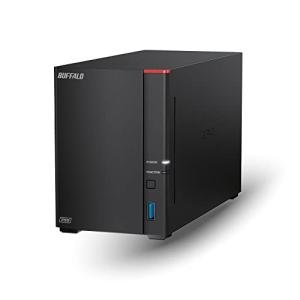
The BUFFALO LinkStation 720 4TB NAS for Home Use is a mid-range, pre-populated network-attached storage (NAS) system geared toward the general U.S. consumer who needs an easy, reliable, and centralized file server with built-in data protection. Its niche is providing a seamless, out-of-the-box private cloud experience without the technical complexity of building a diskless system. The 4TB size is an ideal entry point for a family's initial backup and media consolidation efforts.
It is highly competitive due to its ready-to-go, RAID-enabled configuration and its inclusion of a modern 2.5 Gigabit Ethernet (2.5GbE) port. Compared to external USB hard drives, the Buffalo LinkStation 720 offers shared network access for multiple users and, most importantly, automatic RAID 1 mirroring for redundancy. You should choose this NAS if you prioritize ease of use, network accessibility, and hardware-level data safety for your family's most important files.
Technical Analysis
| Specification | Detail & U.S. Context | Analysis |
| Capacity | 4TB (Terabytes) Pre-Installed | A good entry-level capacity for initial family file backups, photo archives, and document storage. Suitable for 2-4 users. |
| Drive Bays | 2-Bay Configuration (2 x 2TB drives typically) | Allows for data mirroring (RAID 1) for redundancy, which is the primary benefit for home users seeking data safety. |
| Connectivity | 2.5 Gigabit Ethernet (2.5GbE) Port | A key performance feature, allowing up to 2.5x faster data transfer than standard 1GbE. Essential for quick initial backups. |
| RAID Support | RAID 1 (Mirrored) & RAID 0 (Striped) | The recommended setting is RAID 1 , which uses 2TB of the capacity to mirror the other 2TB, yielding 2TB of highly protected usable space. |
| Processor/RAM | Dual-Core CPU & Sufficient RAM | Handles simultaneous tasks like file backups from multiple devices and media streaming without significant lag. |
| Software | LinkStation Web Access/Mobile App | Provides easy, centralized management and secure remote access (private cloud) for users on the go. |
| Backup Features | Apple Time Machine & Direct PC Backup Support | Native support for common U.S. consumer backup protocols, ensuring seamless integration with existing devices. |
1. Pre-Configured Redundancy and Reliability
The major appeal of the BUFFALO LinkStation 720 4TB is its out-of-the-box data safety . It comes with two 2TB hard drives pre-installed, and it is usually configured in a RAID 1 (mirroring) setup. This means that if one of the two internal drives fails, your data is safe on the other.
For the non-technical U.S. user, this is a massive advantage. You don't have to worry about buying drives, installing them, or configuring complex settings; you simply plug it into your router, and your files are immediately protected at the hardware level.
2. Network Speed Advantage with 2.5GbE
While 4TB is an entry-level capacity, the 2.5 Gigabit Ethernet (2.5GbE) port is a premium feature that drastically improves the user experience. You can expect significantly faster file transfers than a standard NAS, which is a major benefit when performing a large, multi-hour initial backup of a family computer.
This speed boost makes the NAS feel highly responsive, even when several people are accessing files or streaming media simultaneously. It ensures that the LinkStation 720 integrates seamlessly with the faster Wi-Fi 6 and Wi-Fi 7 routers common in modern homes.
3. Private Cloud and Multi-User Access
As a Network Attached Storage device, the LinkStation 720 is designed for multi-user, multi-device access. You can set up personalized user accounts for everyone in the family, ensuring each person has their own secure storage partition.
The built-in software also facilitates remote access , creating a private cloud. This means you can securely retrieve files or upload photos from your phone or a remote computer while traveling, without paying a monthly subscription fee to a public cloud provider.
User Profiles
1. The Family Photo Organizer
You have thousands of unorganized photos and videos scattered across multiple phones, computers, and older external hard drives. You need a single, reliable, and accessible vault for all of them, with a guarantee against loss.
-
Use Case: You connect the BUFFALO LinkStation 720 to your router and upload all your family's archives to it. You then use the mobile app to ensure every new photo taken is immediately and automatically backed up to the NAS, leveraging the RAID 1 for ultimate peace of mind against hard drive failure.
-
The Fit: The pre-populated 4TB provides a perfect starting capacity for family memories, and the RAID 1 redundancy is the crucial safety net for irreplaceable photos. The network access allows every family member to contribute easily.
2. The Simple First-Time NAS User
You’re intimidated by the technical setup of a diskless NAS but understand the importance of having a central server for backups and media. You want a trusted brand and a device that is ready to use immediately with minimal configuration.
-
Use Case: You unpack the LinkStation 720 , plug in the power and Ethernet cable, and it appears instantly on your network via the simple setup software. You use the native Time Machine support to run your first backup on your Mac without touching any advanced settings.
-
The Fit: The pre-populated, pre-configured nature of the Buffalo NAS removes all the initial technical hurdles. The reliable brand and guaranteed RAID protection make it an ideal, safe first step into centralized network storage.
3. The Wireless Media Streamer
You have a moderate collection of music and video files and want a central point to store them for smooth, high-quality streaming to various devices around your house. You appreciate quick transfer speeds when moving media files.
-
Use Case: You transfer a new 4K movie file to the NAS using the 2.5GbE port , and the transfer is done in seconds. You then use the LinkStation's media server feature to stream the movie flawlessly to your smart TV and a Bluetooth speaker system in the kitchen simultaneously.
-
The Fit: The 2.5GbE port ensures fast loading of media files, and the dedicated NAS processor handles the media server function reliably, guaranteeing a stutter-free streaming experience across your local network.
"Complementary HomeTechCorner Category Recommendations"
| Recommended Products | Why This Category Is Useful Specifically for This Product | Short Usage Scenario |
| Uninterruptible Power Supplies Ups | Essential for protecting the spinning drives and RAID array from power failure, which could corrupt the data. | A surge protector wouldn't be enough; the UPS keeps the NAS powered, giving you a safe window to manually shut down the system during a prolonged outage. |
| Wi Fi 7 Mesh Systems | Provides the high-speed wireless network needed for the 2.5GbE port to operate at its maximum potential across your home. | You transfer a large 1GB folder from your laptop to the NAS over Wi-Fi, and the fast mesh system utilizes the 2.5GbE connection for a near-instantaneous transfer. |
| Smart Displays | Used to easily access and view the photos and videos stored on the LinkStation. | You ask your smart display to access the "Summer Vacation" folder on your NAS and start a slideshow for guests in the living room. |
| External Hard Drives For Media Libraries | Provides an additional, non-networked backup layer for the most critical files on your NAS (3-2-1 backup strategy). | You connect an external USB drive to the NAS and use the built-in software to perform a weekly backup of your 2TB of photos to the external drive, then store it offsite. |
| Dedicated Home Automation Controllers | Uses the reliable, always-on NAS as the host server for your core automation software. | You install your chosen automation platform on the NAS, ensuring your entire smart home runs off a stable, centralized, and constantly backed-up server. |