PRODUCT REVIEW: SofaBaton U2 Universal Remote with App Control
In-Depth U.S. Market Review
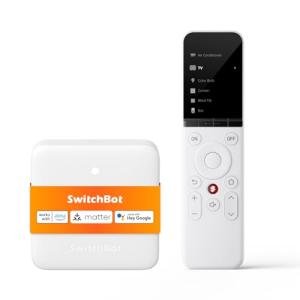
The SofaBaton U2 Universal Remote with App Control carves out a niche in the U.S. home technology market for users seeking a powerful, mid-range solution for consolidating their A/V equipment. It is not just another basic universal remote; it's a "smart" remote designed to bridge the gap between simple IR control and complex, expensive home automation hubs. It appeals particularly to the consumer who has amassed several components—TV, soundbar, streaming box, Blu-ray player—and is tired of managing a clutter of four or five separate clickers.
The U2’s dual strength lies in its extensive IR code library and the critical addition of a companion smartphone app for setup and customization. This app-driven approach significantly simplifies the often-frustrating process of programming traditional universal remotes. By incorporating a feature-rich app, SofaBaton makes advanced features like Activity Macros (or Sequences) genuinely accessible to the average, non-technical U.S. user.
Compared to a high-end universal system like the now-discontinued Logitech Harmony line, the SofaBaton U2 offers 90% of the core functionality—device consolidation and Activity control—at a fraction of the cost. While it lacks Wi-Fi for direct IP control of some smart devices, its comprehensive IR learning capability allows you to replicate almost any function from your original remotes, making it a powerful budget universal remote choice .
Technical Analysis
| Specification | Detail & U.S. Context | Analysis |
| Connectivity | Infrared (IR) Blasting and IR Learning | Supports virtually all legacy A/V equipment (TVs, cable boxes, etc.) and allows for customization by directly capturing signals from original remotes. |
| Device Capacity | Up to 15 Devices Supported | Sufficient capacity for the typical U.S. home theater setup, which usually includes a TV, soundbar, streaming device, and gaming console. |
| Setup Method | Dedicated Smartphone App (iOS/Android) and Code Database | Drastically simplifies initial setup and device adding; bypasses tedious manual code entry by using a massive, continually updated cloud database. |
| Macro/Activity Feature | One-Touch "Activity" Sequences | Allows for programming multi-step commands (e.g., "Watch Movie" turns on TV, A/V Receiver, and Blu-ray player simultaneously) using a single button. |
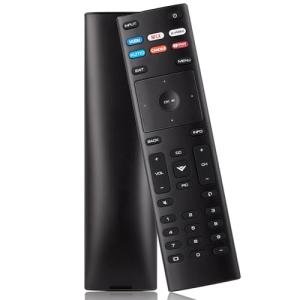
| Ergonomics | Traditional Remote Form Factor with Standard Button Layout | Comfortable in hand; maintains a familiar physical design, making the transition from multiple remotes to one less jarring. |
| Power Source | Built-in Rechargeable Lithium Battery (USB-C) | Eliminates the need for disposable batteries, which is a major convenience and cost-saver for U.S. users, utilizing the ubiquitous USB-C standard. |
1. Dual IR Learning and Code Database Setup
The core technical achievement of the U2 is its sophisticated setup process. Instead of relying solely on manually entering 4-digit codes, the system uses a massive, cloud-based code library accessible through the companion app. This means you can select your TV model, and the app instantly pushes the correct codes to the remote.
For those obscure or non-standard devices, the IR Learning feature is a game-changer. You can point your original remote at the U2, press a button, and the U2 memorizes that exact signal. This ensures that even rare functions (like a custom A/V receiver setting) can be captured and utilized on your universal smart remote .
2. Activity Macros and Custom Button Mapping
The true power of the U2 for an American home theater lies in its Activity feature. This allows you to chain multiple commands into a single button press. For example, pressing "Start Streaming" can power on your Vizio TV, switch your Yamaha receiver to HDMI 1, and power on your Apple TV box.
Furthermore, you are not limited to the printed function of the buttons. You can completely remap controls within the app. Want the volume buttons to always control the soundbar, even when you are actively using the streaming box? The U2 allows for this kind of precise, custom button mapping, dramatically improving the daily user experience.
3. Power and Physical User Experience
The move to a built-in, rechargeable lithium battery charged via USB-C is a significant modern upgrade. This removes the recurring hassle and cost of constantly replacing AA/AAA batteries, positioning it as a convenient best universal remote for entertainment option.
While the remote’s body is a familiar size and shape, the app-driven customization is the key differentiator. You are able to manage and edit all 15 device profiles from the convenience of your smartphone, keeping the remote itself clean and focused on control, not programming.
User Profiles
1. The Home Theater Enthusiast
You have invested in a decent A/V setup—a 4K TV, a separate receiver for 7.1 surround sound, a dedicated media PC, and a game console. You are tired of having a "remote pile" on your coffee table and need one single device to manage it all without spending hundreds of dollars.
-
Use Case: You need a single button press to switch from "Listening to Vinyl" (turns on the stereo and lights) to "Watching 4K UHD" (turns on the TV, receiver, and Blu-ray player). You require precise control over discreet functions on all 5+ components.
-
The Fit: The SofaBaton U2 is perfect because its 15-device capacity and powerful, app-controlled Activity Macros provide the complex control you need. The IR learning feature ensures that even your specialized equipment commands can be integrated into one clicker.
2. The Tech-Savvy Budget User
You appreciate smart technology and customization but operate on a strict budget that precludes expensive, professional-grade control systems. You are comfortable with a smartphone app for setup and value long-term cost-savings like the rechargeable battery.
-
Use Case: You are moving into a new apartment or setting up a secondary home entertainment space and need a clean, modern solution for controlling three devices (TV, budget soundbar, Roku stick) without clutter. You want an initial setup that is fast and headache-free.
-
The Fit: For you, the rechargeable USB-C power source provides excellent long-term value. The app control makes the initial setup much faster than old-school universal remotes, solidifying its place as a powerful budget universal remote choice .
3. The Digital Simplifier
You have migrated almost all your entertainment to streaming but still have a few legacy devices (like a cable box or older DVD player) that you occasionally use. You want a single remote that feels like a modern device but can still talk to your older gear.
-
Use Case: You primarily use your Apple TV for streaming but need a quick way to switch inputs and turn the power on/off on your decade-old plasma TV and a dedicated volume control for your Sonos soundbar, regardless of the active device.
-
The Fit: The U2's ability to lock volume control to a specific device (like your soundbar) and its comprehensive IR library for your older TV makes it the ideal simplification tool. It brings modern, app-based customization to a classic A/V problem.
"Complementary HomeTechCorner Category Recommendations"
| Recommended Products | Why This Category Is Useful Specifically for This Product | Short Usage Scenario |
| Smart Power Strips | A single remote controlling multiple devices should be paired with a single power source that can protect them all from surges and unexpected outages. | As you hit the "Start Movie" activity, you know that your entire entertainment center, from the TV to the soundbar, is safely powered and protected through one central smart strip. |
| Smart Displays | Using the SofaBaton U2 means your focus is on the TV, but a smart display can act as a secondary visual control panel or information hub. | You press the button on the U2 to dim the lights via your Activity Macro, and then glance at the smart display on your media console to confirm the current time and check the weather forecast. |
| Dedicated Control Panels | For family members who aren't comfortable with the U2 app, a simple, dedicated wall panel offers another way to execute those powerful "Activity" macros. | Your kid wants to watch cartoons; instead of handing them the U2, they just press the "Kids TV" button on the dedicated wall panel as they enter the room. |
| Uninterruptible Power Supplies Ups | The U2's power is secure, but the electronics it controls are not; a UPS protects your valuable A/V gear from sudden power loss or brownouts. | Mid-way through a critical scene, the power blinks, but your TV and receiver stay powered by the UPS, allowing the U2 to maintain control and your movie night to continue uninterrupted. |
| Usb C Hubs | With the U2 using USB-C for charging, a dedicated hub on your media console makes it easy to keep the remote and other smart accessories topped up. | When the battery low warning appears on the U2 app, you simply drop the remote onto the conveniently located, multi-port USB-C hub on your end table for a quick charge. |