PRODUCT REVIEW: Smart Motorized Blackout Blinds with Remote Control
In-Depth U.S. Market Review
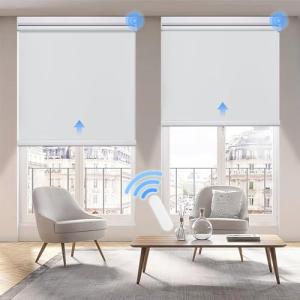
The Smart Motorized Blackout Blinds with Remote Control deliver a fully customized and integrated shading experience, directly challenging high-end, made-to-measure solutions in the U.S. window treatment market. These are complete blind units, pre-fabricated to the user's window dimensions, ensuring a perfect fit for a maximum light block. The "smart" component here refers to the integrated motor and the ability to link it to a hub for app and voice control, positioning it as a premium step up from basic RF-only motorized shades.
The core value proposition for these Smart Motorized Blackout Blinds is the guaranteed quality of the blackout seal—a critical consideration for any U.S. consumer prioritizing true darkness in a bedroom or home theater. Compared to using a retro-fit motor, the integrated design eliminates almost all light leakage around the edges and top of the cassette. While often utilizing a proprietary radio protocol, these systems usually offer a smart bridge for integration into major smart ecosystems.
This product is ideal for the discerning U.S. buyer who wants the aesthetic of custom blinds combined with the convenience and connectivity of smart home technology.
Technical Analysis
| Specification | Detail & U.S. Context | Analysis |
| Customization | Made-to-measure sizing (width and drop) based on user input. | Custom sizing is essential for achieving a true blackout effect in U.S. windows, which come in a vast range of non-standard dimensions. |
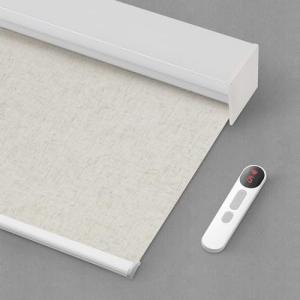
| Cassette/Valance | Integrated aluminum headrail and valance. | The included headrail provides a clean, finished aesthetic and helps seal light leakage at the top, a common failure point for cheaper shades. |
| Motor Type | Integrated Tubular Motor (usually proprietary radio protocol). | Ensures smooth, whisper-quiet operation. The proprietary protocol is often more efficient and reliable than direct Wi-Fi for this specific task. |
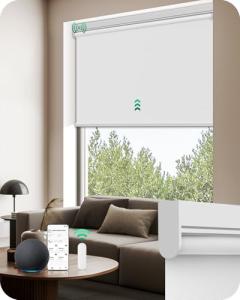
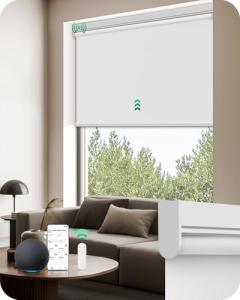
| Smart Integration | Requires a dedicated Bridge/Hub for Wi-Fi/Voice Control. | This is a necessary step to translate the shade's native radio signal into a language (like Wi-Fi or Zigbee) that Alexa or Google Home can understand. |
| Power Source | Built-in Rechargeable Li-ion Battery. | Battery power makes installation non-invasive—no wiring required—a major advantage for older U.S. homes or multi-story installations. |
| Control Methods | RF Remote (included) and App/Voice Control (via hub). | The dual control method ensures the system always works, even if the internet is down, which is a key reliability factor for everyday use. |
| End Limit Setting | Electronic Limit Setting via Remote/App. | Precise and repeatable electronic limit settings allow you to define the exact open and closed position, which is more reliable than mechanical stops. |
1. Precision Sizing and Blackout Performance
The most important technical feature of these Smart Motorized Blackout Blinds is the emphasis on precision, custom sizing. Unlike off-the-shelf shades, a made-to-measure approach minimizes the side gaps—the main culprit for light seepage—to just a fraction of an inch. The blackout fabric itself is heavy and opaque, completely blocking all light.
This dedication to a light seal is augmented by the integrated cassette/valance, which covers the motor and the top light gap, providing a cleaner look while enhancing the blackout effectiveness. This level of darkness is a premium feature often sought by Americans for nurseries and master bedrooms.
2. Power and Connectivity Architecture
The blind is powered by a high-capacity rechargeable battery, which is neatly housed within the motor tube. This design choice means installation is a simple mechanical process without needing to find or run power. Battery life is typically excellent, requiring only a few charges per year.
Connectivity relies on a two-step process: the motor communicates with an RF Remote via a dedicated, reliable radio signal, and for smart home integration, it talks to a small bridge or hub. This architecture keeps the main home Wi-Fi network uncongested while providing the necessary link for app control, scheduling, and voice commands.
3. Control Redundancy and Reliability
The system is designed with control redundancy, which is vital for user satisfaction. You have the dedicated RF remote for immediate, reliable physical control, ensuring operation regardless of your home's internet status. This is the simplest way for a guest or a non-tech-savvy family member to use the blinds.
For the smart home user, the bridge unlocks full integration. You can set up precise schedules, automate opening based on time of day, and incorporate the blinds into complex routines using Alexa, Google Assistant, or other platforms, ensuring the blinds operate flawlessly and on time every day.
User Profiles
1. The Nursery Guardian
You are a new parent in the U.S. who needs to enforce a strict nap and sleep schedule for your infant, making absolute darkness during the day non-negotiable for a perfect nursery environment.
-
Use Case: You need to lower the shades at 9:00 AM for nap time and at 7:00 PM for bedtime, using an app to ensure total darkness without making noise by manually operating the blinds.
-
The Fit: The custom-sized blackout material and minimal-gap design provide the total darkness your child needs for consistent sleep. The smart motor allows for silent, scheduled closure, which you can manage from your phone without entering the room and risking a disruption.
2. The Interior Design Enthusiast
You have spent time and money on a beautiful, modern home and demand that any technological installation blend seamlessly into your decor, meaning no visible wires or clunky hardware.
-
Use Case: You need motorized shades for your wide, modern windows that are battery-powered and housed in a sleek cassette to hide the motor and mounting hardware completely.
-
The Fit: The integrated design, especially the concealing headrail/valance, provides the clean, wire-free, and high-end aesthetic you require. The motor is completely hidden, offering automated convenience while preserving your interior design vision.
3. The Tech-Forward Scheduler
You have a robust Wi-Fi network and a smart home ecosystem, and you view smart automation as a means of passive energy savings and routine enhancement.
-
Use Case: You want the blinds to automatically close when the sun starts to hit the windows to reduce AC usage in the summer and open in the winter to passively capture solar heat.
-
The Fit: Utilizing the necessary smart bridge, you can integrate the blinds into powerful scheduling and scene automation software, allowing for seasonal adjustments that balance comfort, light control, and utility bill reduction without daily manual intervention.
"Complementary HomeTechCorner Category Recommendations"
| Recommended Products | Why This Category Is Useful Specifically for This Product | Short Usage Scenario |
| Multi Protocol Hubs Matter Thread | This is necessary to bridge the proprietary RF signal of the blinds to your main smart home platform, enabling voice and scheduling. | You walk into the living room and say, "Alexa, Evening Scene," and the hub closes all the blinds while dimming the smart lights around the room. |
| Smart Sensors | Integrating a simple motion or presence sensor can prevent the blinds from accidentally closing on an open window. | You step onto your balcony, and a contact sensor detects the open door, preventing the shade from running its close routine and potentially getting snagged in the mechanism. |
| Smart Wall Controllers | A dedicated wall controller can provide multi-room control for all your motorized blinds in a convenient, fixed location. | You are leaving the house and use the main wall-mounted controller in the hallway to tap a "Close All Blinds" button for privacy and sun protection while you're away. |
| Energy Monitoring Smart Plugs | If you use a bridge to enable smart control, plugging the bridge into a smart plug can allow you to remotely power cycle it if connectivity issues arise. | Your shade connectivity is acting up, and you use your phone to remotely turn the smart plug off and on, rebooting the bridge and re-establishing the connection. |