PRODUCT REVIEW: SofaBaton X1S Universal Remote with App Control
In-Depth U.S. Market Review
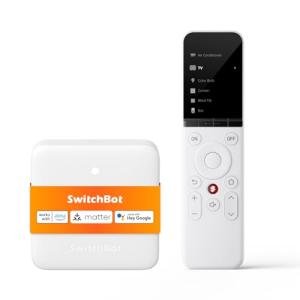
The SofaBaton X1S Universal Remote with App Control is a sophisticated solution that targets the high-end segment of the U.S. universal remote market, appealing to serious home theater enthusiasts and smart home integrators. It is a powerful system, not just a simple remote replacement. Unlike the budget-friendly U2, the X1S features a dedicated hub that facilitates control over both IR-only devices and modern IP (Wi-Fi/Bluetooth) components, effectively bridging the gap between legacy A/V and the connected smart home.
This system is positioned as the spiritual successor to premium systems like the retired Logitech Harmony Elite, offering comparable multi-device and "Activity" management at a much more accessible price point. Its ability to control devices hidden away in cabinets via the hub and included IR extenders is a key feature for clean, modern U.S. entertainment centers.
Compared to basic universal remotes, the X1S provides complete, customizable control over your entire A/V and basic smart home setup (up to 40 devices). It offers powerful scene automation that transforms complex multi-component operations into a single button press. This remote is the ultimate choice for the user seeking a seamless, integrated home theater control experience.
Technical Analysis
| Specification | Detail & U.S. Context | Analysis |
| Control System | Remote + Central Hub with IR/Bluetooth/Wi-Fi | The Hub is the brain, allowing control of devices hidden in cabinets and providing IP control over smart devices, overcoming line-of-sight limitations. |
| Connectivity Protocols | IR, Bluetooth, and Wi-Fi/IP Control | Superior to IR-only remotes; the inclusion of Wi-Fi allows for direct control of network-enabled smart devices (e.g., smart lights, certain media players). |
| Device Capacity | Up to 40 Devices and Custom Activities | High capacity supports complex, multi-zone, and multi-component home theater setups, far exceeding the needs of typical setups. |
| Setup & Programming | Dedicated Smartphone App & Extensive Code Database | The app-driven process simplifies the initial setup, device adding, and complex "Activity" creation, making advanced features accessible. |
| Macro/Activity Feature | Robust Sequence Programming | Allows users to create intricate, multi-step actions (e.g., "Game Night" turns on TV, Xbox, lights, and lowers volume) on a single button. |
| IR Extenders | Included Wired IR Extenders from the Hub | Essential for custom installations where A/V components are stored away in closed cabinets, ensuring reliable IR communication. |
1. Centralized Hub and Multi-Protocol Control
The core technology of the SofaBaton X1S is its control hub, which acts as a central communication node for all your devices. This hub connects to your home Wi-Fi network and is responsible for transmitting both IR signals (via built-in blasters and external extenders) and IP/Bluetooth commands.
This central architecture means you no longer need line-of-sight between the remote and your gear. The remote talks to the hub via Bluetooth (or a proprietary RF), and the hub talks to your devices. This allows for clean installations where all equipment is concealed—a common desire in modern home theater control setups.
2. Advanced Activity and Customization Via App
The X1S truly shines with its Activity feature, which is completely managed through a polished smartphone app. You can program up to 40 different devices and chain their commands into powerful sequences. For example, "Listen to Music" can turn on a specific amplifier input, dim the overhead lights via a smart lighting API, and start a playlist on a smart media player.
The remote itself offers a fantastic tactile experience, and the app allows for deep button remapping and customization. You can ensure that no matter what "Activity" you are currently running, the volume rockers always control your dedicated soundbar or A/V receiver, avoiding confusing context-switching.
3. IR Extenders for Custom Installation
A crucial technical accessory included in the X1S system are the wired IR extenders. These small emitters plug into the hub and can be discreetly taped over the IR windows of components hidden inside cabinets or media closets.
This feature is what elevates the X1S above simpler universal remotes, making it a viable solution for custom home builds or high-end entertainment centers. It guarantees reliable, consistent IR communication even when your equipment is completely out of sight, fulfilling the needs of the discerning home automation controller user.
User Profiles
1. The Home Automation Controller
You have a high-end, multi-component home theater that includes a projector, a motorized screen, a 7.2 surround sound receiver, smart lights, and motorized blackout blinds. You are an expert user who wants a single interface to manage everything.
-
Use Case: You want to press a single button labeled "Movie Night." This sequence must turn on the projector and receiver, drop the screen, close the smart blinds, dim the overhead lights to 10%, and start the Blu-ray player.
-
The Fit: The X1S's high 40-device capacity and its ability to integrate both traditional IR/Bluetooth and Wi-Fi/IP commands for smart home devices make it the perfect, all-in-one universal smart remote for your complex, automated setup.
2. The Clean-Install Enthusiast
You want a minimalist living room aesthetic, meaning all your A/V gear must be hidden away in a media cabinet or closet. You need a control system that can reliably send signals to these hidden devices.
-
Use Case: All your amplifiers, consoles, and streaming boxes are neatly hidden behind closed doors. You need a remote that you can point anywhere in the room, and the commands are reliably relayed to the correct components by a hidden hub.
-
The Fit: The central hub with its included IR extenders is specifically designed for your needs. The remote itself talks to the hub via RF/BT, allowing you to point it anywhere. The hub then precisely broadcasts the correct IR signals from inside the cabinet.
3. The Multi-Zone Media Manager
You have a main home theater in the living room but also a secondary setup (e.g., a TV and soundbar) in the kitchen or basement. You need one primary remote to control both zones, though only one at a time.
-
Use Case: You've finished watching a movie in the main room and move to the kitchen. You switch the remote's "Activity" from "Living Room" to "Kitchen TV" and now instantly have full control over the two kitchen components.
-
The Fit: The X1S's ability to manage up to 40 devices means you can easily create two completely separate "Activity" sets for two distinct media zones. You only ever have to use one high-fidelity smart speakers controller for all your entertainment.
"Complementary HomeTechCorner Category Recommendations"
| Recommended Products | Why This Category Is Useful Specifically for This Product | Short Usage Scenario |
| Smart Lighting | The X1S can integrate smart lighting commands directly into its Activity Macros for a complete scene setting. | You hit the "Start Game" Activity on the X1S, and the system not only powers on the console and TV but also changes the smart light strips behind the TV to your team's colors. |
| Dedicated Home Automation Controllers | The X1S handles A/V well, but a dedicated home controller can enhance its capabilities for advanced, time-based, or sensor-triggered automations. | You set a complex automation where a motion sensor tells the home automation controller to pause the movie (via the X1S API) if you leave the room for more than five minutes. |
| Motorized Roller Blind Kits | As a high-end controller, the X1S is perfectly suited to include shade/blind operation in its one-touch Activity sequences. | The sun starts to set, and you press "Movie Time" on the remote, which not only starts the entertainment but also automatically lowers your smart, motorized blackout blinds. |
| High Fidelity Smart Speakers | While the X1S is the control center, integrating it with quality smart speakers allows for seamless music listening and voice-assisted setup adjustments. | You finish watching TV and simply say, "Play my jazz playlist on the high-fidelity smart speaker," and the X1S switches the receiver input to the music streamer automatically. |
| Cable Management For Entertainment Centers | Since the X1S allows you to hide all your equipment, excellent cable management is the final step to a truly clean and professional A/V setup. | You've finished installing the hub and IR extenders inside the cabinet; now you neatly secure the remaining power and audio cables with ties for a perfect, clean-look installation. |