PRODUCT REVIEW
In-Depth U.S. Market Review
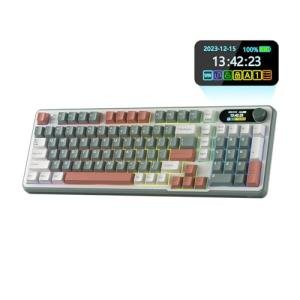
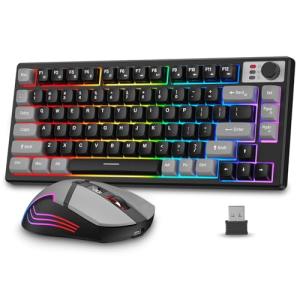
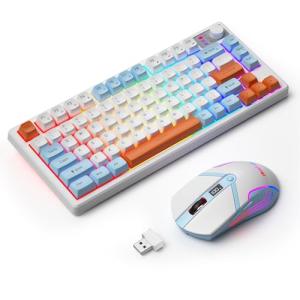
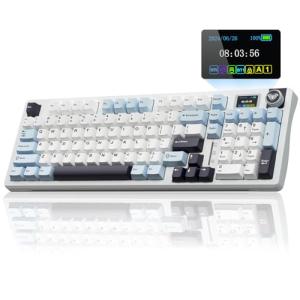
The L75 Pro Low Profile RGB Mechanical Gaming Keyboard targets a distinct, growing segment of the U.S. peripheral market: the user who craves the speed and durability of mechanical switches but dislikes the traditional high-profile, chunky design. This keyboard offers a sleek, slimmed-down profile while retaining the satisfying feel and low-latency performance of a mechanical board, making it an excellent choice for a hybrid user who mixes professional work with serious gaming.
Its core selling point is the convergence of a low-profile aesthetic, similar to a high-end laptop keyboard, with pro-grade mechanical features like hot-swappable low-profile switches and multi-mode connectivity (wired, 2.4GHz, Bluetooth). This blend is highly appealing to users who have limited desk space or prefer a minimalist, modern aesthetic in their U.S. home office.
Compared to a traditional full-height mechanical keyboard, the L75 Pro is more comfortable for long-term typing without a wrist rest and takes up significantly less vertical space. When placed next to other low-profile mechanical boards, its hot-swappable switch capability often gives it a distinct advantage, allowing for a level of customization and maintenance usually reserved for high-profile enthusiast boards. This is a top-tier choice for a slim mechanical keyboard for gaming and office use .
Technical Analysis
| Specification | Detail & U.S. Context | Analysis |
| Profile | Low-Profile Mechanical Design | Crucial for comfort and aesthetics. Reduces the key travel distance and overall keyboard height, appealing to users who dislike the high angle of traditional mechanicals. |
| Switches | Hot-Swappable Low-Profile Mechanical | Allows users to easily change out switches (e.g., from linear to tactile) without soldering, extending the life and customizability of the board, a key enthusiast feature. |
| Connectivity | Tri-Mode (2.4GHz, BT, USB-C) | Provides maximum versatility, essential for the multi-device user. Use 2.4GHz for gaming, Bluetooth for work/mobile, and wired for charging/firmware. |
| Layout | 75% Layout (Compact TKL with Function Row) | Removes the Numpad to save significant desk space, while retaining the dedicated Function Row (F1-F12) and arrow keys, which are vital for gaming and shortcut-heavy work. |
| Keycaps | Low-Profile PBT or ABS (Backlit) | PBT is preferred for durability and resistance to shine/wear, ensuring the legends remain visible and the feel stays consistent over years of U.S. use. |
| Ergonomics | Minimal Typing Angle Required | The low height means most users can type comfortably without a wrist rest, reducing the risk of wrist strain during long sessions of home office use . |
1. Low-Profile Mechanics and Typing Comfort
The L75 Pro’s use of low-profile mechanical switches is the technical centerpiece. These switches offer the speed and tactile feedback of a mechanical switch, but with a reduced height and travel distance. This results in faster actuation times and a typing experience that is less fatiguing over long work and gaming sessions.
The inclusion of hot-swappable sockets for these low-profile switches is particularly noteworthy. This feature future-proofs the keyboard, allowing you to easily purchase and test out new types of low-profile switches as they become available on the U.S. market, truly allowing you to fine-tune your typing experience.
2. Compact Layout and Multi-Device Versatility
The keyboard utilizes a popular 75% layout, which is essentially a Tenkeyless (TKL) design that squishes the navigation cluster (Home, End, Page Up/Down) closer to the main keys. This achieves a highly compact footprint while retaining the Function Row (F-keys) that is essential for many game and application shortcuts.
Its Tri-Mode connectivity ensures this small keyboard can interface with virtually any device you own. The high-speed 2.4GHz connection makes it a legitimate gaming keyboard contender, while the Bluetooth pairing allows you to efficiently switch to your tablet or smartphone for quick text input, all without moving to a different device.
3. Battery Life and Aesthetic Integration
Given its low-profile metal or high-quality plastic chassis, the L75 Pro often boasts a sleek, premium look that contrasts sharply with the bulky plastic of older gaming keyboards. The integrated RGB backlighting is typically more subdued or elegant, matching the minimalist design.
The internal rechargeable battery is critical for powering the two wireless modes and the RGB. Because it’s often used in mixed-use environments (office by day, gaming by night), a long battery life is non-negotiable. Users will find the keyboard a reliable partner, capable of sustained wireless performance before needing a quick USB-C recharge.
User Profiles
1. The Minimalist Home Office Worker
You are setting up a clean, modern home office and despise desk clutter. You need a keyboard that offers a satisfying typing experience all day but doesn't dominate your limited workspace.
-
Use Case: All-day work involving high-volume email and document creation, where typing comfort and speed are paramount. You appreciate the sleek, thin design that integrates flawlessly with a clean aesthetic.
-
The Fit: The L75 Pro’s compact 75% layout and low-profile design significantly reduce its footprint, making it an excellent minimalist keyboard for work . The mechanical switches improve typing feel over typical flat office keyboards without the high-angled stress on your wrists.
2. The Competitive Hybrid Gamer
You are serious about your PC gaming performance but spend equal time in a professional role. You need mechanical speed but want a more subdued, mature look than standard gaming gear.
-
Use Case: Switching from using the 2.4GHz mode for highly competitive, reaction-based FPS games to using the Bluetooth mode on a work-issued laptop. The low-profile keys feel faster to actuate in-game.
-
The Fit: The low-profile mechanical switches provide the speed and consistency required for competitive play, while the Tri-Mode connectivity allows for an easy transition to a professional environment. The elegant, compact design is a perfect fit for a mature gaming and work setup .
3. The Traveling Creator
You frequently move your setup between a standing desk, a second office, and a coffee shop. You need a premium, durable keyboard that is small enough to fit in a backpack easily but still offers a full set of function keys.
-
Use Case: Packing up quickly after a long session of video editing or coding. The 75% layout is a perfect travel size, and the durable construction provides peace of mind on the go.
-
The Fit: The L75 Pro is an excellent portable mechanical keyboard . Its compact size, robust construction (likely with an aluminum top plate), and highly versatile wireless options mean you can maintain a premium, low-latency typing experience anywhere in the U.S.
"Complementary HomeTechCorner Category Recommendations"
| Recommended Products | Why This Category Is Useful Specifically for This Product | Short Usage Scenario |
| Smart Monitor Light Bars | The low profile is sleek and integrates well with a modern light bar, preventing screen glare while illuminating the keys. | You switch on the light bar to eliminate the reflection on your screen, allowing the L75 Pro’s subdued RGB to act as a smooth, ambient backlighting effect for your keys. |
| Portable Monitors | The compact, low-profile nature of this keyboard makes it an excellent travel companion for multi-monitor portable setups. | You set up your portable monitor and L75 Pro in a hotel room, creating a dual-screen, high-performance workstation for remote work away from home. |
| Laptop Stands | Elevates a laptop to an ergonomic screen height, essential when using a separate, low-profile keyboard. | You place your laptop on an elevated stand, creating a comfortable view angle, while the L75 Pro sits flat on your desk for relaxed, straight-wrist typing. |
| Usb C Hubs | Provides a central point for connecting the keyboard for a wired connection or charging, especially crucial for USB-C only laptops. | You connect the keyboard's USB-C cable to the hub, ensuring a stable charge and reliable wired connection to your work laptop, freeing up the laptop's few ports. |