PRODUCT REVIEW
In-Depth U.S. Market Review
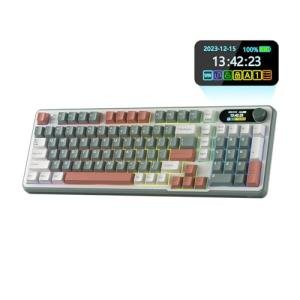
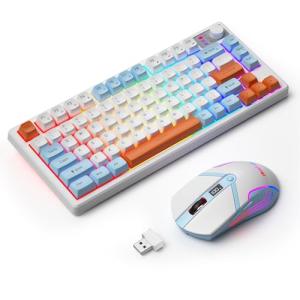
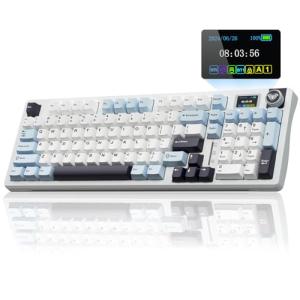
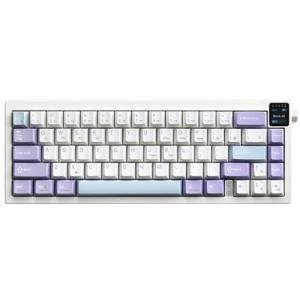
The Wireless Gaming Keyboard & Mouse with RGB Lighting enters a highly competitive U.S. accessories market, squarely aimed at the budget-conscious gamer and casual user looking for an all-in-one wireless solution. Its niche is providing the look and basic functionality of a gaming setup—namely, the vibrant RGB lighting and the wireless convenience—without the premium price tag often associated with high-end, low-latency peripherals.
You are essentially getting a plug-and-play setup that immediately gives your desktop a modern, aggressive gaming aesthetic. The core value proposition is simplicity and visual appeal. It’s a great entry point if you’re building your first PC setup or just upgrading from generic office gear.
Compared to more expensive, dedicated gaming keyboard and mouse sets from brands like Razer or Logitech, you will likely sacrifice some key features. Expect slightly higher latency, membrane or basic mechanical-like switches instead of high-grade mechanical options, and less sophisticated battery life management. However, for everyday computing and casual gaming where milliseconds don't determine victory, this Wireless Gaming Keyboard & Mouse with RGB Lighting combo offers unbeatable visual flair at a fraction of the cost, making it a highly attractive budget gaming keyboard and mouse choice.
Technical Analysis
| Specification | Detail & U.S. Context | Analysis |
| Connectivity | 2.4GHz Wireless USB Receiver (Shared) | Simple, single-dongle connection minimizes USB port usage, a key benefit for laptops or smaller desktop setups common in U.S. apartments. |
| Keyboard Type | Membrane/Mechanical-Feel (Typically) | Provides a softer, quieter typing experience than true mechanical switches. This is preferred in shared office or dorm room environments. |
| Lighting | Multi-Color RGB Backlighting | Crucial for the gaming aesthetic. While unlikely to be per-key programmable, it adds significant visual value for its price point. |
| Mouse DPI Range | Likely 800–2400 DPI (Adjustable) | Sufficient for most genres, including general use and slower-paced games. Higher-end mice go much higher, but this range is practical. |
| Ergonomics | Full-Size Keyboard Layout, Ambidextrous/Contoured Mouse | The full-size layout is standard for U.S. users requiring a Numpad. The mouse shape will be comfortable for general use but lacks specialized gaming grips. |
| Battery | Rechargeable, Integrated (Capacity TBD) | A major convenience for the U.S. consumer market, eliminating the need for disposable AA/AAA batteries, though battery longevity may be average. |
1. Input Mechanism and Responsiveness
This combo utilizes a 2.4GHz wireless connection, which is a standard choice for entry-level wireless gaming peripherals. This connection type generally offers lower latency than Bluetooth, which is critical for making your actions feel immediate in a game.
While the connection is generally stable, you should be aware that 2.4GHz signals can sometimes be affected by interference from other common household electronics like Wi-Fi routers. The keyboard itself likely uses a membrane or "mechanical-feel" switch, giving you a tactile bump that mimics a true mechanical switch but without the high-speed actuation and durability. This is a deliberate design choice to keep the unit a budget keyboard choice .
2. Physical Design and Aesthetic
The design ethos of the Wireless Gaming Keyboard & Mouse with RGB Lighting is clearly focused on the gaming aesthetic, defined by the integrated RGB backlighting. The lighting is the centerpiece, often featuring "breathing" or static color modes that transform the look of your desk.
The keyboard usually features a full-size layout, including a Numpad, catering to the American user who often mixes work, studying, and gaming on the same device. The mouse is typically a mid-size, contoured design that fits a variety of hand sizes, prioritizing comfort over the aggressive weight reduction found in premium models. Both units are designed for straightforward, easy use right out of the box.
3. Power Management and Connectivity Protocol
Powering the duo are integrated rechargeable batteries, a highly desirable feature for the U.S. market, which values sustainability and convenience. You simply plug in a USB cable to recharge when needed, eliminating the constant cost and hassle of disposable batteries.
Both devices operate off a single USB receiver, simplifying the setup process—a major plus for those who dislike managing multiple dongles. This single-receiver setup makes it an excellent choice for a traveling student or a minimalist setup. However, remember that the battery life, while rechargeable, is unlikely to match the multi-week longevity of some of the highest-end, non-RGB wireless peripherals.
User Profiles
1. The Casual College Student
You need a reliable, good-looking setup that works seamlessly with your laptop for both homework and relaxing with friends online. You can't justify spending hundreds of dollars on a peripheral set, but you also don't want the bland grayness of basic office equipment.
-
Use Case: Typing term papers during the day, then switching to Minecraft or League of Legends in the evening, sometimes in a dimly lit dorm room where the RGB provides ambient light.
-
The Fit: The Wireless Gaming Keyboard & Mouse with RGB Lighting is perfect because it provides instant, recognizable gaming style and wireless convenience for a clutter-free desk. You get the fun RGB aesthetic and rechargeable batteries without hitting your limited budget hard.
2. The Home Office Starter
You’ve been asked to work from home, and your old peripherals are causing wrist fatigue and desktop clutter. You want a more ergonomic feel and a wireless connection to keep your dedicated desk space clean and efficient.
-
Use Case: Long hours of spreadsheet work and email, followed by relaxing with a single-player RPG or a streaming service. You value the full Numpad for data entry.
-
The Fit: The full-size layout and rechargeable wireless functionality keep your workspace clean and productive. While not specifically designed for office ergonomics, the mechanical-feel keys offer better feedback than a laptop keyboard. The aesthetic is a fun bonus after the workday is done.
3. The Second-Rig Builder
You already own a high-end main PC but are setting up a secondary PC for your living room, a family member, or a dedicated streaming PC. You need a functional, reliable, and aesthetically pleasing set without needing competition-grade performance.
-
Use Case: Controlling a media server PC or doing light photo editing on a secondary monitor. The primary requirement is stable wireless connectivity and a nice appearance next to the TV or secondary screen.
-
The Fit: Since you aren't reliant on this set for competitive, high-stakes gameplay, the focus shifts to looks and reliability. The Wireless Gaming Keyboard & Mouse combo is an ideal secondary choice, offering a great visual match to an RGB-laden PC build and freeing up USB ports on your rig.
"Complementary HomeTechCorner Category Recommendations"
| Recommended Products | Why This Category Is Useful Specifically for This Product | Short Usage Scenario |
| Smart Monitor Light Bars | The combo's RGB backlighting demands a well-lit desk area for best viewing and comfort. | You want to dim the main lights and use the bar's warm glow for focused work, letting the keyboard's RGB shine during a late-night gaming session. |
| Electric Standing Desks | Wireless peripherals truly shine on a standing desk, reducing cable drag and clutter when adjusting height. | As you raise your electric desk for a mid-day stand-up break, the wireless keyboard and mouse remain perfectly positioned and tangle-free. |
| Uninterruptible Power Supplies Ups | Protects your PC from power loss, which is essential to save game progress or work documents immediately. | A sudden summer thunderstorm threatens a blackout; your UPS gives you just enough time to save your work and safely shut down your gaming rig. |
| High End Gaming Routers | Minimizes latency spikes and lag, ensuring the 2.4GHz connection performs optimally in competitive scenarios. | You need to ensure your gaming data packet is prioritized, guaranteeing that the split-second mouse click registers perfectly during an intense online match. |