

PRODUCT REVIEW
In-Depth U.S. Market Review
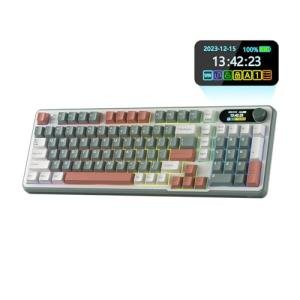
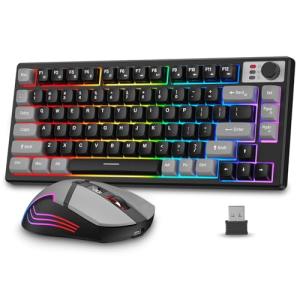
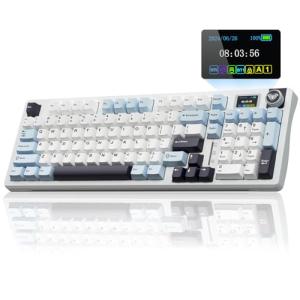
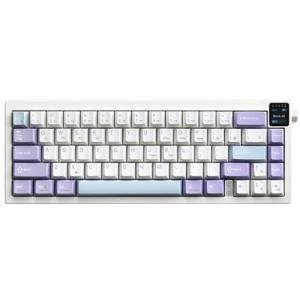
The BlueFinger RGB Wireless Gaming Keyboard and Mouse Combo targets the immense U.S. market segment that prioritizes value and visual flair over professional-grade, competitive performance. It's designed for the casual user, student, or first-time PC owner who wants the aggressive, multi-color aesthetic of a modern gaming setup—the signature feature of the BlueFinger RGB Wireless Gaming Keyboard and Mouse Combo—without the financial commitment of premium brands.
This combo immediately solves the problem of needing two separate, matching wireless peripherals by offering a synchronized, single-purchase solution. You get a cohesive look that is ready to go right out of the box, making it an excellent all-in-one desktop upgrade for anyone bored with standard black or gray office gear.
Compared to high-end wireless gaming sets, you will notice a difference in actuation speed and materials; the BlueFinger is generally not built for e-sports levels of responsiveness. However, if your budget is tight and your usage includes school work, streaming, and casual-to-mid-level gaming, its low price and vibrant RGB presentation offer a compelling alternative that many U.S. consumers find highly attractive.
Technical Analysis
| Specification | Detail & U.S. Context | Analysis |
| Wireless Protocol | 2.4GHz Nano USB Receiver | Provides robust, near-zero delay connectivity necessary for non-competitive gaming; highly convenient for modern U.S. laptops with limited port availability. |
| Keyboard Type | Membrane/Suspension Keys (Quiet Operation) | The "suspension" keycap design provides a slight mechanical look but retains the quieter operation of a membrane keyboard, perfect for dorms or shared home offices. |
| Backlighting | Rainbow RGB or Single-Color Modes | Essential for its visual niche. It gives a powerful aesthetic boost, though it lacks the granular per-key customization of high-end, programmable boards. |
| Mouse Design | Ergonomic, 6-Button Design | The inclusion of side buttons (typically forward/back) is standard for U.S. web browsing and basic gaming macros, enhancing daily productivity. |
| DPI Levels | Multi-Level Adjustment (e.g., 800-1600-2400) | Allows for quick sensitivity changes, which is vital when switching between a high-precision task like graphic design and a fast-paced game. |
| Power Source | Integrated, Rechargeable Battery | A critical value-add in the U.S. market, eliminating the ongoing cost and environmental impact of disposable batteries for daily users. |
1. Input Experience and Tactility
The keyboard component of the BlueFinger RGB Combo typically uses a suspension keycap structure over a membrane layer. This hybrid approach gives you a light, satisfying click or tactile feel that’s better than a flat laptop keyboard, but without the loud clack of a true mechanical switch. This makes it an ideal quiet gaming keyboard and mouse choice for users living with roommates or family.
The mouse complements this with a standard optical sensor and multiple adjustable DPI settings. This adjustability means you can instantly slow the cursor down for precision tasks like sniping or crank it up for rapid movement across multiple monitors—a necessary feature for a modern multi-tasking U.S. user.
2. Aesthetic and Build Quality
The defining feature of the BlueFinger Combo is its vibrant RGB lighting, often a "rainbow" or multi-zone illumination that cannot be individually configured but looks impressive immediately. The light spills around the keys and often includes accents on the mouse, creating a cohesive, eye-catching setup.
Build quality is designed to be functional and lightweight, typical for a budget-focused product. The chassis is likely a durable ABS plastic. While you may not get the heavy, metal plate construction of an enthusiast keyboard, the lightness makes it highly portable and easy to pack up for travel or cleaning.
3. Seamless Wireless and Power Management
Both the keyboard and mouse share a single, compact 2.4GHz USB receiver, which is a significant selling point for simplifying your connectivity. You only tie up one USB port, leaving others free for storage, charging, or other peripherals.
Both devices are powered by internal, rechargeable lithium-ion batteries. You charge them via standard USB, which is incredibly convenient. The expected battery life will vary based on RGB intensity—turning the lights off or down will drastically extend usage time, allowing you to manage when you need to plug in and recharge.
User Profiles
1. The Dorm Room Gamer
You are living in a tight space and need a setup that is easy to manage, looks great, and won’t disturb your roommate. Your budget is constrained, and you need one purchase to satisfy all your peripheral needs.
-
Use Case: Using the keyboard for 8 AM online classes, then diving into non-competitive MMOs or strategy games late at night. The quieter keys and fun lighting are a must-have for your cramped desk.
-
The Fit: The BlueFinger RGB Wireless Gaming Keyboard and Mouse Combo gives you a significant aesthetic upgrade and the quiet typing of its membrane-based switches. The single-dongle, rechargeable design is a massive convenience for keeping your small desk organized and powered up.
2. The Creative Hobbyist
You’re spending your evenings on graphic design, video editing, or music production, and you also enjoy a little gaming on the side. You need precise mouse control and a comfortable keyboard for marathon sessions.
-
Use Case: Swapping quickly from complex photo manipulation that requires fine, low-DPI control, to a casual shooter game where you need speed. The multi-level DPI adjustment is essential for your workflow.
-
The Fit: The mouse's adjustable DPI caters directly to your need for precision in creative apps. The RGB lighting is simply a stylish bonus that personalizes your creative workspace, making the whole setup feel more like your own dedicated area.
3. The Family Entertainment Hub Owner
Your PC is primarily used in a common area like the living room for controlling a media server, playing simple family games, or as a homework station. You need a reliable, wireless solution that can be stored easily and is visually appealing to all users.
-
Use Case: Sitting on the couch to quickly search for a streaming show or playing a kid-friendly platformer. The full-size keyboard is occasionally needed for inputting passwords or search terms.
-
The Fit: The wireless range of the 2.4GHz connection is typically excellent for living room use, and the combo is easy to stow away without cable clutter. The fun RGB lighting makes the PC a more engaging piece of family furniture compared to a generic, dull office setup.
"Complementary HomeTechCorner Category Recommendations"
| Recommended Products | Why This Category Is Useful Specifically for This Product | Short Usage Scenario |
| Smart Monitor Light Bars | The strong RGB aesthetic works best when complemented by controlled, soft overhead or task lighting. | You dim the overhead light to enjoy the RGB effect, using the monitor light bar to perfectly illuminate your documents or notes without screen glare. |
| Power Backup Solutions | Protects your system and peripherals from unexpected power surges or short outages, which are common in older U.S. homes. | A brief flicker of the lights occurs while you're gaming; your UPS keeps your monitor and PC running, preventing a sudden disconnect or data loss. |
| Smart Desk Lamps | Offers focused, personalized task lighting for when the RGB is distracting or when you need to read a physical document. | You need to look over a printed report; you tap your smart desk lamp on with cool, focused white light, leaving your RGB peripherals on for background ambiance. |
| Laptop Stands | Elevates your laptop screen to an ergonomic viewing height, which is important since this combo is often used with portable computers. | You set up your laptop on the stand for a video call, keeping your wireless keyboard and mouse on the desk surface for comfortable typing at wrist level. |