PRODUCT REVIEW
In-Depth U.S. Market Review
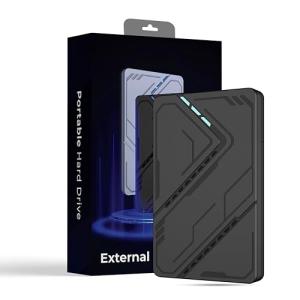
The Kosbees 500GB Portable External Hard Drive is positioned at the most budget-conscious end of the U.S. portable storage market, directly competing for users who need a small, reliable bump in capacity for everyday tasks. This product’s niche is the utility drive—a dedicated, physical vault for documents, small backups, and older media where cost is the absolute primary consideration. It’s an excellent, simple solution for users who are moving files between computers or simply want a dedicated, external safety deposit box for their most critical data.
For consumers seeking a highly affordable solution for simple file overflow, this 500GB portable external hard drive is an excellent home office use and budget choice. The 500GB capacity is a functional size, large enough to hold a full collection of personal documents and thousands of high-resolution photos. Compared to a small flash drive, you get vastly more storage capacity at a similar cost. Compared to 1TB or 2TB SSDs, you sacrifice significant speed and durability but save a considerable amount of money, making it ideal for the casual user or anyone simply needing a cold storage option.
Technical Analysis
| Specification | Detail & U.S. Context | Analysis |
| Storage Technology | Traditional Hard Disk Drive (HDD) with spinning platters. 500GB capacity. | HDD technology provides a low-cost, high-capacity solution. 500GB is sufficient for basic backups and document archives. |
| Interface | USB 3.0 (5Gbps) connectivity, the necessary standard for modern, fast transfer rates. | This interface ensures that the mechanical drive operates at its optimal speed, typically 80– 100 MB/s , which is fast enough for general file transfers. |
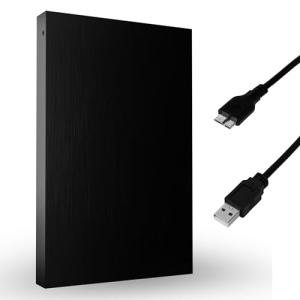
| Power Supply | Bus-powered, meaning it draws all power directly from the connected USB port of the host computer. | Maximizes portability and minimizes cable clutter. No external power adapter is needed, making it easy to use on the go. |
| Physical Form Factor | Compact, very lightweight plastic enclosure designed for easy portability. | The small size allows it to be easily stored in a laptop bag or desk drawer. However, the plastic shell demands careful handling due to the internal moving parts. |
| Compatibility | Universal plug-and-play capability across Windows and macOS without the need for additional drivers. | Simple setup is key for the target user. It’s ready to use out of the box on all major U.S. operating systems. |
| Rotational Speed | Standard 5400 Revolutions Per Minute (RPM) for portable hard drives. | This speed is a proven standard for portable HDDs, balancing adequate data access with the low power requirements of a USB port. |
| Use as Emergency Storage | Ideal for system recovery files, bootable OS images, or a segregated critical data backup. | The small, dedicated capacity makes it perfect for a single, crucial function like disaster recovery archives. |
1. Performance for Everyday Use
The Kosbees 500GB Portable External Hard Drive is an excellent performer for its class and intended use. Utilizing the USB 3.0 standard, it achieves real-world sequential transfer speeds in the 80– 100 MB/s range. This speed is significantly faster than older USB 2.0 drives and more than adequate for most users' needs.
When you're transferring a large folder of office documents, school assignments, or even a modest collection of MP3s, the process will feel very quick. While it won't break any speed records for massive video files, it will reliably and quickly transfer your everyday media and document files without undue waiting.
2. Durability Trade-offs and Best Practices
As a traditional hard disk drive, the Kosbees 500GB drive requires careful handling. The internal spinning platters are sensitive to physical shock, especially when the drive is actively connected and in use. You must be mindful not to drop it or jar it violently to avoid potential data corruption or failure.
To get the most reliability, you should use it primarily as a "cold storage" device—meaning you connect it only to perform your backup or transfer, and then immediately disconnect and safely store it. This minimizes the risk of damage compared to a drive that is constantly plugged in.
3. Simplicity and Power Draw
The primary benefit of this drive's design is its utter simplicity. It is bus-powered, requiring only a single USB cable connected to your computer. This eliminates the clutter of a bulky power adapter and makes the drive hassle-free to use on the go.
The plug-and-play nature means that anyone, regardless of technical ability, can use this drive immediately. It is a fantastic entry point for teaching basic data management and backup principles to a less experienced user or family member.
User Profiles
1. The Essential Document Backer-Upper
You are a general user who has a collection of extremely important files—financial documents, tax information, legal papers, and crucial passwords—that must be backed up and stored physically off your main computer. You need a dedicated, affordable volume for this single, critical purpose.
-
Use Case: You are performing your annual backup of all your financial and legal documents (totaling about 50GB) and need a reliable, small drive to store them in a fireproof safe.
-
The Fit: The 500GB capacity is more than enough for a dedicated document archive, and its low cost makes it a practical solution for a physical, off-site backup strategy. Its small size ensures it tucks away easily once the backup is complete.
2. The Multi-Device File Transferer
You frequently work across multiple computers (e.g., a desktop at home, a laptop for travel, and a friend's machine) and need a reliable, fast medium to move large files that are too big for email or cloud services.
-
Use Case: You need to move a 5GB batch of high-resolution photos and a 2GB video file from your desktop PC to your work laptop for a presentation the next morning.
-
The Fit: The USB 3.0 speed makes the file transfer quick and seamless. The 500GB capacity provides ample space for a rolling collection of files you are actively working on, acting as a high-capacity, durable alternative to carrying multiple smaller flash drives.
3. The Starter Console Gamer
You have recently purchased a used last-generation console (PS4 or Xbox One) and need a super-cheap way to immediately double your storage capacity for games. You are not concerned about the absolute fastest load times.
-
Use Case: Your new console is running low on space after downloading only a few games, and you need an inexpensive fix to allow you to download 5-10 more titles.
-
The Fit: The 500GB is a perfect, budget-friendly capacity boost for last-gen consoles, allowing you to install a significant number of additional games. The simple plug-and-play setup makes it an effortless solution for a beginner console user.
"Complementary HomeTechCorner Category Recommendations"
| Recommended Products | Why This Category Is Useful Specifically for This Product | Short Usage Scenario |
| Uninterruptible Power Supplies Ups | HDDs are very sensitive to power disruption, so a UPS protects the drive during critical read/write operations. | You are midway through a full system backup when the apartment complex loses power, but the UPS keeps your computer and the Kosbees drive safely running until the transfer is complete. |
| Usb C Hubs | Essential for connecting this USB-A-based drive to modern ultrabooks and MacBooks that are primarily USB-C. | You connect a small USB-C hub to your slim laptop, instantly giving you the necessary USB-A port to plug in your 500GB drive and begin your file transfer. |
| Electric Standing Desks | Helps establish an ergonomic workstation where the drive can be safely connected and managed without wires being snagged. | You raise your electric standing desk to your optimal working height and comfortably manage your file system, ensuring the drive sits safely on the desk surface. |
| Anti Fatigue Mats | Enhances comfort during the long periods of organization and data management often associated with external storage. | You stand comfortably on your anti-fatigue mat while you organize and move hundreds of files to your external drive for long-term storage. |
| Smart Desk Lamps | Provides targeted, adjustable lighting for the desktop area where the drive is connected, aiding in cable and port management. | You adjust your smart desk lamp to highlight the back of your PC tower, making it easier to plug the Kosbees drive into the correct high-speed USB 3.0 port. |