PRODUCT REVIEW
In-Depth U.S. Market Review
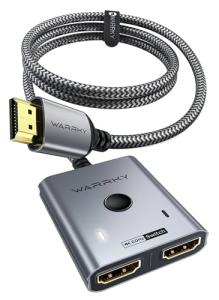
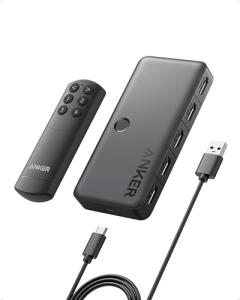
The Anker 4K HDMI Switcher - 2 Input, 1 Output steps into the U.S. accessories market with a focus on simplicity, portability, and guaranteed signal integrity—hallmarks of the Anker brand. This 2x1 switch is built for the user who values a clean, minimalist setup and primarily needs to switch between two high-resolution sources. It excels as a dedicated solution for a gamer with two consoles, or a remote worker who alternates between a work laptop and a home PC on a single 4 K monitor.
In contrast to bulkier 4-port switches, this unit is compact and often requires no external power, making it an excellent budget monitor choice and an ideal device for travel. Compared to basic, generic switches, you gain the confidence of the Anker brand's reputation for quality control and reliability, which is a major selling point for U.S. consumers concerned about video flickering or signal dropouts common with cheap alternatives.
Technical Analysis
| Specification | Detail & U.S. Context | Analysis |
| Configuration | 2-in, 1-out (2x1) HDMI Switcher | Simple, dedicated setup to manage two primary sources, minimizing signal loss. |
| Max Resolution Support | 4 K @60 Hz (HDMI 2.0 Bandwidth) | Sufficient for most U.S. 4K streaming and gaming (PS4 Pro, Xbox One X) but not 4 K @120 Hz . |
| HDR Passthrough | HDCP 2.2 and HDR 10 Support | Ensures compatibility with DRM-protected 4 K content and full color gamut from major streaming services. |
| Power Requirements | Bus-powered (No external power required for short cable runs) | A key feature for portability and a clean desktop setup; power is drawn from the connected HDMI source. |
| Switching Method | Manual Button on Unit | Simplest and most reliable switching method for two sources; no remote control needed. |
| Cable Length | Integrated, Short HDMI Output Cable | Reduces cable clutter and ensures optimal signal path to the display; ideal for connecting to a monitor. |
| Chassis/Build | Compact, Matte Finish Design | Aesthetically pleasing and easy to integrate into a modern, minimalist home office use environment. |
1. Signal Transmission and Bus Power
A significant technical feature of this Anker switch is its reliance on bus power—meaning it draws the necessary electrical current directly from the connected HDMI source device (like a laptop or console) through the HDMI cable itself. For its intended use with 4 K @60 Hz , this is a huge benefit for portability and a clean setup, as it eliminates the need for an external power brick.
However, you should note that this bus-powered design is typically limited to 4 K @60 Hz and shorter cable runs. If you use long or low-quality cables, or if your source device has weak HDMI power output, you may experience flickering, requiring you to look for a model with dedicated external power. For most desktop and small living room setups in the U.S., it performs reliably.
2. Physical Integration and Portability
The Anker 4K HDMI Switcher is deliberately compact, featuring a small, integrated HDMI output pigtail cable. This design is highly functional for desktop use where the switch needs to be placed right next to a monitor, reducing the mess of a separate, long output cable. Its small footprint and lack of a power cord make it an excellent portable monitors and travel accessory.
You can easily toss it into a laptop bag and use it to manage a projector and a laptop input during a presentation, or quickly switch between two devices on a hotel room TV. This simplicity and small size appeal directly to the U.S. commuter and remote worker looking for a fuss-free solution.
3. Resolution and Target Audience
With its maximum support for 4 K @60 Hz , this switch perfectly targets the vast majority of non-premium display users in the U.S. who own 4 K TVs or monitors that cap out at 60 Hz . It reliably passes through essential features like HDCP 2.2 (necessary for U.S. streaming DRM) and HDR 10 for rich visuals.
The manual push-button on the unit provides the most reliable source switching. Since there's only one button for two inputs, the operation is instant and intuitive, which is far less complex than managing an IR remote for a simple 2-source setup. This manual, direct control is favored by users who want absolute control over the input selection.
User Profiles
1. The Home Office Minimalist
You value a clean, clutter-free U.S. home office desk and use one high-resolution monitor for two distinct tasks: professional work and personal entertainment/gaming. You need a simple, reliable way to switch between them.
-
Use Case: You switch from your work docking station output to your home gaming PC's video card output multiple times a day with a single, immediate button press.
-
The Fit: The bus-powered 2x1 design is ideal for your minimalist aesthetic. It sits discreetly on your desk, requires no external power adapter, and the simple manual button is the quickest way to transition from your last work email to your first evening game.
2. The Traveling Presenter
You frequently travel for work across the U.S., carrying a work laptop and sometimes a presentation device (like an iPad or a dedicated small streaming box). You often have to connect to various conference room monitors or hotel TVs.
-
Use Case: You arrive in a client's conference room with a single, awkwardly placed HDMI cable and need to quickly switch between your laptop and your media player for a presentation.
-
The Fit: Its compactness and bus-powered operation make it highly portable. You can connect it in seconds and manage two sources efficiently, ensuring a seamless, professional transition between devices without having to fumble with power adapters or finding an extra outlet.
3. The Classic Console Collector
You own a mix of 4 K consoles like the PS4 Pro and a retro console with an HDMI converter, and you only have one convenient, high-quality HDMI port on your wall-mounted TV.
-
Use Case: You are playing a PS4 game but want to quickly swap to your Nintendo Switch for a quick session without changing the cable behind the TV.
-
The Fit: The switch provides a dedicated, reliable point of access for your devices. The 4K@60Hz support is perfect for these consoles, and the manual switching ensures that you are always in control of which device is active on the screen.
"Complementary HomeTechCorner Category Recommendations"
| Recommended Products | Why This Category Is Useful Specifically for This Product | Short Usage Scenario |
| Smart Docking Stations | To consolidate all your laptop's peripheral connections (including the HDMI output that goes into the switch) via a single USB-C cable. | You arrive at your desk and plug in one USB-C cable, which instantly connects your work laptop to power, peripherals, and the Anker switch for your monitor. |
| Cable Management For Entertainment Centers | To keep the short, integrated output cable and the two input cables neatly organized on a tight desktop or media shelf. | You use a small adhesive clip to secure the pigtail cable from the switch to the back of your monitor stand, preventing it from dangling. |
| Ergonomic Monitor Arms | To facilitate a clean desk aesthetic that perfectly complements the simplicity of the bus-powered Anker switch. | You clamp your monitor arm to the desk, creating space underneath, and place the tiny Anker switch neatly at the base of the arm for easy access. |
| Uninterruptible Power Supplies Ups | While the switch itself is bus-powered, a UPS provides clean power to the connected source devices, protecting them and thus ensuring the switch remains stable. | Your gaming PC, which is powering the switch, is protected by a UPS, preventing the screen from cutting out due to a momentary dip in household voltage. |