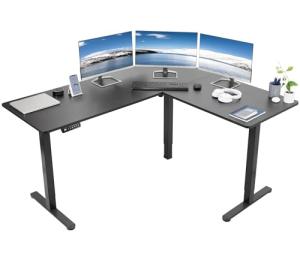
2. 🔌 Choosing Your System: Key Features and Compatibility
When selecting your ideal Electric Standing Desks , you must consider the number of motors, the physical structure for stability, and the communication protocol needed to integrate the desk into your smart office ecosystem.
Essential Variations and Motor Configurations
Electric Standing Desks are defined by the quality and redundancy of their motorized lifting system:
-
Single Motor Desks (Budget/Light Use):
-
Pros: Most affordable option and generally consumes slightly less standby power. Suitable for lighter loads (single monitor, laptop) and narrower desk tops.
-
Cons: Slower lift speeds, lower maximum load capacity, and may exhibit more wobble at maximum height compared to dual-motor systems.
-
US Lifestyle Context: Ideal for a student or a secondary workstation in a small urban apartment where space and budget are limited.
-
Dual Motor Desks (Performance/Professional Use):
-
Pros: Electric Standing Desks with dual motors offer significantly faster, smoother, and quieter height adjustments. They provide superior stability, a higher weight capacity (essential for multiple monitors and heavy desktop PCs), and a longer expected lifespan. They are the professional standard for reliable 24/7 Monitoring .
-
Cons: Higher initial cost and slightly higher peak power draw during movement.
-
US Lifestyle Context: Necessary for a financial trader or software developer working from home in Silicon Valley, requiring multiple heavy monitors and seamless, quick transitions between perfect sit and stand heights.
-
Frame Style (Two-Stage vs. Three-Stage):
-
Two-Stage: Two telescoping segments per leg. Offers a good height range but is limited on the low end, sometimes sitting too high for short users.
-
Three-Stage: Three telescoping segments per leg. Provides a wider height range, often allowing the desk to drop lower for ergonomic seating and extend higher for tall users. This versatility is crucial for maximum ergonomic benefit.
Compatibility Protocols
For seamless smart control and automated movement, Electric Standing Desks must be able to communicate with your other smart devices and applications.
-
Bluetooth/Proprietary App: Most Electric Standing Desks use a proprietary Bluetooth chip to communicate with a dedicated smartphone app. This allows you to control the height, set memory presets, and track usage history via Remote Access .
-
API Integration (IFTTT/Zapier): The highest-value desks offer an open Application Programming Interface (API) or integration via services like IFTTT. This is critical for automating height adjustments based on non-desk triggers (e.g., your calendar or smart watch).
-
Power Management: While in use, the motor draws peak power, but when stationary, the desk must minimize standby consumption. Look for desks with low standby draw (under 0.1W) to ensure maximum Energy Efficiency when the desk is not actively moving.
-
Controller Features: A quality hand controller usually includes a small digital display and 3 to 4 memory buttons, providing critical local access for quick height changes without needing the app.
3. 🛠️ Installation and Setup Walkthrough
Installing Electric Standing Desks is a manageable DIY project, primarily involving mechanical assembly of the frame and tabletop, followed by electrical wiring of the motors.
Pre-Installation Preparations
-
Clear Space: Ensure you have a large, clean area (like a carpeted garage or large room) to assemble the frame upside down before mounting the desktop.
-
Verify Components: Check that all leg columns, motors, crossbars, and the control box are present. Electric Standing Desks include many small screws and bolts that must be accounted for.
-
Cable Management Plan: Plan how you will manage the motor cables and the power cables for your computer, monitors, and peripherals. Proper cable management is crucial for safe movement and aesthetic appeal.
Installation Guide (Typical Dual-Motor Desk)
-
Assemble Frame: Attach the feet to the bottom of the leg columns. Connect the leg columns to the crossbars. Attach the entire frame assembly upside down to the underside of the desk top using the provided screws.
-
Wire the Motors: Connect the motor cables from each leg column to the central control box. Connect the control box to the keypad and the main power cable. Use the included cable ties to secure all motor cables to the frame, ensuring they won't snag during movement.
-
Flip and Power: With assistance, carefully flip the Electric Standing Desks right-side up. Plug the desk into a surge protector or a Smart Wall Outlet .
-
Calibration: Follow the manual's instructions to run the initial calibration routine (usually pressing and holding a specific button until the desk cycles to its lowest point). This sets the motor limits for safe, repeatable movement and ensures reliable 24/7 Monitoring .
-
Set Presets: Program your ideal sitting height and standing height into the memory presets using the keypad. Test the one-touch transition feature.
Troubleshooting Common Issues
-
Issue 1: Desk Stops Halfway and Displays an Error Code.
-
Issue 2: Wobble at Standing Height.
-
Resolution: This is usually due to loose frame connections or a poor floor surface. Tighten all screws connecting the crossbars and legs. If the floor is uneven, use the adjustable feet on the Electric Standing Desks to level the surface, ensuring maximum stability.
-
Issue 3: Remote Access (App Control) Disconnects Frequently.
4. Advanced Automation and Maximizing Value
The "smart" features of Electric Standing Desks enable automations that enforce healthy work habits, optimize power usage, and integrate with your schedule.
Powerful Automation Scenarios
-
Automated Posture Changes: You program a daily routine via a smartphone app: every hour, the Electric Standing Desks automatically transitions from sit height to stand height and sends a reminder notification. This enforcement of dynamic posture is key to maximizing health benefits and utilizing the desk's smart 24/7 Monitoring .
-
Energy Efficiency Shutdown: You integrate the desk with a Motion/Presence Sensor in your office. If the sensor detects no presence for 60 minutes, the desk sends a notification via Remote Access . After 90 minutes of inactivity, the smart power strip plugged into the desk automatically cuts power to all monitors and non-essential peripherals, eliminating phantom load and maximizing Energy Efficiency .
-
Focus Mode Integration: When you activate "Focus Mode" on your smart home control panel, the desk automatically moves to your preferred standing height. This movement visually and physically signals the start of focused work, while simultaneously activating the "do not disturb" feature on your phone.
Longevity & Maintenance
Electric Standing Desks are built for longevity, often rated for 10,000 cycles or more. To ensure smooth, long-term operation, avoid exceeding the desk's stated weight capacity. Regularly check the frame bolts for tightness. Keep the firmware updated via the app; updates often improve anti-collision sensitivity and motor performance, contributing to both safety and Energy Efficiency . Check the app's battery status (if applicable) and diagnostics often to ensure the system is performing optimally for reliable 24/7 Monitoring .
5. COMPLEMENTARY CATEGORY RECOMMENDATIONS (MANDATORY TABLE)
| Recommended Categories |
Why This Category Is Useful Specifically for This Product |
Short Usage Scenario |
| Motion Presence Sensors |
Sensors detect occupancy, triggering the desk's auto-shutoff routine to eliminate phantom load and boost Energy Efficiency . |
The motion sensor detects the user leaving the office, triggering the Electric Standing Desks shutdown sequence after 30 minutes. |
| Smart Power Strips |
These strips plug into the desk and control power to monitors/peripherals, allowing the desk's app to eliminate phantom load after hours. |
The desk detects inactivity and commands the smart power strip to cut power to the monitor and speakers. |
| Monitor Arms Stands |
Monitor arms attach directly to the desk, ensuring monitor height remains ergonomically correct during motorized sit-stand transitions. |
The user moves the desk to standing height, and the monitor arm keeps the screen at eye level automatically. |
| Smart Displays |
Displays provide a central visual hub for managing desk routines, showing scheduled move times, and controlling height via voice commands. |
Asking the smart display, "Move desk to Sit Height 2," triggers the movement via Remote Access . |
| Ergonomic Tools |
Anti-fatigue mats are essential complements, providing comfort and support during the standing portion of the desk's use. |
Stepping onto the anti-fatigue mat when the desk moves to the standing memory preset. |
| Voice Assistants |
Voice control allows for hands-free height adjustment, which is quick and simple, eliminating the need to use the keypad or app. |
Saying, "Hey Assistant, stand up the desk," triggers the motorized movement. |
| Smart Home Control |
Used to link the desk's height status to other smart home routines (e.g., changing lighting or music based on working/leaving). |
Setting the desk to standing height triggers the overhead office light to switch from cool to warm white. |
| Smart Wall Outlets |
These provide the power source and can be used for secondary power management and status checks. |
Plugging the desk into a Smart Wall Outlet to ensure 24/7 Monitoring of its power consumption. |
Electric Standing Desks are an indispensable investment in your long-term health and professional Energy Efficiency . They offer superior ergonomics, reliable motorized control, and seamless smart integration, providing verifiable benefits that far surpass static alternatives. By leveraging the automated posture changes and Remote Access controls, you maintain continuous 24/7 Monitoring of your work routine and energy usage. Choose the dynamic flexibility of an Electric Standing Desks today and transform your home office into an intelligent, health-focused workspace.