2. 🔌 Choosing Your System: Key Features and Compatibility
Selecting the right Motion/Presence Sensors requires understanding the nuanced differences between motion and presence, and ensuring the device communicates effectively within your home’s network.
Essential Variations and Form Factors
The distinction between the sensor types defines their primary utility within your US home environment:
-
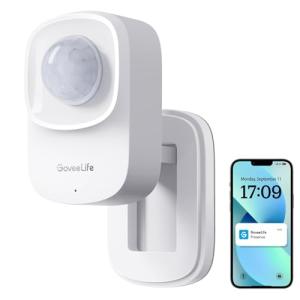
PIR Motion Sensors (Security & Pass-Through Areas):
-
Pros: These are the most common and budget-friendly. They excel at quickly detecting movement across long distances (up to 25 feet) and feature long battery life due to their low-power consumption. They are the ideal choice for security-focused perimeter monitoring or automating lights in hallways and stairwells.
-
Cons: They struggle to detect subtle movement. If you are sitting still at a desk or reading a book, the lights may turn off, requiring you to wave your arms. They are prone to false positives from sunlight or sudden temperature changes.
-
US Lifestyle Context: Perfect for a long driveway or a main corridor in a large suburban home in Texas, where quick activation of a light path or triggering a home security siren is required.
-
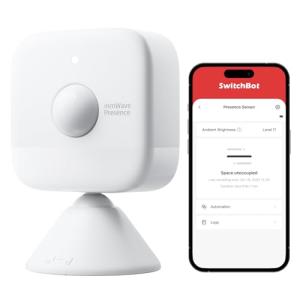
High-Frequency Radar/Ultrasonic Presence Sensors (Comfort & Energy Efficiency):
-
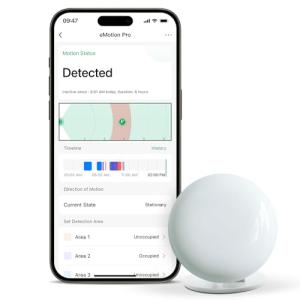
Pros: These advanced sensors use highly sensitive micro-movement detection, solving the common "smart lights turning off" problem. They can detect occupancy even if you are perfectly still, ensuring lights and climate control remain on until the room is genuinely vacated. They are highly effective for Energy Efficiency in occupied areas.
-
Cons: They are significantly more expensive and often require a USB power supply (Plug-in) or frequent battery changes due to the continuous monitoring required. They may also have a smaller, more localized field of view.
-
US Lifestyle Context: Essential for a home office in California or a workshop where you need reliable, continuous lighting and ventilation without interruptions while you are deeply focused on a task.
-
Outdoor/Weather-Rated Motion Sensors:
-
Pros: Designed with enhanced ingress protection (IP ratings) and greater sensitivity customization to handle temperature extremes and wind/rain. They are robust and reliable for perimeter security and outdoor 24/7 Monitoring .
-
Cons: Often pricier and require careful mounting to avoid detecting neighboring property activity or passing cars.
-
US Lifestyle Context: Ideal for monitoring the backyard patio area or the side yard of a Seattle home, triggering security lights and enabling Remote Access camera recording upon unexpected nighttime activity.
Compatibility Protocols
A strong network is the backbone of reliable motion detection. You need low-latency communication for instant reaction times.
-
Z-Wave and Zigbee: These mesh network standards are perfectly suited for Motion/Presence Sensors . Their low power draw is critical for battery life, and the mesh structure ensures reliable signaling around corners and through walls, offering crucial 24/7 Monitoring stability. Most security systems mandate the use of these protocols.
-
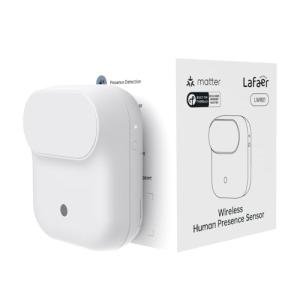
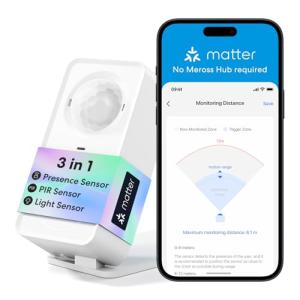
Thread and Matter: The newest standard offers a modernized, quick, and robust mesh network. Choosing Matter-compatible Motion/Presence Sensors guarantees easier setup and better interoperability with major platforms (e.g., Apple, Google), future-proofing your automations and simplifying Remote Access .
-
Wi-Fi: Wi-Fi sensors are easy to deploy, but they generally have poor battery life and can introduce a slight delay (latency) in triggering events. They are best reserved for plug-in or permanently powered outdoor units.
3. 🛠️ Installation and Setup Walkthrough
Proper placement and sensitivity calibration are the two most critical factors when setting up your Motion/Presence Sensors to maximize their effectiveness in your home.
Pre-Installation Preparations
-
Map the Coverage: Decide what you want to achieve (security vs. automation). For security, sensors should face paths of ingress (hallways, stairs). For lighting automation, sensors should cover high-traffic areas without blind spots.
-
Avoid HVAC Vents and Windows: PIR sensors are triggered by heat changes. Placing a sensor directly opposite a window receiving direct sunlight or near an HVAC vent will cause constant false alarms and severely impact its Energy Efficiency performance.
-
Pet Immunity: If you have pets (common in US homes), mount PIR sensors higher up (6-8 feet) and angle them down, or choose a model specifically rated for pet immunity (often filtering movement below 40 lbs) to prevent false alerts.
Installation Guide (Typical Battery-Powered Sensor)
-
Pairing: Insert the batteries and begin the pairing process in your smart hub’s app. The device will be discovered via its protocol (Z-Wave, Zigbee, etc.).
-
Temporary Placement: Use painter’s tape to temporarily mount the sensor in the desired location.
-
Walk Test: Walk through the sensor's field of view in different directions (e.g., walking toward it, walking across it) while checking the app or the sensor's LED indicator. This confirms the desired detection zone is covered. Adjust the angle until the coverage is precise.
-
Final Mount: Once satisfied with the coverage, clean the surface and use the provided adhesive strips or screws for a final, permanent mount.
-
Calibration: Access the sensor settings in the app. Adjust the sensitivity (if available) and set the re-trigger time (the period the sensor ignores subsequent motion after the initial trigger) to 30-60 seconds for optimal lighting control and Energy Efficiency .
Troubleshooting Common Issues
-
Issue 1: False Triggers (Phantom Events).
-
Resolution: The sensor is likely detecting heat changes from outside its intended area. Remount the sensor away from vents, reflective surfaces, or direct sunlight. If outdoor, reduce the sensitivity in the app.
-
Issue 2: Lights Turn Off While I Am Still in the Room.
-
Resolution: This is the classic PIR limitation. If you are sitting still, the heat profile isn't changing enough. Increase the sensitivity, or better yet, replace the PIR sensor with a true Motion/Presence Sensor (radar) for that room to ensure genuine 24/7 Monitoring of occupancy.
-
Issue 3: Slow Response Time (Latency).
-
Resolution: This is a network issue, typically with Wi-Fi or a weak Z-Wave/Zigbee mesh. For security events requiring instant reaction, ensure the sensor has a strong, close path back to the hub. Add a hardwired repeater device nearby to improve reliability for Remote Access and automation.
4. Advanced Automation and Maximizing Value
The true smart home experience is realized when you utilize Motion/Presence Sensors as intelligent triggers for complex, multi-device routines that enhance security and drive real Energy Efficiency .
Powerful Automation Scenarios
-
The Contextual Security Tripwire (Security & Monitoring): In your suburban home in Atlanta, you set an automation: "If the Garage Motion/Presence Sensors detect motion after 11:00 PM AND the security system is Armed Away ," the system will not just send a Remote Access alert, but also flash the outdoor smart lights red and trigger the security camera to begin recording at maximum resolution. This targeted, time-based 24/7 Monitoring prevents false daytime alerts but provides maximum response at night.
-
Intelligent HVAC Zone Control (Energy Efficiency): Your family frequently forgets to close the door to the unused media room. Motion/Presence Sensors in that room are set to detect occupancy. If no presence is detected for 30 minutes, an automation commands your smart vent system to close the vents in that room, redirecting conditioned air to occupied zones. This drastically increases your HVAC system's efficiency and lowers your monthly utility bills.
-
The 'Welcome Home' Sequence: A motion sensor positioned near your front door (paired with a geo-fence) detects your arrival at night. The sensor triggers a routine that turns on the entryway light, unlocks the smart lock, and initiates your favorite background music on a smart speaker. The sensor then maintains the lights for 5 minutes after detecting motion stops, providing seamless comfort.
Longevity & Maintenance
Maintaining your Motion/Presence Sensors ensures continuous, reliable automation. Replace batteries annually, or immediately upon the low battery warning. Consistent battery health is essential for timely 24/7 Monitoring alerts. Clean the sensor's lens or face gently with a microfiber cloth every six months; dust accumulation can dull the PIR lens and decrease sensitivity, leading to inconsistent performance. Finally, stay engaged with firmware updates. Manufacturers often release updates that improve pet immunity, reduce false triggers, and enhance the low-power consumption algorithms for improved Energy Efficiency .
5. COMPLEMENTARY CATEGORY RECOMMENDATIONS
| Recommended Categories |
Why This Category Is Useful Specifically for This Product |
Short Usage Scenario |
| Smart Lighting |
Motion/Presence Sensors are the core trigger for lighting automation, ensuring lights turn on exactly when a room is entered and off when it's vacated, saving energy. |
Entering the laundry room triggers the smart bulb to instantly turn on to full brightness. |
| Alarm Systems |
The sensors act as the primary internal detection layer for the alarm system, providing critical activity data for immediate security response and 24/7 Monitoring . |
The sensor detects motion in the living room while the alarm is armed, triggering the security siren and calling the monitoring center. |
| Security Cams |
A sensor trigger can activate a camera to begin recording, providing contextual video verification for security alerts received via Remote Access . |
Motion is detected on the front porch, causing the nearby outdoor security cam to start a video recording. |
| Thermostats |
Occupancy data from the sensors is essential for advanced smart thermostats and vents to direct heating or cooling only to actively used rooms, driving Energy Efficiency . |
The hallway sensor registers no motion for 30 minutes, prompting the smart thermostat to adjust the temperature back 5 degrees. |
| Smart Wall Switches |
Sensors can be automated to turn on smart switches (for fans or non-smart lighting) automatically when presence is detected in a room. |
Presence is detected in the bathroom, automatically turning on the smart exhaust fan switch. |
| Central Hubs |
A central hub is necessary for the sensors to communicate across protocols (Z-Wave/Zigbee/Thread), process complex automation logic, and enable secure Remote Access . |
The hub receives the motion signal, processes the time-of-day condition, and executes the appropriate routine. |
| Voice Assistants |
Voice assistants can be programmed to announce which Motion/Presence Sensors have been triggered, providing audible security alerts and 24/7 Monitoring status updates. |
When motion is detected in the garage, the kitchen smart speaker announces, "Motion detected in the garage." |
| Smart Locks |
Sensors can be used to initiate an "Away" scene after they stop detecting presence, leading to an automatic lock-down of the house. |
No presence is detected in the house for 5 minutes, automatically locking the smart deadbolt. |
Motion/Presence Sensors are the hidden intelligence that truly brings your home to life. They move your security and comfort from reactive to proactive, ensuring lights are on when you need them and off when you don't, while keeping watch with comprehensive 24/7 Monitoring . This investment in awareness delivers instant safety alerts via Remote Access and measurable savings through tangible Energy Efficiency . Make the smart choice today to equip your property with Motion/Presence Sensors and let your home finally anticipate your needs.