PRODUCT REVIEW
In-Depth U.S. Market Review
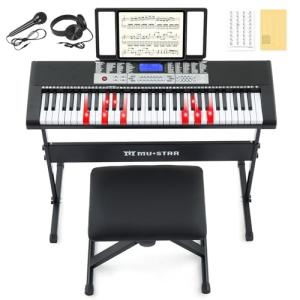
The Smart 59-Key Piano Keyboard with LED Lights occupies a specific and growing niche in the U.S. educational and hobbyist music market. It's designed not for professional performance, but as a dedicated, interactive learning tool. By integrating a physically marked keyboard with smart, light-up key technology, it aims to drastically lower the entry barrier for absolute beginners seeking a simple piano keyboard for learning . This product leverages the power of visual cues and gamification through a companion app to make learning feel immediate and rewarding.
It’s directly competing against traditional beginner keyboards and subscription-based online courses. Compared to standard 61-key non-smart keyboards, you are trading a few keys for a revolutionary guided learning experience that uses lights and the app to practically force you into the correct finger placement. While more expensive than a basic acoustic keyboard, the upfront cost includes the technology that replaces weeks of frustrating, unguided practice, making it a compelling, modern choice for the U.S. consumer interested in a smart keyboard for beginners .
Technical Analysis
| Specification | Detail & U.S. Context | Analysis |
| Key Count | 59 Full-Size Keys | This is slightly less than the standard 61, but it covers a sufficient range (nearly five octaves) for the vast majority of beginner-level songs and lessons popular in the U.S. curriculum. |
| Key Illumination | Multi-Color LED Lights per Key | The core smart feature; lights guide the user to the next key to be played, eliminating the need to constantly look at sheet music or a screen. |
| Connectivity | Bluetooth MIDI, USB MIDI | Bluetooth provides cable-free connectivity to a learning app on a phone or tablet, while USB ensures compatibility with desktop DAWs and dedicated music software. |
| Learning App | Proprietary Companion App (iOS/Android) | Essential for the 'smart' experience, providing lessons, sheet music, tutorials, and gamified feedback in a structured, accessible format for U.S. beginners. |
| Pedal Support | Sustain Pedal Input (Included/Optional) | Essential for realistic piano playing, allowing the user to sustain notes for a more authentic musical performance, even at the beginner level. |
| Sound Generation | Built-in Speakers and Headphone Jack | The internal speakers allow for immediate playback, while the headphone jack is crucial for late-night practice in a typical U.S. apartment or shared living space. |
| Key Type | Velocity-Sensitive Keys (Usually not fully weighted) | Provides a more expressive playing experience than non-sensitive keys, allowing dynamic control over the volume, a key element in musical expression. |
1. Light-Up Learning and App Integration
The most crucial feature of this smart piano keyboard is its unique LED light system. Each of the 59 keys illuminates individually, acting as an immediate, visual instructor. When you begin a lesson on the companion app, the lights guide you directly to the correct notes and timing, allowing you to focus on finger placement and rhythm instead of struggling to read sheet music.
This visual feedback loop is extremely powerful for U.S. learners who prefer an immediate, hands-on learning style. The proprietary app is the brain of the operation, offering structured courses, a library of popular songs, and MIDI recording capabilities. The app provides instant scoring and progress tracking, adding a gamified element to practice that keeps beginners motivated.
2. MIDI Connectivity and Versatility
Despite its focus on beginner education, the keyboard is a fully functional MIDI controller. It features both wireless Bluetooth MIDI and a wired USB MIDI connection. The Bluetooth link is perfect for a clean setup with an iPad or tablet, making it easy to practice on the couch or at a kitchen table.
The USB connection, however, ensures it can be used for more serious music creation later on. If you outgrow the learning app, you can seamlessly transition to using the keyboard with professional Digital Audio Workstations (DAWs) like GarageBand or Logic Pro on a Mac or PC. This versatility ensures the Smart 59-Key Piano Keyboard remains useful long after the initial learning phase.
3. Key Feel, Acoustics, and Practice Environment
The keyboard features 59 full-size, velocity-sensitive keys. While not fully weighted like a professional digital piano, the velocity sensitivity is a key step up from basic plastic keyboards, allowing the player to control the volume and emotion of their playing by how hard they strike the key. This is a vital feature for developing musicality in the early stages.
For acoustics, the unit includes decent built-in speakers for casual practice. More importantly for shared living spaces in the U.S., it has a standard headphone jack. This allows for completely silent practice, letting you focus intensely without disturbing roommates or neighbors. The included sustain pedal input further enhances the experience, allowing you to play pieces with greater realism and expression.
User Profiles
1. The Adult Beginner
You’ve always wanted to learn piano but felt overwhelmed by traditional lessons, sheet music, and the commitment of time. You need a modern, engaging, and self-paced way to learn that fits into a busy work schedule. You value immediate feedback and easy setup.
-
Use Case: You want to learn to play popular songs right away, without the frustration of complex theory. Your goal is to be able to sit down and play a recognizable tune in the first week.
-
The Fit: The light-up keys of the Smart 59-Key Piano Keyboard are your perfect instructor. They remove the barrier of reading music, allowing you to focus on muscle memory. The app’s structured lessons let you learn at your own pace, turning your piano learning into a satisfying, gamified experience after dinner.
2. The Tech-Savvy Parent
You are looking for a fun, educational activity for your child (or yourself) that encourages musical development using technology they already love. You want a product that feels less like homework and more like an interactive game.
-
Use Case: You need an introductory musical instrument that uses a tablet or phone to deliver lessons and tracks progress automatically, blending the digital and physical worlds of learning.
-
The Fit: The Bluetooth connectivity and companion app make this a compelling choice. You can set your child up with the tablet, and the light-up keys will intuitively guide them through lessons. The progress tracking makes it easy for you to monitor their development and celebrate milestones, all without the need for a private tutor.
3. The Digital Music Creator
You are a young producer or beatmaker who primarily works "in the box" (on a computer) but needs a physical keyboard for recording melody lines and chord progressions into your DAW. You appreciate smart features but mainly need a compact, expressive MIDI controller.
-
Use Case: You require a physical keyboard that can accurately send MIDI data to your laptop via USB or Bluetooth for quick, hands-on melodic input into your music production software.
-
The Fit: The keyboard functions flawlessly as a 59-key velocity-sensitive MIDI controller. You can use the full-size keys for natural playing, and the compact size makes it a great addition to a smaller home studio desk setup. Its core function as a MIDI controller ensures its continued utility even after the learning features have served their purpose.
"Complementary HomeTechCorner Category Recommendations"
| Recommended Products | Why This Category Is Useful Specifically for This Product | Short Usage Scenario |
| Smart Monitor Light Bars | To provide proper, non-glare illumination for the keys and any accompanying sheet music or practice books. | You are practicing late at night and turn on your monitor light bar to perfectly illuminate the keyboard and your music stand without casting glare on your screen. |
| Smart Docking Stations | For a neat and powerful way to connect the keyboard, headphones, and power to your primary laptop or computer simultaneously. | You plug in one USB-C cable to your laptop, instantly connecting the smart keyboard for MIDI input, your headphones, and an external monitor for the sheet music display. |
| Ergonomic Executive Chairs | To ensure you maintain proper posture and comfort during long, focused practice sessions at the keyboard. | You adjust the lumbar support on your ergonomic chair before a two-hour practice session, ensuring you remain comfortable and focused on your finger positioning. |
| Laptop Stands | To hold your laptop or tablet at a comfortable viewing height while following the light-up lessons on the keyboard. | You prop your iPad on an adjustable stand to align the sheet music in the app perfectly with your sight line while your hands are on the light-up keys. |
| Portable Power Stations | To ensure continuous power for the keyboard and your tablet, allowing you to practice anywhere in the house or yard without worrying about outlets. | You take the smart keyboard out onto your deck on a nice day and plug both the keyboard and your tablet into a portable power station for an outdoor practice session. |