PRODUCT REVIEW
In-Depth U.S. Market Review
The 192 PCS Cable Management Kit for Home Tech is designed to be the ultimate, all-in-one solution for tackling a houseful of tangled wires, making it perfect for first-time buyers or renters looking to undertake a comprehensive home organization project . This is not a single product but a highly versatile collection of various tools, typically including ties, sleeves, clips, and mounts, ensuring you have the right tool for every single cable management job, from securing wires behind a TV to tidying up a desk.
Its competitiveness comes from its sheer volume and variety. Compared to buying individual packs of ties, sleeves, or clips, this kit provides a cost-effective, ready-to-use arsenal. For those seeking easy cable management with maximum flexibility, the abundance of included adhesive mounts and ties means you can organize multiple rooms and different types of tech simultaneously.
Technical Analysis
| Specification | Detail & U.S. Context | Analysis |
| Component Variety | High-count mix of: Velcro cable ties, zip ties, adhesive cable clips, cable sleeves, and mounting bases. | The mix ensures capability for both temporary bundling (Velcro ties) and permanent routing (adhesive clips), covering all U.S. home tech scenarios. |
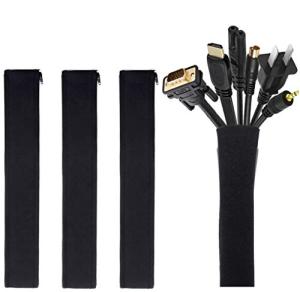
| Cable Sleeves | Often includes 1-2 neoprene or zippered sleeves. | Necessary for consolidating thick bundles of cables behind a desk or A/V unit, providing a uniform, professional look. |
| Adhesive Elements | Utilizes 3M or equivalent strong adhesive on clips and mounting bases. | The quality of the adhesive is paramount for the long-term effectiveness of the fixed components on different surfaces like wood, metal, and drywall. |
| Tie Types | Includes both reusable Hook-and-Loop (Velcro) ties and disposable Nylon Zip Ties. | The dual tie system offers flexibility: Velcro for frequently changed cables and zip ties for permanent, tight bundles (like inside a PC case). |
| Specialized Clips | Often includes desk cable drops, wire anchors, and earbud wraps. | These small, specialized items address micro-management issues, like keeping a phone cable from falling off a nightstand. |
1. Versatility and Material Cross-Functionality
The core strength of the 192 PCS Cable Management Kit is its incredible range of components. You’re not limited to one type of organization. You can use a neoprene sleeve for the main cluster of monitor cables, use reusable Velcro ties to bundle power bricks, and employ the adhesive clips to secure and route individual wires along the underside of a desk. This all-in-one approach is essential for a large-scale home tech organization project.
The inclusion of both reusable Velcro ties and permanent zip ties means you can differentiate between components you access often (like charger cables) and those that need to be permanently secured (like internal computer wiring).
2. Adhesion and Anchoring System
A significant portion of the kit is dedicated to adhesive-backed anchors and clips. These are the tools that allow you to route cables along non-obvious paths, such as up the back of a desk leg or inside a cabinet. The reliability of the adhesive is crucial, especially for mounting cable tie bases that will hold the weight of several wires.
The various clip sizes, from single-wire drops to larger mounting squares, ensure that you can anchor almost any cable, regardless of its diameter, to any clean, flat surface in your workspace. This feature is key to achieving a truly zero-clutter aesthetic.
3. Addressing Both Macro and Micro Needs
This kit is designed to handle both macro and micro cable organization . For macro needs, the included sleeves and longer Velcro straps can tame the "spaghetti monster" behind a large TV or computer. These components address the bulk and aesthetic challenge.
For micro needs, the numerous small, individual clips and self-adhesive cable drops prevent individual wires (like charging cables or thin peripheral wires) from disappearing or cluttering the desktop surface. This level of detail ensures no wire is left behind in your clean desk setup goal.
User Profiles
1. The Full Home Setup Organizer
You have just moved into a new home or apartment and need to set up several tech areas: the main office, a bedroom charging station, and an entertainment center. You need a complete, one-time purchase.
-
Use Case: You need to bundle large TV power cables, anchor Ethernet wires along the office baseboard, and secure all the charging cables on two nightstands, all with a single set of supplies.
-
The Fit: The sheer quantity and variety in the 192 PCS kit mean you can tackle all these distinct projects in different rooms without running out of materials, offering a high-value, comprehensive solution.
2. The DIY PC Builder/Hobbyist
You enjoy building or upgrading your own desktop computers, but you also want to manage your external peripherals neatly. You need ties for internal wiring and external anchors for desk accessories.
-
Use Case: You need zip ties for neatly managing the power supply and internal fan cables inside your PC case for optimal airflow, and adhesive clips to route your external monitor and keyboard cables on your desk.
-
The Fit: The combination of nylon zip ties (for internal, permanent bundling) and external adhesive anchors/Velcro (for flexible desk runs) makes this kit perfect for both the inner and outer workings of a high-performance gaming PC setup .
3. The Classroom/Small Business Manager
You manage a small office or learning center with multiple workstations, each requiring power, network, and peripheral cables that are easily knocked loose or create tripping hazards.
-
Use Case: You need to secure the numerous wires under a set of four shared desks, ensuring the power and Ethernet cables are locked in place and trip-proof.
-
The Fit: The high number of mounting bases and clips is ideal for mass-deployment across multiple workstations. You can secure critical cables under every desk, drastically improving safety and reducing accidental disconnections in a busy environment.
"Complementary HomeTechCorner Category Recommendations"
| Recommended Products | Why This Category Is Useful Specifically for This Product | Short Usage Scenario |
| Under Desk Cable Management Tray | This kit's components are perfect for tidying the last few cables that run into or out of a main under-desk tray. | You use the main cable tray to hold the power strips, and then use the kit's zip ties and clips to neatly guide the remaining cables from the tray to your laptop dock. |
| Electric Standing Desks | The flexibility of the ties and sleeves is essential for managing the dynamic movement of a standing desk. | You use the Velcro ties from the kit to bundle the moving cables under your standing desk and secure them loosely to the desk frame, ensuring they don't snag as the desk moves up and down. |
| Power Backup Solutions | Use the ties and clips to neatly secure the numerous power cables that lead from devices to a large UPS unit. | The cables for your monitor, PC, and network gear all plug into a UPS; you use the kit's ties to create a single, neat bundle of all those power cords, making the area less of a mess. |
| Gaming Headsets | Use the small clips from the kit to secure the often long and annoying cable of a wired gaming headset to the desk or monitor. | You use a small adhesive clip on the side of your monitor stand to hold the coiled cable of your wired gaming headset, ensuring it's always ready to grab and doesn't clutter your desktop. |
| Smart Power Strips | Use the adhesive bases to mount a smart power strip under your desk and the ties to secure all the input/output cables. | You mount the smart strip under your desk with a large adhesive base, and then use the Velcro ties to bundle all the connected cables for a tidy and smart power source. |
| Custom Chair Components Casters Arms | Secure wires that run near your office chair to prevent them from getting tangled in the casters or moving parts. | You use a flat adhesive clip to secure the power cable along the desk leg, keeping it well out of the way of your rolling office chair's wheels and preventing damage. |