Creating an ergonomic workspace often begins with the physical placement of the keyboard and mouse. A high-quality keyboard tray helps reduce strain on the wrists and shoulders by allowing for a more natural typing angle. These tools transform a standard desk into a customized workstation, providing extra surface area while improving overall posture and comfort during long hours of computer use.
Keyboard Trays
Optimize your workspace for comfort and productivity with our versatile keyboard trays
Product List
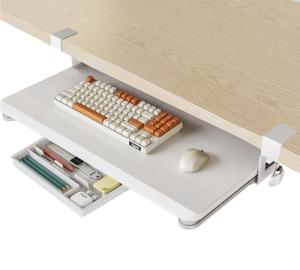
Fenge Under Desk Keyboard Tray
Fenge
Product Review Score
4.8 out of 5 stars
206 reviews$52.99 $47.49
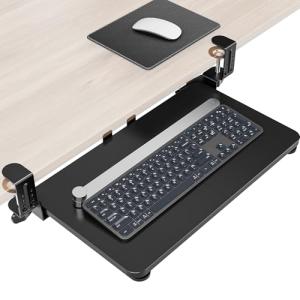
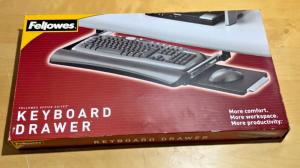
Fellowes Keyboard Drawer Adjustable
Fellowes
Product Review Score
4.22 out of 5 stars
219 reviews$35.99
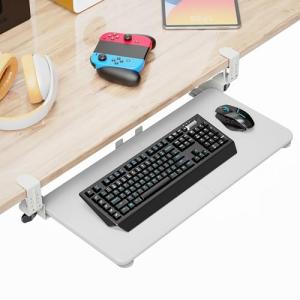
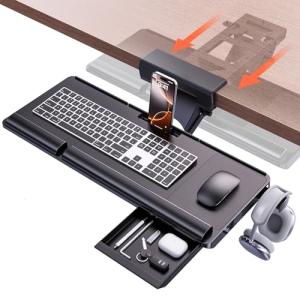
Ergonomic Under-Desk Keyboard Tray
Klearlook Maximized Clarity!
Product Review Score
4.46 out of 5 stars
16 reviews$106.99
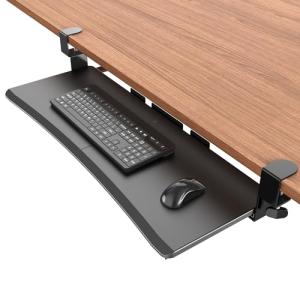
C-Clip Under Desk Keyboard Tray
Upgravity
Product Review Score
4.1 out of 5 stars
178 reviews$49.99 $39.99
💡 Practical Usage Tips
- Measure the distance between the C-CLAMP mounts carefully to ensure they do not hit the desk legs or underlying support beams.
- Applying a small amount of white lithium grease to the BALL-BEARING SLIDES every few months will keep the movement smooth and quiet.
- Adjust the tray height so that the elbows remain at a ninety-degree angle, which helps prevent long-term fatigue in the forearms and wrists.
- Check the tension of the adjustment bolts periodically to ensure the tray stays locked in your preferred position during heavy typing sessions.
✅ What to Look For & ⚠️ What to Avoid
Must-Haves:
- A wide platform is essential for those who use a full-sized keyboard and a mouse on the same level, such as the VIVO Extra Long tray.
- Look for NEGATIVE TILT capabilities that allow the keyboard to angle downward, which is the most ergonomic position for the hands.
- Steel construction in the mounting brackets provides the necessary rigidity to prevent the tray from bouncing while typing.
Red Flags:
- Avoid trays with a very low STATIC LOAD CAPACITY if you tend to rest your arms heavily on the desk surface.
- Be cautious of single-clamp designs on very wide trays, as these often suffer from lateral wobbling or tilting over time.
- Watch out for "tool-free" designs that use low-quality plastic parts, as these may crack under the pressure of daily adjustments.
🛡️ Build Quality & Performance
The durability of a keyboard tray is largely defined by its frame material and the quality of its sliding tracks. Most reliable models utilize COLD-ROLLED STEEL for the chassis, which ensures the unit remains level and stable even after months of constant sliding. The platform itself is often made from a WOOD COMPOSITE or MDF, providing a solid surface that resists flexing.
Performance is measured by how well the tray handles the vibrations of active typing. While clamp-on models like the Huanuo Drawer-Integrated tray offer the convenience of no-drill installation, they must be tightened properly to avoid "drifting" during use. Permanent screw-mount versions generally offer the highest stability and the widest range of motion, including full 360-DEGREE SWIVEL options for users who frequently change their sitting position.
🏆 Top Recommendations
| Best For | Model Name | Key Feature | Why It Wins |
|---|---|---|---|
| Maximum Space | VIVO Extra Long | 34-inch Width | Fits keyboard and large mouse pad together. |
| Best Ergonomics | Huanuo 360 Adjustable | Negative Tilt | Superior wrist positioning and 3D movement. |
| Storage Needs | Huanuo Drawer Tray | Built-in Drawer | Adds organization for small desk tools. |
| Thick Desks | Xinlei Large Clamp | 3.2" Clamp Range | Works with much thicker desk surfaces. |
❓ Frequently Asked Questions
Will a clamp-on tray damage my desk surface?
Most modern clamp-on trays include protective padding on the pressure points. This prevents scratching or marring of the desk material, though it is important to ensure the clamps are seated flatly against the surface.
What is negative tilt and why do I need it?
Negative tilt allows the keyboard to angle away from the user. This position is highly recommended by ergonomists because it helps keep the wrists in a neutral, straight position, reducing the risk of repetitive strain injuries.
Can I install these trays on a desk with a metal support beam?
This depends on the placement of the beam. Many C-clamp trays require several inches of flat space near the edge. If the support beam is right at the edge, the clamp may not be able to grip the desk securely. Always measure the distance from the desk edge to any obstructions before purchasing.