PRODUCT REVIEW
In-Depth U.S. Market Review
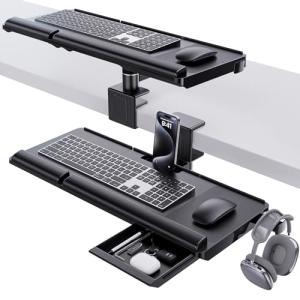
The Klearlook Upgraded Ergonomic Keyboard Tray Under Desk is positioned as an essential productivity accessory, particularly appealing to the growing U.S. home office and dedicated budget gamer markets. Its value proposition is simple: reclaim valuable desk surface area while improving typing ergonomics. This makes it an ideal choice for compact apartments or multi-purpose workspaces where every inch matters.
This keyboard tray competes primarily in the mid-range mechanical mount category, where ease of installation and stability are key buying factors. The included wrist rest and a small storage drawer elevate it slightly above the most basic sliding trays. Compared to heavier, more expensive ergonomic arms, you get a fixed height and simpler mechanism, but a much lower barrier to entry both in cost and installation complexity. It's a great under desk keyboard platform for home office use looking for a quick fix.
Technical Analysis
| Specification | Detail & U.S. Context | Analysis |
| Dimensions | 24.4" (W) x 10" (D) tray surface; suitable for standard full-size keyboards. | Offers a good width for a full-size keyboard and mouse pad combo, addressing the common U.S. preference for full 104-key layouts. |
| Adjustment | Slides in and out on metal rails; fixed height. | The sliding mechanism is smooth and reliable for daily use. Lack of height/tilt adjustment is a notable compromise for deep ergonomic personalization. |
| Mounting | Screw-in clamps (hardware included) for sturdy installation. | Requires drilling into the desk underside. This provides superior stability over C-clamp models but limits portability and requires a permanent commitment. |
| Ergonomics | Integrated wrist rest (non-removable). | The added wrist rest provides immediate comfort and reduces strain, a key feature for long remote work sessions. The fixed nature might not suit all wrist positions. |
| Material | MDF wood/particle board platform with metal rails. | Standard, budget-friendly construction. While durable enough for keyboards, it's not as premium or heavy-duty as solid wood or metal options. |
| Extra Feature | Small, built-in storage drawer. | A subtle but useful addition for storing pens, flash drives, or small desk clutter, adding to the overall desk-tidying appeal. |
1. Tray Surface and Ergonomic Design
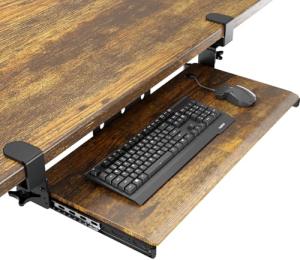
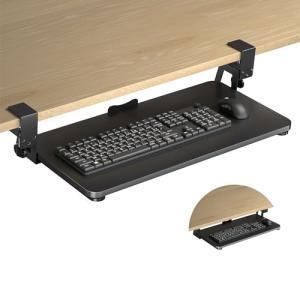
The main tray surface measures 24.4" by 10", providing ample real estate for most standard full-size keyboards and a mouse or a tenkeyless setup with extra mousing room. The key ergonomic benefit is bringing the keyboard down and forward, encouraging a more neutral shoulder and wrist position.
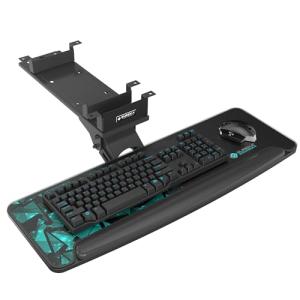
The integrated wrist rest is a key component of the Klearlook Upgraded Ergonomic Keyboard Tray. It is designed to provide continuous support, which is critical for preventing Carpal Tunnel Syndrome during extended typing sessions. While fixed, its placement is designed to work well for most users utilizing a standard office chair height.
2. Physical Structure and Installation Requirements
This model uses a classic screw-in mounting system with durable metal rails, ensuring that once it's installed, the platform is rock-solid and wobble-free. This permanence is a trade-off: it requires you to drill pilot holes into the underside of your desk, which is a consideration for renters or expensive furniture.
The construction materials—primarily MDF or particle board for the platform and metal for the rails—keep the unit lightweight yet sufficiently strong for its intended purpose. The overall footprint is designed to be minimal, ensuring that the sliding platform tucks away cleanly when not in use, maximizing the usable space of your primary desktop.
3. Storage and Overall Convenience Features
A unique feature of this product is the inclusion of a small, integrated storage drawer, a great addition for a tidy workspace. This space is perfect for stowing away essentials like charging cables, desk tools, or small personal items, preventing them from cluttering the main desk surface.
The smooth-gliding metal rails allow for easy, one-handed operation, letting you pull the tray out when needed and push it back in quickly. This ease of use, combined with the integrated ergonomic supports, positions it as a practical, convenience-focused upgrade over simply placing your peripherals on the desk.
User Profiles
1. Remote Work Power User
You spend 8+ hours a day typing, coding, or managing documents, and you've noticed shoulder tension or wrist discomfort. Your primary desk is an expensive, full-size executive model, but you need a solution to achieve an ergonomically sound typing height without replacing your whole setup.
-
Use Case: You are moving from a standard desk height (29"-30") to a more ideal typing height (25"-26") to maintain proper elbow angles while working. The integrated wrist rest is a non-negotiable feature for you.
-
The Fit: This Klearlook Keyboard Tray is a fantastic fit because the screw-in design provides superior stability for heavy, consistent use, unlike clamp models that can shift. It helps you get your keyboard to the correct ergonomic height, and the small drawer means your desk stays clear for monitor stands and paperwork.
2. Budget Gamer
You have a compact gaming battle station in a bedroom or small den, and your massive monitor and speakers are taking up too much room on your desk. You need to free up surface space for your mousepad and energy drink while keeping your mechanical keyboard in a comfortable position for late-night sessions.
-
Use Case: You use a full-size mechanical keyboard and want to quickly tuck it away after a gaming session or when you need to spread out homework. The system needs to be sturdy enough to handle fast-paced, aggressive keyboard inputs without rocking.
-
The Fit: The 24.4" platform accommodates your gear well, and the screw-in mounting ensures it won't wobble when you slam the keys during a tense match. While it lacks some of the fine-tuning of dedicated gaming setups, it’s a cost-effective way to get the keyboard lower and improve comfort for long hours.
3. Small-Space Maximizer
Your desk is a multi-functional surface in a small apartment—it's your office during the day, your dining table in the evening, and a crafting station on weekends. Clutter is your enemy, and fast, complete desk clearance is your goal.
-
Use Case: You need to completely clear your main desk surface in under a minute to transition to another activity, but you don't want to store your keyboard and mouse in a drawer or on a shelf.
-
The Fit: The sliding mechanism is your best friend here; the entire keyboard and mouse disappear instantly beneath the desk, transitioning your workspace seamlessly. The 10" depth is a perfect fit for a low-profile keyboard and mouse.
"Complementary HomeTechCorner Category Recommendations"
| Recommended Products | Why This Category Is Useful Specifically for This Product | Short Usage Scenario |
| Electric Desks | Pairing a fixed keyboard tray with an electric desk gives you flexible seated heights while maintaining the best ergonomic keyboard position. | You just finished a long typing session sitting down and, with the press of a button, you raise your desk, keeping your keyboard accessible on the tray for a quick standing check of your email. |
| Monitor Arms Stands | By moving your keyboard off the desk surface, you create the necessary room to install a proper monitor arm, completing your ergonomic workspace setup. | You finally got the keyboard low and out of the way, so now you mount your monitor on an arm to perfectly align the top of the screen with your eye level. |
| Ergonomic Monitor Arms | An ergonomic arm is vital since the fixed height of the keyboard tray means you must adjust your monitor and chair precisely to match. | You find the perfect seated height using the keyboard tray and then use your monitor arm to smoothly position your screen to prevent neck strain. |
| Usb C Hubs | With your main peripherals tucked under the desk, you can use a USB-C hub to easily connect your mouse and keyboard, managing cables efficiently. | You need to connect your work laptop to the peripherals, so you simply plug one USB-C cable from the hub, which is neatly routed near the tray, into your computer. |