PRODUCT REVIEW
In-Depth U.S. Market Review
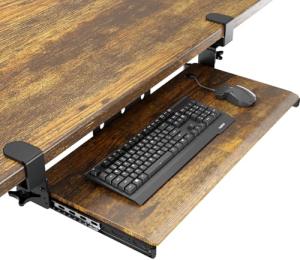
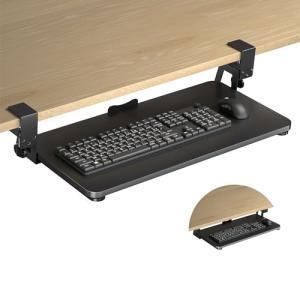
The UPGRAVITY Large Keyboard Tray Under Desk is a direct and competitive solution for the modern U.S. worker needing improved ergonomics without desk modification. It's squarely targeted at the booming no-drill keyboard tray segment, which appeals to renters, students, and owners of valuable desks who don't want to use screws. This large keyboard tray excels in offering a substantial surface area combined with a simple, yet robust, C-clamp mounting system.
The product's size—a generous 31.2 inches wide including the clamps—makes it a viable ergonomic keyboard solution for almost any setup, supporting both a full-sized keyboard and a large mouse pad simultaneously. Compared to screw-in models, the C-clamp system means instant, reversible installation. Compared to smaller clamp-on trays, the UPGRAVITY Large Keyboard Tray offers significantly more desk area, making it a better fit for power users who rely on full-sized equipment.
Technical Analysis
| Specification | Detail & U.S. Context | Analysis |
| Tray Dimensions | 27" (W) x 11.81" (D) usable surface. Total width is 31.2" with clamps. | The nearly 12-inch depth is key, comfortably accommodating larger, ergonomic keyboards and providing substantial wrist support space. |
| Mounting | Sturdy C-Clamp mount system with anti-slip pads. | This no-drill mounting is highly valued in the U.S. market for its flexibility, reversibility, and ease of installation on desks up to 1.57" thick. |
| Movement | Smooth ball-bearing slide rails for easy push/pull operation. | Ensures quiet and effortless adjustment, crucial for focused work environments like quiet home offices. The tray locks firmly in place when fully extended. |
| Ergonomics | Low-profile placement; lowers the keyboard for better elbow angle. | While it lacks adjustable tilt, the fixed lower height is inherently more ergonomic than typing directly on the desk surface, reducing shoulder hunching. |
| Construction | Steel clamps and rails paired with a high-density black platform. | Provides excellent stability and a weight capacity that can handle heavy peripherals, a necessary feature for large mechanical keyboards. |
| Reach/Extension | Slides out nearly the full depth of the tray. | A deep extension ensures that the keyboard is positioned optimally for comfortable typing, not too close to the desk edge. |
1. No-Drill Mounting and Stability
The defining feature of this UPGRAVITY keyboard tray is its robust C-clamp mounting system. These clamps use a padded design to firmly grip the desk edge without causing any damage, making it the best slide-out keyboard drawer for renters or owners of expensive desks.
While often perceived as less stable than screw-in models, this system is engineered with sturdier steel clamps to eliminate wobble. This rigidity ensures that even during intense typing or gaming sessions, the tray remains locked in place, maintaining a stable platform.
2. Extra-Large Surface Area
At 27 inches wide, the usable surface of this tray is significantly larger than many competitors, catering to the American preference for expansive desk setups. This means you can comfortably fit a full 104-key keyboard and have plenty of room for a high-DPI gaming mouse or a large mouse pad.
The depth of nearly 12 inches is equally important, allowing you to position the keyboard farther back on the tray. This leaves valuable space in the front for your wrists to rest on the tray surface itself, inherently adding an ergonomic benefit even without a dedicated wrist rest.
3. Smooth Operation and Desk Compatibility
The tray utilizes high-quality, smooth ball-bearing slide rails, ensuring silent and easy movement. This is a crucial element for a seamless user experience, allowing you to quickly tuck the tray away to free up desk space or pull it out to begin work.
The C-clip design is highly versatile, fitting most standard desks up to 1.57 inches thick. However, users with desks featuring thick front support bars or unique edge designs must measure carefully, as the clamps require clear access to the desk edge.
User Profiles
1. Modular Desk User
You frequently rearrange your home office or move your desk between different rooms in your house, so a permanent, screw-in solution is a non-starter. You need a reliable, large keyboard tray that can be installed and uninstalled in minutes without leaving a mark.
-
Use Case: You just upgraded to a new electric standing desk and want to test various setups before committing to screw holes. You need a large surface area for a full-size mechanical keyboard and a large gaming mousepad.
-
The Fit: The sturdy C-clip mount system of the UPGRAVITY Large Keyboard Tray is your perfect solution. It offers the stability of a bolted system with the flexibility of a clamp design, and the extra large size means no compromises on peripheral space.
2. Desk Aesthetics Purist
You own a high-end, solid wood or glass-top desk that you consider a piece of furniture and absolutely refuse to drill holes into. You seek a discrete, non-damaging solution to improve your typing posture.
-
Use Case: You need to lower your keyboard to reduce shoulder strain but maintain the pristine look of your expensive desktop surface. The tray needs to be nearly invisible when pushed in.
-
The Fit: This is the ideal large keyboard tray under desk for you. The clamps are padded and don't damage the finish, and the entire unit slides neatly under the desk, completely preserving the visual integrity of your workspace.
3. Heavy-Duty Equipment User
You use a heavy, full-size mechanical keyboard with custom keycaps and a large, soft-surface mouse pad, all of which require a very sturdy platform that won't wobble or flex under aggressive use. You need a tray that feels like a natural extension of the desk.
-
Use Case: You spend your day inputting data or competitive online gaming, demanding a rock-solid platform for fast, forceful keystrokes and rapid mouse movements.
-
The Fit: The combination of the solid steel C-clamps and the large, robust platform provides the necessary stability. The sheer size of the 27" x 11.81" tray means your entire setup, including the mouse, has a stable, unified surface to operate on.
"Complementary HomeTechCorner Category Recommendations"
| Recommended Products | Why This Category Is Useful Specifically for This Product | Short Usage Scenario |
| Laptop Stands | Since the keyboard is lowered, you need a laptop stand to bring your screen up to eye level and complete the ergonomic triangle. | After installing the keyboard tray, you elevate your laptop with a stand so you're not straining your neck looking down at the screen while you type. |
| Ergonomic Monitor Arms | An ergonomic arm is crucial to precisely position your monitor since the keyboard tray’s height is fixed relative to your desk. | You adjust your keyboard tray to the perfect height, then use your monitor arm to easily fine-tune the screen position for perfect eye alignment. |
| Electric Standing Desks | Using a sit/stand desk with a keyboard tray allows you to maintain the proper ergonomic typing height whether you're sitting or standing. | You switch from sitting to standing, and because the keyboard tray moves with the electric desk, your wrists remain at the comfortable, optimized typing angle. |
| Usb C Hubs | A USB-C hub can be mounted under the desk to manage all your keyboard and mouse cables, keeping the desktop and the tray itself completely clean. | You route the keyboard and mouse cables neatly under the desk and connect them to a hub, leaving only one main cable to plug into your computer. |