PRODUCT REVIEW
In-Depth U.S. Market Review
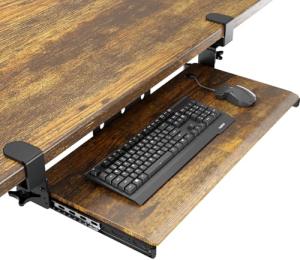
The VIVO Large Keyboard Tray Under Desk Pull Out with Extra Sturdy C Clamp Mount System, 27 (33 Including Clamps) x 11 Inch Slide-Out Platform Computer Drawer for Typing, Black, MOUNT-KB05E is a serious contender in the U.S. desk accessory market, specifically targeting users with larger keyboards or those prioritizing maximum mousing space. VIVO is a well-regarded brand known for its commitment to desk and monitor mounting solutions, positioning this tray as a reliable, heavy-duty alternative to budget-tier offerings.
This model is a strong choice for the home office use demographic, especially those seeking a durable, long-term solution without drilling into their expensive desks. The focus on an "Extra Sturdy C Clamp Mount System" signals superior stability and higher weight capacity than typical clamp-on models.
Compared to standard 25 or 26 -inch clamp-on trays, this VIVO MOUNT-KB05E offers a 27 × 11 inch platform, giving you two extra inches of width. This small increase is significant, often being the difference between comfortably fitting a full-size keyboard and mouse pad versus having a cramped setup. The extended platform surface provides a truly spacious and stable area for intense typing, making it a great ergonomic keyboard tray solution.
Technical Analysis
| Specification | Detail & U.S. Context | Analysis |
| Platform Dimensions (W x D) | 2 7 ′′ × 1 1 ′′ (Tray only) | One of the widest clamp-on options available, ideal for larger or mechanical keyboards prevalent in the U.S. PC market. |
| Total Width (Including Clamps) | 3 3 ′′ | Crucial measurement; requires a large span of free space under the desk for installation. |
| Mounting Mechanism | Heavy-Duty C-Clamps (Extra Sturdy System) | Provides enhanced weight support and reduced lateral wobble, superior to basic C-clamp designs for a more stable typing experience. |
| Material | High-Grade Steel Clamps and Metal Slide Rails, Particle Board Platform | The emphasis on steel components suggests a higher build quality and greater overall durability than all-plastic alternatives. |
| Ergonomic Drop | Positions keyboard typically 4-5 inches below the desk surface. | Essential for proper posture, aligning with professional ergonomic standards popular in U.S. corporate and remote work environments. |
| Installation | Non-Drill Clamp-On System | Highly preferred by U.S. renters and those with high-value furniture; setup time is minimal. |
| Weight Capacity | Not explicitly listed, but the "Extra Sturdy" system suggests higher load limits than competitors. | Confidence in resting arms, heavy keyboards, and accessories without worrying about the tray bowing or failing. |
1. Large Platform Design and Workspace Utility
The 27 -inch width of the VIVO Slide-Out Platform Computer Drawer for Typing is its most compelling feature. This extra space makes a world of difference for users with large accessories or for those who prefer to keep their mouse far from the keyboard. It solves the common problem where a standard tray feels restrictive.
You can comfortably place a full-size ergonomic keyboard and still have ample room for a large gaming or design mouse pad. This generous dimension ensures your entire hand and forearm can rest on the surface, supporting the weight and reducing wrist strain. It's a key feature for a comfortable, all-day Remote Work Power User experience.
2. Extra Sturdy C-Clamp System and Build Quality
The core of the VIVO MOUNT-KB05E's value is the "Extra Sturdy C Clamp Mount System." This isn't just a marketing phrase; it points to reinforced clamp arms and more robust materials used in the mounting hardware. For you, this translates directly into minimal to zero tray wobble during aggressive typing or fast mouse movements.
The steel construction of the slide rails and clamps provides superior stability and longevity compared to lighter-duty aluminum or plastic. This commitment to structural integrity allows you to apply force to the tray without deflection, giving you the feel of a permanent, fixed drawer, all while enjoying the convenience of a non-permanent, clamp-on installation.
3. Installation Ease and Desktop Clearance
As a clamp-on model, the installation process is straightforward and tool-free, making it an excellent budget monitor choice for quick ergonomic upgrades. You simply attach the clamps to the tray, adjust the depth, and tighten them onto your desk edge. The total 33 -inch width is the major consideration you need to check.
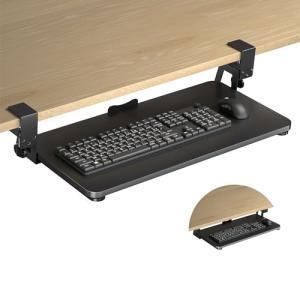
You must ensure your desk has a minimum of 33 inches of free space underneath, clear of any support beams or drawers, for the clamps to attach properly. Once installed, the tray easily slides completely out of sight, freeing up your main desktop surface for other activities like writing or using a laptop.
User Profiles
1. Peripheral Enthusiast
You use high-end, large peripherals, such as a full-size mechanical keyboard with a dedicated number pad and an ergonomic mouse with a large mouse pad. Your current desktop feels cluttered and your typing position is too high.
-
Use Case: You need a tray that is wide enough to house all your premium gear comfortably, providing a rock-solid, low-profile surface that won't impede the performance of your mechanical keyboard.
-
The Fit: The VIVO's 27 -inch width is the ideal solution, providing that crucial extra space to accommodate your full setup without sacrificing stability, thanks to the heavy-duty clamp system.
2. Desk Protector/Renter
You own an expensive solid wood desk or rent an apartment and are strictly forbidden from drilling or making any permanent modifications to your furniture.
-
Use Case: You require an ergonomic upgrade that is 100% non-invasive, easy to remove, and will not cause any surface damage to your desk.
-
The Fit: This tray’s clamp-on system is fully non-drilling. The heavy-duty clamps ensure a secure, damage-free grip, giving you the stability of a permanent mount without any of the risks.
3. Data Entry Specialist
Your job involves many hours of continuous, fast typing and numeric entry, requiring an optimized typing position to prevent long-term wrist and shoulder strain.
-
Use Case: You need the keyboard positioned below your elbow height for proper wrist alignment. Stability and a smooth slide are paramount to maintain your workflow without distraction.
-
The Fit: The excellent depth and drop of the tray facilitate the correct ergonomic position, and the "Extra Sturdy" clamps ensure zero wobble, allowing you to focus on high-speed data entry without the distraction of a bouncing tray.
"Complementary HomeTechCorner Category Recommendations"
| Recommended Products | Why This Category Is Useful Specifically for This Product | Short Usage Scenario |
| Ergonomic Mice Keyboards | A well-positioned tray is only half the battle; the input devices themselves must also promote a healthy wrist angle. | After installing the tray, you realize your standard keyboard still causes some wrist strain, so you decide to upgrade to a split ergonomic keyboard to maximize the comfort of your new low typing position. |
| Laptop Stands | If you use a laptop with this tray, you'll need to elevate the laptop's screen to eye level to complete the ergonomic setup. | You pull out your new keyboard tray, and suddenly the laptop screen is too low, so you prop it up on a sleek stand to align the screen with your gaze, creating a perfect ergonomic triangle. |
| Desk Accessories Mats Drawers | Utilizing the under-desk space effectively requires other accessories to manage clutter and increase functional surface area. | You are looking for a small, clip-on headset holder to keep your gaming headset off the desk and right next to the tray for easy access during breaks. |
| Electric Desks | Pairing a manual tray with a motorized desk offers the most flexible sit-stand experience. | You adjust your standing desk to your ideal height and then quickly realize you need to pull your keyboard tray out to a slightly lower position for the most comfortable standing-typing angle. |