

PRODUCT REVIEW
In-Depth U.S. Market Review
The Google Nest Thermostat, in its Charcoal iteration, is designed to be the definitive budget-friendly smart thermostat for the U.S. market, focusing on simplified installation, energy-saving features, and deep integration with the Google Assistant ecosystem. Positioned below the premium Nest Learning Thermostat, this model targets consumers who want smart climate control without the higher upfront cost, making it highly competitive against entry-level models from ecobee and Honeywell.
Its main appeal lies in its clean, modern design and its use of the Savings Finder feature, which actively looks for ways to tweak your schedule for efficiency. Compared to the more expensive 3rd-Gen Nest Learning Thermostat, you lose the learning algorithm that automatically builds a schedule and the Farsight feature, but you gain a simpler, sensor-free physical design and a lower price point. This makes the Google Nest Thermostat a superb programmable Wi-Fi thermostat for the mass market, particularly for apartment owners or those prioritizing the Google smart home experience.
Technical Analysis
| Specification | Detail & U.S. Context | Analysis |
| Control Interface | Touch Bar/Side Swipe | Intuitive control via the side of the unit, moving away from the classic rotating ring of the Learning model. Maintains a sleek, modern aesthetic. |
| Compatibility | Standard 24V HVAC Systems | Compatible with most forced-air, heat pump, and conventional heating/cooling systems common in U.S. homes (up to Y1, G, C, O/B, W1, R). |
| Wi-Fi | 802.11 b/g/n (2.4 GHz) | Standard connectivity. Requires a stable 2.4GHz Wi-Fi signal. Essential for remote control, updates, and Google Home integration. |
| Power | C-Wire Recommended (Optional) | While it can attempt to "power-steal" from the HVAC system on some setups, a C-wire is highly recommended for reliable operation, especially in U.S. multi-stage systems. |
| Key Feature | Savings Finder | Software feature that suggests minor schedule adjustments to save energy. A core value proposition for the energy-conscious U.S. consumer. |
| Sensors | Temperature, Humidity, Proximity/Ambient Light | Internal sensors manage the immediate area's climate. Lacks compatibility with external Nest Temperature Sensors (unlike the Learning model). |
| Ecosystem | Google Home App Required | Deep integration into the Google Home ecosystem for all programming, remote control, and voice interaction via Google Assistant. |
1. Simplified Control and Aesthetic Design
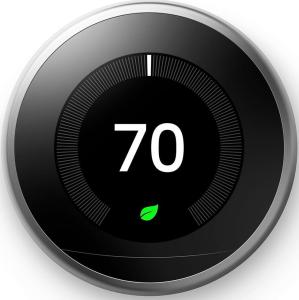
The Google Nest Thermostat distinguishes itself visually with a clean, mirror-like face and a side-mounted touch bar for adjustments. You are trading the tactile, satisfying rotation of the classic Nest ring for a modern, minimalist swipe interface. This design choice results in a slimmer, less obtrusive device that blends easily into any wall and is popular with design-conscious U.S. homeowners.
This simplification extends to its internal operation; it is a schedule-based, programmable Wi-Fi thermostat . It relies on your manually set schedules and the intelligence of the Savings Finder, rather than the complex 'learning' algorithms of the more expensive model.
2. Power Requirements and U.S. Wiring Context
While Google markets this unit as often C-wire optional, for reliable, long-term performance with U.S. HVAC systems, especially those with multi-stage heating or cooling, a dedicated C-wire (common wire) is strongly recommended. Without it, the thermostat must 'power-steal,' which can cause issues like system short-cycling or offline events.
If your home lacks a C-wire, you may need to purchase and install a C-wire adapter (sold separately) to ensure the uninterrupted operation of the Wi-Fi and the internal battery backup. This is a crucial consideration for the DIY smart thermostat installer .
3. Deep Google Ecosystem Integration
This thermostat is the optimal choice if you are heavily invested in the Google Home ecosystem. The entire setup, scheduling, and control are handled through the Google Home app, not the legacy Nest app. This streamlines your smart home interface, putting climate control alongside your smart speakers and displays.
You get seamless voice control via Google Assistant for setting temperatures, checking humidity, or adjusting your schedule. However, unlike some competitors, its reliance on the Google Home app means less native, out-of-the-box integration with competing smart home platforms like Apple HomeKit.
User Profiles
1. The Google Ecosystem Homeowner
You have multiple Google Assistant devices—Nest Hubs, Minis, and smart speakers—and you want your thermostat to be a seamless, native part of that infrastructure. You prioritize simplicity and integrated voice control.
-
Use Case: You are upstairs in the bedroom and use a voice command ("Hey Google, set the temperature to 72 degrees") to adjust the Nest Thermostat downstairs. You also use the Google Home app for all your automations and remote control.
-
The Fit: This thermostat is the most cohesive experience for a Google-centric home. The control is centralized in the Google Home app, avoiding the need to jump to a separate manufacturer's application for climate control.
2. The Budget-Conscious Energy Saver
You want to upgrade from a basic programmable thermostat to a smart model primarily to reduce your utility bills, but you don't want to spend hundreds of dollars upfront. You are willing to input a schedule manually.
-
Use Case: You use the Savings Finder feature, which intelligently suggests pushing your heating start time back by 15 minutes in the morning. This minor adjustment is automatically implemented and helps you save energy over time, all visible in the monthly Home Report.
-
The Fit: The lower price point combined with the core energy-saving features like Savings Finder and remote scheduling makes this an excellent entry-level smart thermostat that quickly pays for itself in reduced energy costs.
3. The Minimalist Designer
You value a clean, uncluttered, and modern aesthetic in your home. You appreciate technology that blends into the background, and you prefer a simple, swipe-based interface over a rotating dial.
-
Use Case: You appreciate the simple, Charcoal-colored display that looks like a piece of modern art on your wall. You use the touch bar for quick, temporary adjustments but primarily rely on your pre-set schedule to manage the house climate.
-
The Fit: The sleek, low-profile design of this modern Wi-Fi thermostat is perfect for matching contemporary interior design styles, offering smart control without the look of a bulky, traditional interface.
"Complementary HomeTechCorner Category Recommendations"
| Recommended Products | Why This Category Is Useful Specifically for This Product | Short Usage Scenario |
| Voice Assistants | To enable hands-free temperature adjustments from anywhere in the room without having to walk over to the physical thermostat. | You are cooking in the kitchen and say, "Hey Google, raise the temperature by two degrees" to your nearby Nest Mini, and the change is instantly registered on the thermostat. |
| Smart Displays | To provide a visual dashboard for climate control, allowing you to view and adjust the temperature using a touchscreen interface. | You use your Nest Hub Max on the counter to check the indoor temperature, adjust the schedule, and see the energy-saving history graphs. |
| Contact Sensors | To create simple automations that adjust the heating/cooling when a window or door is left open, preventing energy waste. | You open your bedroom window on a cool day, and a contact sensor detects the opening, automatically pausing the heat cycle on the Nest Thermostat. |
| Energy Monitoring Smart Plugs | To control secondary heating or cooling elements (like space heaters or portable fans) based on the Nest Thermostat's temperature reading and your schedule. | The living room temperature drops below 68°F; a routine is triggered to turn on the space heater plugged into the smart plug until the room hits 70°F. |
| Smart Power | To provide a dedicated C-wire adapter or power supply to ensure reliable, continuous power to the Wi-Fi module of the C-wire optional thermostat. | After a few unreliable moments, you install a dedicated C-wire power supply to guarantee your Nest Thermostat stays online and never has to "power-steal" from your HVAC system. |