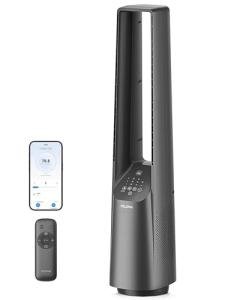
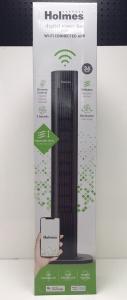
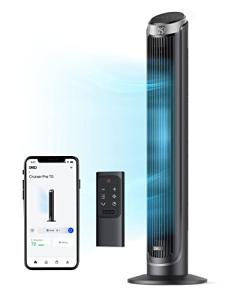
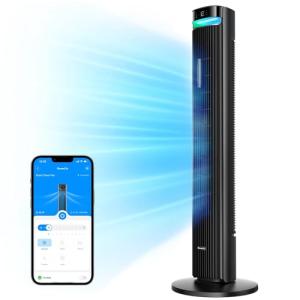
PRODUCT REVIEW: GoveeLife Black Tower Fan for Bedroom
In-Depth U.S. Market Review
The GoveeLife Black Tower Fan for Bedroom, 36" Smart Floor Fan with App/Voice Control, Temperature Sensor, 5 Modes 8 Speeds (25ft/s), 29dB Quiet Oscillating Fan for Office, 24H Timer, Auto Cooling is a prime example of a traditional household appliance updated for the modern U.S. Smart Home . It is positioned in the market as a high-value, feature-rich tower fan that prioritizes quiet operation and seamless smart integration via Wi-Fi and voice control.
The GoveeLife fan competes directly with other premium smart fans by offering a robust feature set, including an integrated temperature sensor and auto-cooling modes, all managed through a user-friendly app. Compared to a standard, non-smart tower fan, you get advanced automation, precise speed control (8 speeds), and a significantly quieter experience (down to 29dB), making it an ideal choice for the Bedroom or quiet home Office environment.
Technical Analysis
| Specification | Detail & U.S. Context | Analysis |
| Connectivity/Control | Wi-Fi & Bluetooth, App/Voice Control (Alexa/Google) | Essential for smart home integration, allowing for hands-free operation and remote control from anywhere in the home. |
| Noise Level | Down to 29dB (Quiet Operation) | Highly competitive noise level, making it one of the quietest fans in its class, perfectly suited for the Bedroom environment. |
| Fan Speeds/Modes | 8 Speeds, 5 Modes (e.g., Sleep, Auto, Nature) | Provides highly granular control over airflow, allowing the user to precisely tailor the cooling experience to the exact need. |
| Airflow Speed | Up to 25ft/s Air Velocity | Ensures effective air circulation, capable of cooling a medium-to-large sized U.S. room efficiently. |
| Height/Design | 36" Tower Fan, Slim Black Design | The height provides good air distribution across a bed or office desk, and the sleek design fits modern interior aesthetics. |
| Integrated Sensor | Temperature Sensor with Auto Cooling Mode | Allows the fan to automatically adjust speed based on room temperature, removing the need for constant manual adjustment. |
| Oscillation | Wide-Angle Oscillation (Angle not specified) | Necessary for distributing cool air evenly across a larger space like a living room or a long office. |
1. Smart Integration and Automation for Office Use
The Wi-Fi and voice control capabilities are the core of this Smart Floor Fan . Integration with platforms like Alexa and Google Assistant allows for sophisticated, hands-free automation. You don't have to get out of bed or stop typing to change the speed.
Crucially, the integrated Temperature Sensor enables the Auto Cooling Mode . This turns the fan into a smart climate appliance: it automatically increases the speed when the room gets too warm, providing dynamic cooling and consistent comfort for your home Office environment without manual intervention.
2. Quiet Operation and Sleep Mode for the Bedroom
The noise level, peaking at just 29dB in its lowest settings, is a primary selling point for the Tower Fan for Bedroom profile. This low-decibel operation ensures that the white noise is unobtrusive, supporting, rather than disrupting, sleep.
The inclusion of specific modes, such as the Sleep Mode , optimizes the fan's operation for nighttime. This typically involves a gradual reduction in fan speed over the course of the night, further ensuring a quiet and comfortable sleeping environment without unnecessary noise or temperature fluctuations.
3. Airflow, Speed, and Directional Control
With 8 Speeds and 5 Modes , the GoveeLife fan offers a level of control far surpassing typical three-speed fans. This precise speed tuning allows you to find the exact "sweet spot" for airflow, whether you need a gentle breeze or a powerful stream of air (up to 25 ft/s ).
The oscillation function is essential for larger U.S. rooms. Tower fans are generally effective at air distribution, and the slim, vertical design ensures the air stream is spread vertically, cooling a wider area than a traditional pedestal fan.
User Profiles
1. The Light Sleeper/Bedroom Optimizer
You are highly sensitive to noise and temperature changes, and you use a fan primarily for quiet air circulation and white noise, not just high-powered cooling. You value smart controls for hands-free adjustment.
-
Use Case: You use the voice assistant to turn the fan on from your bed, setting it to Sleep Mode . You rely on the low 29 dB operation to provide a soothing ambient noise without disrupting your sleep.
-
The Fit: The ultra-quiet operation and the granular 8-speed control make this fan an excellent choice for a dedicated Tower Fan for Bedroom . The smart features allow you to adjust the speed without getting out from under the covers.
2. The Connected Home Power User
You have a fully integrated smart home and want a fan that can be linked to your existing ecosystem, allowing for complex, multi-device automation routines.
-
Use Case: You link the fan's power and speed to an air quality monitor (via your smart home hub). When the room's CO2 level rises, the fan automatically turns on at a medium speed to increase air circulation and exchange.
-
The Fit: The robust Wi-Fi connectivity and App/Voice Control ensure that the GoveeLife Smart Floor Fan can become an active participant in your home's complex automation scenarios, moving beyond simple on/off control.
3. The All-Day Remote Worker
You spend your entire workday in a home office, where comfort and a non-distracting environment are essential for productivity. You need reliable, automated, and quiet climate control.
-
Use Case: You leave the fan in Auto Cooling Mode . As the afternoon sun warms your office, the fan automatically increases from speed 2 to speed 4 based on its internal temperature sensor, maintaining a comfortable temperature without you having to touch it.
-
The Fit: The intelligent Auto Cooling feature and the quiet operation are perfectly suited for the home Office environment, allowing you to maintain focus while ensuring you stay cool and comfortable throughout the workday.
"Complementary HomeTechCorner Category Recommendations"
| Recommended Products | Why This Category Is Useful Specifically for This Product | Short Usage Scenario |
| Smart Desk Lamps | Smart lighting can be used to indicate the fan's current mode or temperature status from across the room. | You set your smart desk lamp to turn blue when the fan's integrated sensor detects the room temperature has dropped below 7 2 ∘ F . |
| Smart Wall Switches 192 | Using a smart switch for the overhead light provides voice control consistency with the fan's voice control. | You use a simple voice command, "Alexa, turn on the fan and the light," simultaneously activating both devices upon entering the room. |
| Wireless Programmable Buttons | A physical button can be set up as a simple, no-app, no-voice control to cycle through the fan's modes. | You stick a programmable button on your nightstand; pressing it once cycles the fan from 'Off' to 'Sleep' mode before you fall asleep. |
| Learning Thermostats | Integration with a smart thermostat allows for the fan to be used as part of a whole-home cooling strategy. | Your learning thermostat detects that the living room is 7 8 ∘ F and automatically turns on the smart tower fan to assist the main AC unit. |