2. 🔌 Choosing Your System: Key Features and Compatibility
When selecting your Wireless Sirens/Panic Buttons , you must focus on the power source and sound intensity of the siren, and the portability and trigger method of the panic button for your specific security needs.
Essential Variations and Security Placement
Wireless Sirens/Panic Buttons come in two distinct component variations, each serving a different, vital security function in a US home:
-
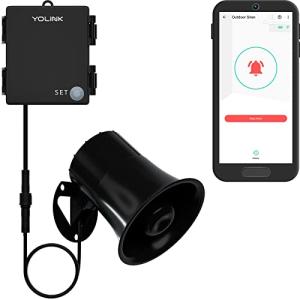
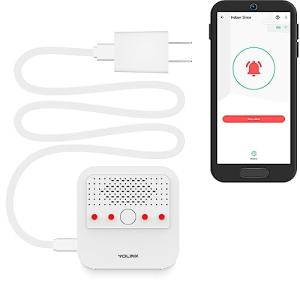
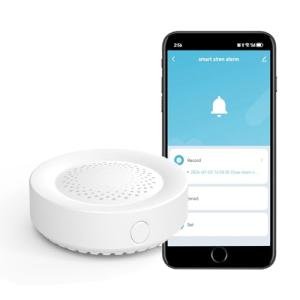
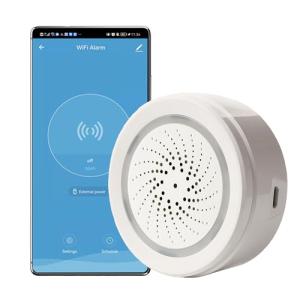
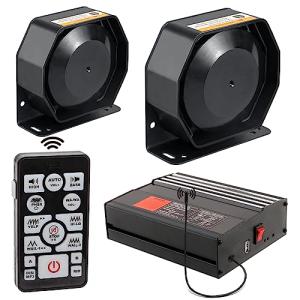
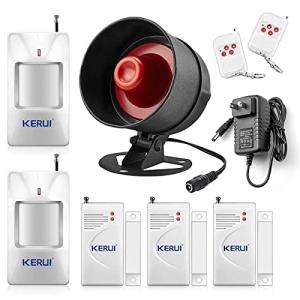
High-Decibel Sirens (Deterrence and Warning):
-
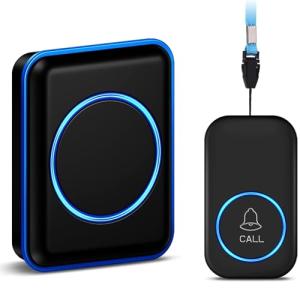
Pros: These units are designed to be extremely loud (100 dB minimum), acting as the primary deterrent to intruders. They typically plug into a wall outlet or are hardwired, often featuring a battery backup to ensure they sound even if the power is cut. They provide the necessary, audible 24/7 Monitoring alert for the immediate vicinity.
-
Cons: Placement is crucial; they should be heard clearly but not so loud that they cause hearing damage indoors. Requires a stable power source (plug or wiring).
-
US Lifestyle Context: Ideal for placing one siren centrally on the main floor and one in the detached garage of a suburban home, ensuring a breach at either location results in maximum, immediate audible deterrence.
-
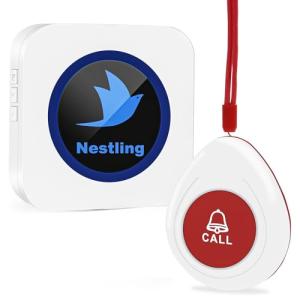
Panic/Emergency Buttons (Manual Intervention):
-
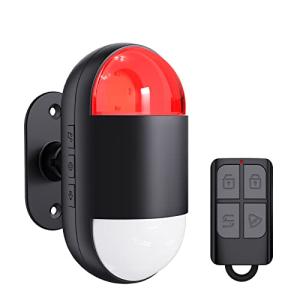
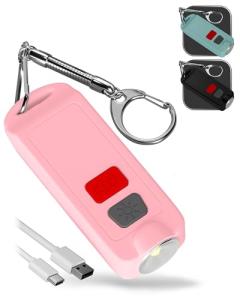
Pros: These are small, portable, battery-powered buttons that can be worn, placed on a bedside table, or mounted discreetly near a back door. They allow for instant, manual triggering of the alarm system—either a silent alert to emergency services or an immediate siren blast. This provides critical, personal security intervention capability.
-
Cons: Requires consistent battery replacement. Can be accidentally pressed if not designed with a recessed button or multi-press feature.
-
US Lifestyle Context: Necessary for older adults living alone, placed next to the bed for silent signaling to medical services, or mounted in a hidden spot near a back door for immediate security lock-down.
-
Visual Indicators (Flashing LEDs):
-
Pros: Many sirens include bright, flashing LED lights. These lights draw attention to the property during an alarm event, helping neighbors or responding officers locate the source of the alarm quickly. This is crucial for visible 24/7 Monitoring .
-
Cons: The LED lights themselves are a power drain, which slightly reduces the overall Energy Efficiency of the siren's battery backup when the main power is out.
Compatibility Protocols
For instantaneous, low-latency communication during an emergency, your Wireless Sirens/Panic Buttons must be seamlessly integrated with your central alarm hub.
-
Z-Wave and Zigbee: These mesh networks are the most reliable choice. They ensure the immediate, low-latency signal transmission required for an alarm—a key sensor breach must trigger the siren instantly. They also run on low power, maximizing the battery life of panic buttons and siren backups.
-
Wi-Fi: Wi-Fi sirens are simple but may suffer from network lag, delaying the siren sound during a critical event. They can also add to network congestion.
-
Hub-Centric Operation: Most Wireless Sirens/Panic Buttons are designed to work exclusively with a specific alarm hub (e.g., Ring, SimpliSafe, Abode). You must confirm protocol and brand compatibility before purchasing. This ensures that their status (armed/disarmed) and power levels are visible via Remote Access .
3. 🛠️ Installation and Setup Walkthrough
Installing Wireless Sirens/Panic Buttons is quick and flexible, focusing on strategic placement for maximum audible coverage and discreet access for manual buttons.
Pre-Installation Preparations
-
Acoustic Mapping: Identify the best location for the siren. It should be audible throughout the entire house and preferably heard outside to alert neighbors. Avoid placing it near existing loud noises (like the air handler).
-
Panic Button Placement: Decide where the panic buttons will be most useful—bedside table, interior wall near a rarely used door, or worn as a keychain. They must be easily accessible but shielded from accidental presses.
-
Hub Pairing: Power up the siren (plug in or insert batteries). Use the main alarm app to pair the Wireless Sirens/Panic Buttons directly to your hub. Confirm the hub acknowledges the siren's connection status for reliable 24/7 Monitoring .
Installation Guide (Typical Plug-in Siren/Button Mount)
-
Siren Installation: If plug-in, select an outlet not controlled by a switch. If battery/mounted, use adhesive or screws to secure the siren to a central wall or ceiling. Plug the siren in and wait for the battery backup to charge fully.
-
Panic Button Setup: Use the app to assign the button's function (e.g., "Medical Alert" or "Intrusion"). Secure the panic button in its chosen spot, ensuring it is protected (many buttons require a long press or two-button combo to activate).
-
Customization: Use the app's settings to adjust the siren's volume, duration, and tone. Test the panic button by triggering a safe, non-emergency response (e.g., a flashing light) to verify functionality and Remote Access status reporting.
-
Final Test: Run a full security system test to confirm a sensor breach instantly triggers the siren and the siren itself sends a status update to your app.
Troubleshooting Common Issues
-
Issue 1: Siren Battery Backup Fails During Power Outage.
-
Resolution: Ensure the siren's internal battery is installed and fully charged (this can take 24 hours after plugging in). Battery performance degrades over time; if the siren is old, replace the battery pack, as reliable backup is critical for 24/7 Monitoring .
-
Issue 2: Accidental Panic Button Triggers.
-
Resolution: This can result in costly false emergency calls. Reposition the button to a safer, recessed location. In the app, verify if you can change the trigger requirement from a single press to a two-button combination or a long press (5 seconds) for better security.
-
Issue 3: Remote Access Cannot View Siren Status.
4. Advanced Automation and Maximizing Value
The highest utility of Wireless Sirens/Panic Buttons comes from integrating the alarm state into convenience and Energy Efficiency routines, leveraging their instant trigger capability.
Powerful Automation Scenarios
-
Immediate Security Response and Lighting: A contact sensor triggers the alarm. The automation instantly activates the Wireless Sirens/Panic Buttons at full volume, flashes all internal Smart Wall Switches and Smart Dimmers repeatedly, and sends a critical push alert to your phone via Remote Access . This multi-sensory response is essential for safety and deterrence.
-
Panic Button as a "Full Shutdown": You program a dedicated panic button, placed by the garage door, as a "Good Night" switch. Pressing it locks all Smart Keyless Locks , turns off all smart lights (maximizing Energy Efficiency ), and silently sets the system to "Stay" mode. This uses the high reliability of the security device for a high-value convenience routine.
-
Environmental Alert Integration: A Water Leak Detector signals a flood in the basement. An automation triggers the siren to sound a distinct, non-security tone (a short chime or voice message like "Water detected!") to alert occupants without causing panic, ensuring quick intervention. This expands the device's 24/7 Monitoring role.
Longevity & Maintenance
Longevity for Wireless Sirens/Panic Buttons is critical, as they are only used during emergencies. You must prioritize battery and communication health. Proactively replace the siren's backup battery every 3-5 years (check the manufacturer's recommendation) to guarantee 24/7 Monitoring during power failures. Test all panic buttons monthly to ensure they are paired and functioning. Installing firmware updates often improves the device's signal efficiency and ensures the rapid transmission required in an alarm state.
5. COMPLEMENTARY CATEGORY RECOMMENDATIONS
| Recommended Categories |
Why This Category Is Useful Specifically for This Product |
Short Usage Scenario |
| Alarm Systems |
The siren is the key audible output, and the panic button is a manual input device for the base alarm system. |
A sensor breach in the alarm system triggers the high-decibel siren instantly. |
| Smart Sensors |
Sensors (contact, motion, glass break) are the inputs that automatically trigger the siren and panic alert outputs. |
Motion detected by the Motion/Presence Sensors automatically triggers the siren. |
| Smart Lighting |
Flashing smart lights work with the siren's sound to create a multi-sensory deterrence and warning system. |
The siren blares, and smart dimmers flash the living room lights to 100%. |
| Smart Locks |
Panic buttons can be programmed to trigger an immediate door lock-down for enhanced security during an intrusion. |
Pressing the panic button locks all Smart Deadbolt Replacements in the house simultaneously. |
| Smart Home Control |
Used to program the siren to activate only on specific conditions (e.g., system armed, after midnight). |
A wall controller icon is pressed to activate the panic button's silent emergency alert. |
| Power Backup Solutions |
A UPS protects the central hub/router, ensuring the siren can communicate the alarm status and the panic button's signal gets through via Remote Access . |
The UPS keeps the mesh network active so the siren status is visible during an outage. |
| Video Doorbells |
The doorbell camera provides the video evidence needed to verify a security event before manually triggering the siren or panic button via Remote Access . |
Viewing an intruder on the doorbell cam prompts you to manually trigger the siren. |
| Smart Wall Switches |
Used to automate the turning off of lights when the system is armed, leveraging the alarm status for Energy Efficiency . |
Pressing the arm button on the alarm keypad turns off all lights via the smart wall switches. |
Wireless Sirens/Panic Buttons are the vital voice of your security system, transforming silent smart alerts into immediate, high-impact action. They provide guaranteed audible deterrence and essential manual safety intervention, ensuring reliable 24/7 Monitoring both inside and outside your property. By choosing these dedicated, wireless devices, you gain the confidence of instant response and seamless Remote Access confirmation. Invest in the essential protection of Wireless Sirens/Panic Buttons today.