The world of gaming hardware has evolved far beyond simple buttons and plastic shells. Modern setups now prioritize precision, customization, and seamless connectivity to create a truly immersive experience. Whether searching for a keyboard with tactile feedback or a mouse with ultra-fast tracking, selecting the right tools can significantly enhance both competitive play and daily productivity.
Smart Gaming Peripherals
Level up your gaming experience with high-tech gear designed for serious players
Product List
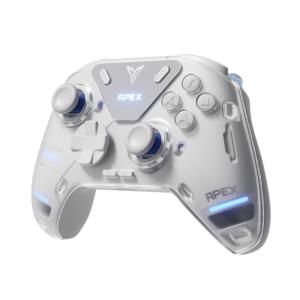
FLYDIGI APEX 4 Wireless Controller
Flydigi
Product Review Score
4.45 out of 5 stars
139 reviews$129.50
💡 Practical Usage Tips
- For the most stable connection during intense gaming, it is best to place wireless receivers within one meter of the keyboard or mouse to avoid signal interference.
- Users should switch to a wired connection when performing firmware updates or screen customizations to prevent the risk of software corruption.
- Dimming the integrated RGB LIGHTING or setting a timeout for built-in displays can extend the battery life by more than half.
- If a controller features HALL EFFECT sensors, adding a small deadzone in the settings can help prevent accidental movements caused by high sensitivity.
✅ What to Look For & ⚠️ What to Avoid
MUST-HAVES:
- Look for a GASKET-MOUNTED architecture like that found in the RK Royal Kludge S98 to enjoy a quieter and more cushioned typing experience.
- Prioritize devices with HOT-SWAP capabilities so individual switches can be replaced or upgraded without needing to solder.
- Select mice with high-resolution optical sensors to ensure smooth and accurate tracking across different desk surfaces.
RED FLAGS:
- Avoid keyboards that lack N-KEY ROLLOVER, as this can lead to "ghosting" where the system fails to register multiple simultaneous key presses.
- Be cautious of budget membrane models used in high-humidity areas, as the internal contact layers can become less responsive over time due to oxidation.
- Watch out for wireless peripherals that only offer a POLLING RATE of 125Hz, which might feel sluggish or laggy in fast-paced games.
🛡️ Build Quality & Performance
The physical construction of a peripheral determines how well it stands up to years of heavy use. Premium models often utilize a mix of internal padding and reinforced frames to create a solid, stable feel. For instance, the AULA S98 Pro uses multiple layers of specialized foam to dampen vibrations, resulting in a deeper and more satisfying sound during use. This attention to detail prevents the "hollow" noise often found in cheaper alternatives.
Performance is equally tied to the internal tech, such as OPTICAL SWITCHES that use light to register clicks instantly. While traditional mechanical parts can eventually wear out or double-click, these modern sensors offer much longer lifespans. It is also important to consider the exterior finish; while soft-touch coatings feel comfortable initially, they may require regular cleaning to prevent them from becoming sticky or worn after long periods of contact with skin oils.
🏆 Top Recommendations
| Best For | Model Name | Key Feature | Why It Wins |
|---|---|---|---|
| Enthusiasts | AULA S98 Pro | Smart LCD Screen | Excellent acoustic dampening and modularity. |
| Competitive Gaming | Razer Basilisk V3 Pro | 30K DPI Sensor | Industry-leading precision and optical switches. |
| Ergonomics | L75 Pro Low Profile | 3.0mm Travel | Reduces wrist strain with a shorter deck height. |
| Pro Controllers | Flydigi Apex 4 | Force-Feedback Triggers | Prevents stick drift with Hall Effect tech. |
❓ Frequently Asked Questions
What is the benefit of a "Hot-Swap" keyboard?
A hot-swap keyboard allows the user to pull out the mechanical switches and replace them with different ones without using a soldering iron. This makes it easy to repair a single broken key or change the "feel" of the keyboard from clicky to quiet whenever desired.
How do Hall Effect sensors prevent stick drift?
Unlike standard controllers that use parts that rub together and wear out, Hall Effect sensors use magnets to track movement. Because there is no physical contact, the parts do not degrade over time, which virtually eliminates the drifting issues common in older controllers.
Does the RGB lighting affect performance?
RGB lighting does not slow down the speed of the device, but it does draw a significant amount of power. On wireless devices, keeping the lights at maximum brightness can drain the battery several times faster than if the lights were turned off.