Securing a property no longer requires invasive wiring or expensive contracts with professional monitoring companies. Modern security solutions have evolved into user-friendly packages that allow homeowners to install and manage their own protection networks using straightforward interfaces. These systems typically rely on a central hub that communicates with various sensors, providing real-time alerts directly to a smartphone app for immediate awareness and peace of mind.
Pre-Packaged DIY Alarm Kits
Everything you need to secure your home with ease and confidence
Product List
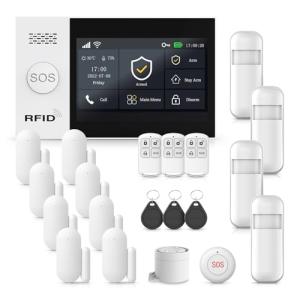
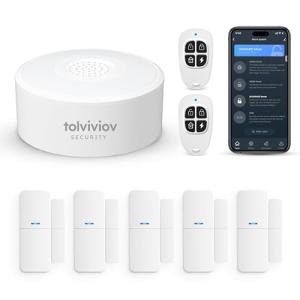
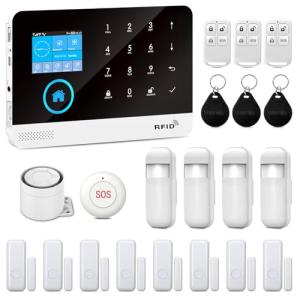

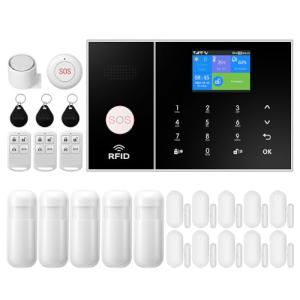
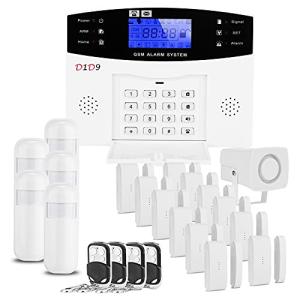
💡 Practical Usage Tips
- Position the main hub in a central location within the home to ensure the 433MHz RF signal can reach all peripheral sensors without interference.
- Connect the central unit to a dedicated uninterruptible power supply (UPS) because the internal Lithium-ion battery often provides limited runtime during extended power outages.
- Regularly test the sensor telemetry by triggering doors and windows to verify that the app receives the alert before the system is needed for a real emergency.
- If using a system with cellular backup, ensure the SIM card is unlocked and supports the correct 4G LTE bands for the region to avoid connectivity failures.
✅ What to Look For & ⚠️ What to Avoid
Must-Haves
- Dual-Path Connectivity: A robust system should support both Wi-Fi and cellular networks, like the YBJ 4G Smart Wireless Home Alarm System, to ensure alerts are sent even if the internet goes down.
- Modern App Ecosystem: Look for hardware built on the Tuya Smart ecosystem, which allows for broader compatibility with other smart home devices and smoother remote management.
- Expandable Sensor Network: The best kits allow for the addition of numerous peripherals, supporting high density through 433MHz sub-GHz protocols for better wall penetration.
Red Flags
- Legacy Network Dependence: Avoid systems that rely solely on 2G GSM networks, as these infrastructures are being sunsetted in many regions and will render the remote features useless.
- Lack of Heartbeat Polling: Be cautious of systems that do not perform a bidirectional check on sensors, as you might not know if a window sensor has a dead battery until it fails to trigger.
- Weak Internal Batteries: Sirens or hubs with very low capacity 500-800mAh batteries may not survive a power outage longer than a few hours.
🛡️ Build Quality & Performance
The physical construction of these DIY kits typically utilizes lightweight molded polymers. While this makes the units easy to mount using adhesive strips, the plastic mounting hardware can sometimes exhibit brittleness if subjected to high mechanical stress during installation. Users will notice that devices with a capacitive touch panel, such as the DIY Touch Screen Home Security Alarm System, offer a more modern aesthetic compared to older tactile keypads. However, the responsiveness of these screens can vary, with some showing latency during rapid input.
Acoustically, the integrated sirens often rely on a piezo element which produces a high-pitch frequency capable of reaching 120dB. While loud, these sirens can cause chassis resonance at peak volume due to limited acoustic insulation. Connectivity wise, the reliance on the 2.4GHz band is standard, meaning users with 5GHz-only router configurations will need to adjust their network settings to ensure the Wi-Fi uplink connects successfully.
🏆 Top Recommendations
| Best For | Model Name | Key Feature | Why It Wins |
|---|---|---|---|
| Maximum Security | YBJ 4G Smart Wireless | 4G LTE & Wi-Fi | Offers true redundancy with cellular failover if Wi-Fi cuts out. |
| Large Homes | YBJ 21-Piece Kit | High Sensor Count | Includes enough sensors to cover multiple entry points and windows. |
| Ease of Use | DIY Touch Screen System | 4.3-inch IPS Display | The visual interface simplifies arming and disarming for all family members. |
| Budget Friendly | Wireless WiFi Door Alarm | Simplified Hub | Provides essential App alerts without the cost of a complex screen. |
❓ Frequently Asked Questions
Does the system work if the Wi-Fi goes down?
It depends on the specific model you choose. Systems with only 802.11b/g/n Wi-Fi will lose their ability to send remote alerts to your phone during an internet outage, though the local siren will still sound. Models with a 4G LTE module can switch to cellular data to maintain communication.
Are these kits compatible with 5GHz Wi-Fi?
Generally, no. Most of these IoT devices use ESP8266 or similar chipsets that operate strictly on the 2.4GHz band. You must ensure your router broadcasts a 2.4GHz signal for the initial setup and ongoing operation.
How are the sensors powered?
The peripheral sensors typically use non-rechargeable coin cells like CR2032 or small 23A batteries. These usually last between 6 to 10 months depending on how frequently the doors or windows are opened and closed.
Is professional monitoring available?
These are primarily self-monitored systems designed for cloud-tethered alerts to your personal device. They do not typically connect to a central dispatch station for police or fire services unless you use third-party bridging services.