💡 Practical Usage Tips
- Disconnecting the battery base from AC power periodically is crucial because constant trickle charging can degrade the internal cells over time.
- Users must verify the specific generation of their device, as a proprietary mechanical interlock often prevents older bases from fitting newer hardware.
- When using high-drain devices like projectors, ensuring the power source supports the correct USB-C Power Delivery (PD) protocol is necessary to prevent brightness throttling.
- Cleaning the contact points regularly helps avoid resistive heating and ensures a reliable connection between the base and the smart device.
✅ What to Look For & ⚠️ What to Avoid
MUST-HAVES:
- A stable center of gravity is essential for devices that rotate or tilt, such as the design found in the SAMSUNG Freestyle Battery Base.
- Look for pass-through charging capabilities that allow the device to operate seamlessly while the base refills its energy reserves.
- High-capacity options, such as those exceeding 10,000mAh, are preferable for ensuring adequate runtime during extended audio or video playback.
RED FLAGS:
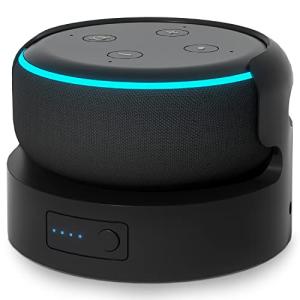
- Be cautious of bases that lack advanced thermal management, as enclosing a smart speaker can lead to overheating during high-volume use.
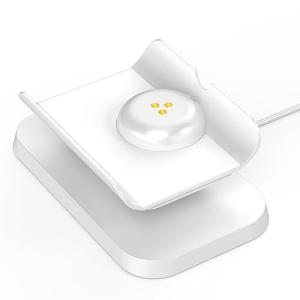
- Some docks, like specific models for displays, are purely passive mechanical stands and do not contain any internal energy storage.
- Avoid units where the pogo-pin interface feels loose or misaligned, as this often results in intermittent power loss.
🛡️ Build Quality & Performance
The construction of a custom battery base goes beyond simple aesthetics; it plays a vital role in the thermal and structural integrity of the connected device. High-quality units typically utilize high-impact ABS plastic or polycarbonate frames to withstand the rigors of portability. For audio devices, the housing often incorporates an insulating fabric wrap or a silicone non-slip foot to dampen vibrations and prevent rattling during bass-heavy playback.
Performance varies significantly based on the internal electrical architecture. Premium models integrate sophisticated controllers that manage voltage throughput and prevent deep discharge cycles, which protects the lifespan of the lithium-ion cells. However, some older designs, such as the Ninety7 Battery Base for Google Home, prioritize form factor over thermal dissipation, which can lead to cell exhaustion if the unit remains tethered to AC power for too long.
🏆 Top Recommendations
| Best For |
Model Name |
Key Feature |
Why It Wins |
| Portable Cinema |
Samsung Freestyle Gen 2 |
32,000mAh Capacity |
Supports high-wattage 65W draw without throttling brightness. |
| Echo Dot (3rd Gen) |
Liboer Portable Base |
Friction-Fit Cup Design |
Provides up to 12 hours of audio playback in a compact form. |
| Meta Portal (10") |
Rounkin Adjustable Dock |
Ergonomic Tilt |
Excellent mechanical stability for desktop use (Passive Only). |
| Google Home |
Ninety7 Carbon |
Aesthetic Fabric Match |
Seamless visual integration with the original speaker design. |
❓ Frequently Asked Questions
Can I leave the battery base plugged in all the time?
Generally, it is not recommended. While some modern bases have protection circuits, continuous connection to AC power can cause resistive heating and accelerate the degradation of the lithium-ion cells. It is best to unplug the unit once fully charged or cycle the power occasionally.
Will a Gen 1 battery base work with a Gen 2 projector?
Compatibility depends on power requirements. For example, a Gen 1 base might physically fit a Gen 2 projector, but if the peak draw requirements (e.g., 65W) are not met, the device may throttle performance or fail to charge during operation. Always check the wattage output.
Do all docks include a battery?
No. Some products, like the Rounkin Adjustable Dock, are passive mechanical stands designed for ergonomic positioning and charging pass-through but do not contain an internal battery. These require a constant connection to a wall outlet to function.