🔌 Choosing Your System: Key Features and Compatibility
When you start looking for the right Entertainment Center Cable Solutions , you will primarily encounter three main variations, each suited for a specific US home layout and component density.
Essential Variations
-
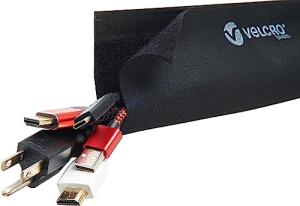
Cable Sleeves and Wraps: These are the simplest solution. They involve grouping cables into flexible, often zippered or velcro-fastened tubes.
-
Pros: They are inexpensive, highly flexible, and ideal for situations where your cables need to exit the bundle at various points, such as near a computer desk or when the components are close together. Installation is quick, offering an immediate cosmetic upgrade.
-
Cons: They don't secure the cables to the entertainment center itself, meaning the entire bundle can still shift. They offer minimal thermal management compared to enclosed systems. This is often the best choice if you live in a densely populated apartment building and are moving frequently.
-
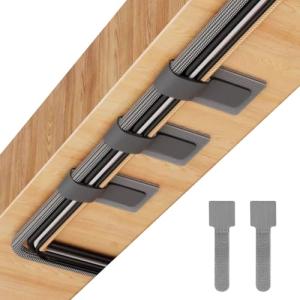
On-Wall Raceway Systems: These are rigid or semi-rigid channels that mount directly to the wall or the back of the furniture.
-
Pros: They are excellent for concealing wires that must travel vertically from a wall-mounted TV down to a console. They look polished, offer robust physical protection, and are paintable to blend into your décor. They are a permanent, professional-looking choice for your dedicated home theater space.
-
Cons: Installation is more involved, often requiring drilling. You must pre-plan your cable runs, as adding a new cable later can be difficult.
-
Integrated Power and Management Systems (Power Bricks/Trays): These combine heavy-duty, surge-protected power strips with a recessed tray or box specifically designed to house the excess cable slack and power bricks.
-
Pros: This is the ultimate solution for Energy Efficiency and organization, minimizing the "wall wart" clutter. They manage both low-voltage signal cables and high-voltage power cables in separate, safe compartments. A crucial feature for protecting your investment in areas prone to weather-related power surges, such as the US Southeast.
-
Cons: They can be bulky and require more physical space behind or inside your entertainment unit. They are the highest cost option.
Compatibility Protocols
Unlike most smart devices, Entertainment Center Cable Solutions are largely protocol-agnostic in the traditional sense, as they manage the physical layer rather than the digital layer (Wi-Fi, Zigbee, etc.). However, their value is enhanced by your smart home protocols:
-
HDMI/DisplayPort: Your cable solution must support high-bandwidth cables like HDMI 2.1 without kinking or stressing the connectors. Poor cable management can destroy the signal integrity needed for 4K/120Hz or 8K content.
-
Ethernet (Cat 6/7/8): For devices that rely on high-speed wired connections, the system must allow for proper bend radii to maintain the integrity of the twisted-pair wiring. You must ensure your cable pathways can handle the wider diameter of premium Ethernet cables often used for media streaming.
-
Integration with Smart Power: The most critical compatibility is with your Smart Power products. By integrating your cable management with a smart power strip (often Z-Wave or Wi-Fi controlled), you gain the ability to remotely reboot frozen components—a key aspect of Remote Access and 24/7 Monitoring of your system’s operational health.
🛠️ Installation and Setup Walkthrough
Implementing effective Entertainment Center Cable Solutions is a project best approached methodically. Rushing through the installation is counterproductive and defeats the purpose of organization.
Pre-Installation
Before you even open the package, your first step is a digital and physical audit. First, unplug everything and clean the area thoroughly. Next, map out what you have: television, streaming box, gaming console, AV receiver, etc. Identify which cables are signal (HDMI, Optical) and which are power. A strong Wi-Fi signal is often necessary not for the cable solution itself, but for the smart power strip you should be using alongside it. Test your signal strength with a phone or tablet where your smart hub or power component will sit. If the signal is weak, you may need a Wi-Fi repeater before proceeding.
Installation Guide
-
Tag and Group: Label both ends of every cable with a small, color-coded tag. Group power cables and signal cables separately; do not mix them in the same narrow channel, as power cables can introduce signal interference.
-
Mount the Core: Secure your primary management component, whether a power management box or a main raceway spine, to the back of the cabinet or the wall. If you are using a tray, ensure it is oriented for easy access but completely out of sight.
-
Run the Spine: Route the largest cable groups (often the HDMI bundle) through the primary channels or sleeves first. Use Velcro straps instead of zip ties, as Velcro allows for non-destructive adjustments and is safer against crimping sensitive cables.
-
Connect and Test: Plug in and connect one component at a time, ensuring you are using the shortest, most high-quality cable possible for each run. Power up your system and verify that all video and audio signals are working before securing the cable management covers or fully cinching the sleeves. This step prevents you from having to tear down your perfect organization because of a single bad cable.
Troubleshooting
4. Advanced Automation and Maximizing Value
The true value of modern Entertainment Center Cable Solutions emerges when they are integrated with smart power management, allowing your system to achieve a new level of efficiency and control, fulfilling the promise of Energy Efficiency and simplifying 24/7 Monitoring .
Automation Scenarios
-
The "Goodnight" Shutdown: You can link your Entertainment Center’s smart power strip (the hidden core of your Entertainment Center Cable Solutions ) to a simple voice command or a time-based schedule.
-
Automation: When you say, "Alexa, goodnight," the smart power strip (Wi-Fi/Z-Wave enabled) automatically cuts power to the TV, soundbar, and streaming box. This doesn't just reduce phantom drain (excellent for Energy Efficiency ), but it forces a hard reboot on devices that often get sluggish over time, ensuring a fresh start. This is especially useful for managing power to a high-end gaming router in a packed Texas apartment building that needs regular reboots for optimal performance.
-
Surge Protection and System Monitoring: You can use your smart home hub to monitor the power consumption of key components.
-
Automation: If the smart power strip reports an abnormal power spike (indicating a potential surge or component failure), an alert is sent to your phone. For ultimate protection and 24/7 Monitoring , you can set a rule to automatically cut power to the entire entertainment system if the main TV’s draw exceeds a safe threshold for more than five seconds, protecting your expensive electronics from damage. This is non-negotiable protection if you live in a region with frequent electrical storms.
-
Remote Access Reboot on Freeze: For US consumers with complex, multi-component home theaters, screen freezing is inevitable.
-
Automation: Instead of manually digging behind your cabinet to unplug and replug a frozen streaming stick, you simply open your smart home app. You use Remote Access to toggle the specific outlet controlling that device. The power cycle instantly reboots the component, all without disturbing your perfect arrangement of Entertainment Center Cable Solutions .
Longevity & Maintenance
Your cable management is a long-term investment. To ensure years of seamless performance, you should schedule a bi-annual audit. Always ensure your smart power strip firmware is up-to-date for the latest surge protection profiles. Since high-quality AV cables are often stiff, you should occasionally check all cable entry and exit points in your raceways to ensure the tension hasn't pulled the connector loose. For integrated trays, use a small can of compressed air to clear dust, which can act as insulation and lead to overheating within the enclosed area, undermining your 24/7 Monitoring efforts to maintain safe component temperatures. This proactive maintenance ensures your Entertainment Center Cable Solutions continue to deliver peak performance and safety.
5. COMPLEMENTARY CATEGORY RECOMMENDATIONS
| Recommended Categories |
Why This Category Is Useful Specifically for This Product |
Short Usage Scenario |
| Smart Power |
Integrates directly with your cable management to offer surge protection, Energy Efficiency , and Remote Access rebooting of frozen components. |
Use a smart power strip housed in your cable tray to hard-reboot a frozen streaming device via your phone without touching the physical setup. |
| Networking Gear |
High-speed, low-latency networking is essential for the devices you are managing. Better cable routing allows for clean, optimal Cat 6/7/8 runs. |
Ensure your entertainment center’s Ethernet cables run smoothly from your gaming router/modem (which may be in a separate, densely populated apartment building utility closet) through the cable raceway. |
| Large Screen Displays 15 |
The ultimate visual output depends entirely on the signal integrity of the HDMI cables you are managing and securing. |
Mount a new 85-inch OLED TV and use vertical raceways to perfectly hide the thick HDMI 2.1 cable that runs down to your AV receiver. |
| Av Control |
These hubs provide the automation layer necessary to execute the Remote Access and power-cycling scenarios, maximizing the smart functionality of the setup. |
Use an IR/RF hub to control non-smart components, while the cable-managed smart power strip provides power for the entire system. |
| Soundbars Audio |
High-fidelity audio cables (like optical or eARC HDMI) require careful management to prevent kinking and interference, which affects sound quality. |
Secure the eARC cable connecting your premium soundbar to your TV to prevent tension stress and intermittent audio dropouts. |
| Uninterruptible Power Supplies Ups |
Provides battery backup for your sensitive electronics, seamlessly integrating with the power management section of your Entertainment Center Cable Solutions . |
In the event of a power outage, the UPS provides clean shutdown time for your NAS and modem, neatly tucked away in the cable management box. |
| Universal Smart Remotes 283 |
Allows you to consolidate control of all the managed components, simplifying the user interface that interacts with the cleanly wired system. |
Replace five different traditional remotes with one universal smart remote, reducing the overall clutter and reliance on manual system control. |
6. CONCLUSION
The transition from a messy, disorganized wiring setup to a system based on professional Entertainment Center Cable Solutions is one of the most impactful, yet overlooked, upgrades you can make to your smart home. This foundational investment delivers benefits far beyond neatness; it guarantees reliable performance, simplifies Remote Access for maintenance, enhances Energy Efficiency by controlling phantom power, and protects your components through better 24/7 Monitoring and surge management. By choosing the right sleeves, raceways, and power integration systems, you are not just organizing cables—you are solidifying the backbone of your modern smart living experience. Take the final step now to bring confidence, longevity, and effortless functionality to your home entertainment center.