

PRODUCT REVIEW
In-Depth U.S. Market Review
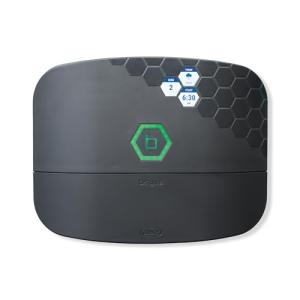
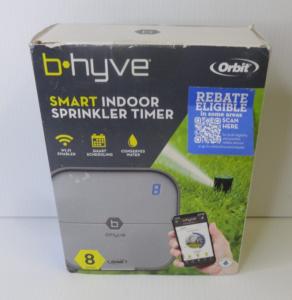
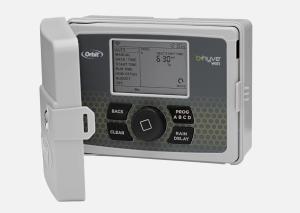
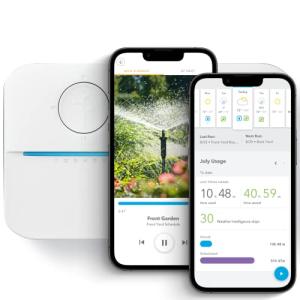
The Smart WiFi Sprinkler Timer with Alexa & Google Support steps into the thriving U.S. smart home ecosystem as a highly accessible entry point for automating your lawn and garden irrigation. This product’s niche is the budget-conscious homeowner or renter looking to upgrade an existing, traditional timer without committing to a complex, professional-grade smart system. It’s designed for easy DIY installation and immediate integration with the two most popular voice assistants, making it an appealing option for a wide audience.
You’re primarily buying convenience and water savings. The competitive edge here lies in its straightforward WiFi connectivity and built-in compatibility with both Alexa and Google Home, which covers the vast majority of U.S. households already using smart speakers or displays. Compared to the more feature-rich, high-end controllers like Rachio or Rain Bird, you sacrifice advanced features like hyper-local weather intelligence or automatic leak detection. However, you gain simplicity, a much lower initial cost, and the basic scheduling smarts that most homeowners truly need to manage a medium-sized lawn effectively. This makes it an excellent, budget smart sprinkler choice for home office use when balancing work and yard care.
Technical Analysis
| Specification | Detail & U.S. Context | Analysis |
| Zone Capacity | Standard 6-Zone Output | Suitable for smaller to mid-sized U.S. yards (typically 4-6 zones). Larger properties may need a multi-unit setup. |
| Connectivity | 2.4 GHz Wi-Fi Protocol | Standard for most budget smart home devices; ensures wide router compatibility but requires a stable 2.4 GHz network signal. |
| Weather Integration | Basic internet-based weather data (Local Forecasts) | Allows for basic "skip-watering" rules based on rain or high wind forecasts, preventing overwatering. |
| Smart Control | Amazon Alexa & Google Assistant Support | Essential for U.S. market adoption; enables voice commands like "Alexa, turn on Zone 3 for 10 minutes." |
| Power | 120V AC Input, 24V AC Output (Standard) | Uses the ubiquitous 24V AC standard for sprinkler solenoids, ensuring compatibility with virtually all existing U.S. valve systems. |
| Enclosure | Indoor-Rated Housing Only | Requires placement in a garage, utility room, or a separate, weatherproof outdoor enclosure, adding to the total cost for exterior mounting. |
| Scheduling | App-Based Custom and Cycling Schedules | Offers more flexibility than old-school mechanical timers, including precise start times, duration, and specific days. |
1. Smart Programming and Weather Intelligence
The core functionality of this Smart WiFi Sprinkler Timer is shifting the control from a dated wall unit to your smartphone. You gain the ability to create highly customizable, dynamic watering schedules. You can set specific watering times, durations, and days for each of the 6 zones, all within a clean, easy-to-navigate mobile app interface.
More importantly, the weather intelligence feature elevates it beyond a simple timer. By accessing local weather forecasts via the internet, the system can automatically suspend or skip watering cycles if rain is predicted or if temperatures drop below a certain threshold. This is critical for preventing water waste and maintaining healthy turf, especially in areas with unpredictable spring and fall weather.
2. Electrical Compatibility and Installation Ease
Installation is straightforward because the unit uses the industry-standard 24V AC power for its solenoid valves. For an existing system, this is simply a matter of disconnecting the zone wires from your old timer and reconnecting them to the corresponding terminals on the new unit. The included 120V AC power adapter plugs into a standard U.S. wall outlet.
While the physical wiring is simple, you must ensure the unit is installed in a protected indoor location, such as a garage or basement. Since the housing is not rated for outdoor exposure, placing it outside requires purchasing a separate, waterproof enclosure, which is a necessary consideration for many U.S. homes where the old timer was mounted outside.
3. Seamless Voice and Wi-Fi Connectivity
The dual support for both Alexa and Google Assistant is a major selling point in the competitive U.S. market. Once connected to your 2.4 GHz home Wi-Fi network, the device shows up in your chosen smart assistant app, allowing for immediate voice control. Imagine stepping out onto your patio and saying, "Hey Google, run Zone 4 for five minutes" to test a new sprinkler head.
This reliable WiFi connectivity is what truly makes the timer "smart." Beyond voice control, it allows for remote management. If you’re traveling or away from your home office, you can check your watering status or pause a schedule instantly from anywhere, simply by using the companion mobile application on your phone.
User Profiles
1. The Starter Homeowner
You just bought your first home in the suburbs and inherited an ancient, confusing sprinkler timer that uses confusing dials and pins. You are looking for a simple, cost-effective way to get better control of your yard without spending hundreds of dollars on a pro-grade system.
-
Use Case: You need to set a basic summer schedule but want the ability to easily pause the system when a big thunderstorm rolls through, or manually water a newly seeded patch of grass with a quick command.
-
The Fit: The low cost and easy DIY installation make this an ideal first Smart WiFi Sprinkler Timer . The Alexa/Google support is a huge win, letting you use a voice command instead of fumbling with the app for a quick zone check. You don’t need 16 zones or hyper-precise ET data, just reliability and simple smarts.
2. The Traveling Student
You have a small duplex rental with a landlord-maintained yard, but they put you in charge of the water bill. You travel frequently for school breaks and internships and need to be able to monitor and adjust the system while you are hundreds of miles away.
-
Use Case: You are checking the weather forecast from your remote location and see a week of heavy rain coming. You need to delay the entire watering schedule for seven days to save money and avoid damaging the turf.
-
The Fit: Remote access is the key feature for you. Being able to access the app over Wi-Fi, regardless of your physical location, ensures you can control your water usage and avoid expensive overages. The basic weather integration also gives you peace of mind that the lawn won't be watered during a downpour.
3. The Water-Conscious Senior
You are a retiree living in an area with increasingly strict water restrictions and high usage penalties. You need a simple interface that is easy on the eyes and a reliable way to ensure you are watering exactly according to the local rules.
-
Use Case: The local water district only allows watering before 9:00 AM on Tuesdays and Fridays. You need a device that can reliably execute this fixed schedule and, crucially, keep a clear record in the app of when watering occurred to dispute any potential penalty notices.
-
The Fit: The app-based scheduling is far superior to old timers for setting and maintaining exact compliance with local ordinances. Furthermore, the ability to monitor water consumption (based on run-time) helps you stay within your monthly allotment, giving you simple, effective smart power over your irrigation.
"Complementary HomeTechCorner Category Recommendations"
| Recommended Products | Why This Category Is Useful Specifically for This Product | Short Usage Scenario |
| Smart Displays | Allows for hands-free, visual control of your zones directly on the counter or in the garage. | You are prepping the lawnmower in the garage, and you just glance at your smart display to confirm Zone 2 is running before you start the engine. |
| Smart Power | You will need a reliable power source, and a smart plug can enable automation for the timer's power supply itself. | You can use a smart plug to ensure the timer is completely powered off during the non-watering winter season in cold climates without unplugging it. |
| Water Irrigation | Crucial for expanding the smart features by measuring the actual conditions your timer is addressing. | You notice a patch of grass browning and check your soil sensor data before deciding to manually run that zone via the app for 15 minutes. |
| Outdoor Smart Plugs | If you need to place the timer outside, this provides a weather-resistant power source for the required enclosure. | You need to mount the weatherproof enclosure on the side of your house, so you plug the controller's power adapter into an outdoor smart plug for protection. |
| Voice Assistants | Essential for leveraging the hands-free control and integration of this specific smart timer. | You are sitting on the porch after a long day and simply tell your voice assistant to start a five-minute soak cycle on Zone 1 without getting up. |