PRODUCT REVIEW
In-Depth U.S. Market Review
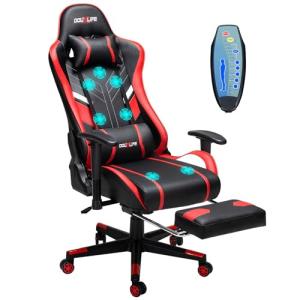
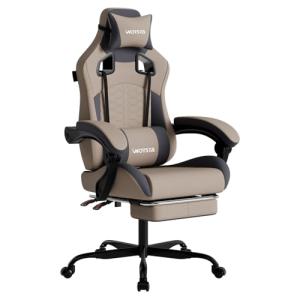
The Ergonomic Gaming Desk Chair with Adjustable Armrests carves out a niche in the highly competitive U.S. office and gaming furniture market by focusing on affordability without sacrificing core ergonomic features. This chair targets the vast segment of users who spend long hours at a desk—from remote workers to avid PC gamers—but are operating on a budget that excludes premium brands. It offers the high backrest and aggressive styling typical of a gaming chair, blending it with the adjustability expected in a solid office chair, making it a versatile budget choice for home office use.
In the U.S. market, this chair competes directly with dozens of mid-range, unbranded, high-back faux leather chairs. Compared to other $150-$250 desk chairs, you get a genuinely robust lumbar support pillow and armrests that offer a decent range of height and pivot adjustments, which is often an omission on cheaper models. While it doesn't have the high-density foam or multi-year warranty of a premium $500+ model, this Ergonomic Gaming Desk Chair provides significantly better feature value than entry-level task chairs found in big-box stores.
Technical Analysis
| Specification | Detail & U.S. Context | Analysis |
| Material | High-density shaping foam, PU leather, and a nylon base. PU leather is common in the U.S. market for its easy maintenance. | The combination offers a cost-effective blend of comfort and simple cleanup, but may not breathe as well as fabric mesh, a consideration for warmer climates. |
| Recline Angle | Up to 135 degrees. Standard for a versatile desk chair, allowing for a comfortable rest/break position. | This range is sufficient for non-sleeping reclines, perfect for leaning back during a long meeting or a break between gaming sessions. |
| Armrests | 3D Adjustable (Height, Swivel, Forward/Backward movement). A premium feature on a budget chair. | True 3D adjustment is a significant ergonomic advantage, helping you align your forearms perfectly with your desk height to reduce shoulder strain. |
| Piston | Class 3 gas lift cylinder, BIFMA certified for safety. Rated for up to 300 lbs in most configurations. | A BIFMA-certified Class 3 piston meets U.S. safety standards and provides reliable height adjustment for the majority of users. |
| Lumbar Support | External, adjustable cushion that straps onto the backrest. Offers targeted support. | While not integrated, the external cushion is highly adjustable, letting you position the support exactly where your lower back needs it most. |
| Weight Capacity | Advertised for users up to 350 lbs. The base and lift cylinder need to be appropriately rated. | While claiming 350 lbs is a selling point, heavy users should verify the chair's actual footprint and frame material for maximum stability. |
1. Ergonomics and Lumbar Support System
This Ergonomic Gaming Desk Chair with Adjustable Armrests utilizes high-density shaped foam for the seat and back, providing firm and supportive comfort that's suitable for extended use. The use of a thick foam core helps the chair maintain its shape over time, which is a major concern for lower-cost seating options that often flatten out quickly. This construction is a key differentiator in the budget gaming chair segment.
The chair includes an effective lumbar pillow and a neck/headrest pillow, which are crucial for maintaining proper spinal alignment during long sessions. The lumbar cushion is externally mounted and highly adjustable via straps, letting you fine-tune the support precisely to your lower back curve. This feature directly addresses the primary cause of desk fatigue: poor posture.
2. Armrest Versatility and Adjustability
One of the standout features of this budget gaming chair is the inclusion of multi-directional, or 3D, adjustable armrests. You can modify the height, swivel the armrest pad, and slide it forward or backward, which is an exceptional level of customization for a chair at this price point. This adjustability is vital for preventing shoulder and wrist strain, as it allows you to match the armrest height exactly to your desk height.
The ability to precisely position your arms on the armrests is an often-overlooked ergonomic detail. By correctly aligning your forearms, you reduce the load on your neck and shoulders, making the chair comfortable for both typing/mousing and leaning back for a break. These adjustable armrests are a major win for the "best portable monitor for travel" (or any) user looking for a supportive home office chair.
3. Physical Construction and Durability
The chair rests on a heavy-duty nylon base and uses a BIFMA-certified Class 3 gas lift, ensuring reliable and safe operation. The nylon base is a common and robust choice that reduces the overall weight and cost compared to a steel base, while still providing strong stability for the maximum rated weight. BIFMA certification is essential, as it verifies the chair’s compliance with U.S. safety and performance standards.
The chair is upholstered in durable PU (polyurethane) leather, which mimics the feel of genuine leather but is easier to clean and significantly less expensive. While PU leather can retain heat during hot U.S. summers, its robustness against spills and easy maintenance make it a practical choice for a gaming or home office environment. The overall construction emphasizes a durable, easy-to-assemble product designed for daily use.
User Profiles
1. Remote Work Power User
You spend 8 to 10 hours a day working from home, primarily typing, attending virtual meetings, and occasionally standing up to stretch. You need a chair that supports your entire back through long working sprints but don't want to spend hundreds of dollars on a high-end ergonomic brand. Your priority is reliable, all-day lower back support and armrests that keep your elbows at desk height.
-
Use Case: Sitting in focused work mode for hours, then quickly dropping the recline angle for a five-minute power call or brief mental break without leaving the chair.
-
The Fit: The high-back design and external, adjustable lumbar support perfectly address your need for continuous back alignment. The 3D adjustable armrests are the killer feature for you, allowing you to fine-tune your seated typing posture to prevent carpal tunnel and shoulder tightness—a major upgrade from most fixed-arm budget chairs.
2. Budget Gamer
You’re building out your first serious PC battlestation and are looking for a gaming chair that looks the part—high back, bucket seat styling—but leaves enough money in the budget for a new graphics card. You need comfort for 3-4 hour gaming sessions, plus the ability to lean way back when watching cutscenes or waiting in a lobby. You value style, comfort, and a strong tilt lock.
-
Use Case: Immersing yourself in a demanding RPG late into the evening, requiring a chair that holds you securely and provides full-back support, then reclining to 135 degrees to watch an ending cinematic.
-
The Fit: This Ergonomic Gaming Desk Chair delivers the aggressive aesthetic you want and the vital recline functionality for downtime. The firm foam provides the necessary support for focused gaming posture. It’s an ideal budget monitor choice companion, giving you a full-featured seating experience without the premium price tag.
3. College Student on a Stipend
You're furnishing a dorm room or a first apartment and need a single, all-purpose chair that can handle everything from writing term papers to late-night console gaming or casual video streaming. Space is tight, and you need a chair that can be pushed in close to a small desk. Durability against spills is a bonus, and assembly needs to be straightforward.
-
Use Case: Transitioning from intense note-taking and studying for exams to relaxing with a console controller in hand, needing a chair that's easy to clean from accidental coffee spills.
-
The Fit: The easy-to-clean PU leather and durable construction are perfect for the demanding environment of student life. Its manageable size and the high-level of adjustability make it suitable for a variety of tasks and compact spaces. The straightforward assembly means you can get back to studying (or gaming) quickly after it arrives.
"Complementary HomeTechCorner Category Recommendations"
| Recommended Products | Why This Category Is Useful Specifically for This Product | Short Usage Scenario |
| Electric Standing Desks | This chair is designed for long hours, and pairing it with a standing desk encourages essential movement and posture changes throughout your long workday. | You lock in the chair’s height for your perfect seated position, but then raise the desk with a push of a button for a mid-afternoon standing meeting, keeping your energy up. |
| Ergonomic Monitor Arms | An ergonomic chair is only half the battle; an adjustable arm allows you to perfectly align your screen with your eye level, complementing the chair's posture benefits. | After adjusting your chair's height and armrests, you effortlessly glide your monitor up and forward to eliminate neck strain and complete your perfect ergonomic triangle. |
| Smart Monitor Light Bars | For the long hours this chair enables, a light bar helps reduce eye strain caused by screen glare and uneven room lighting, especially during late-night use. | You're finishing a document late at night; the monitor light bar illuminates your desk and keyboard gently while keeping glare off your screen, protecting your eyes in your comfy chair. |
| Ergonomic Foot Rests | While the chair provides excellent upper-body support, a footrest ensures proper lower-body blood flow and leg positioning, completing the ergonomic setup. | You settle into the perfectly adjusted seat and place your feet on the angled footrest, ensuring your knees are at a perfect 90-degree angle for maximum lower-back support. |