Maintaining digital privacy in public spaces has become a modern necessity for professionals and students alike. These specialized filters act as a physical safeguard, ensuring that sensitive data remains visible only to the person sitting directly in front of the machine. Beyond security, they often double as protective layers that reduce glare and minimize eye strain during long working sessions.
Privacy Screens
Keep your personal space safe and protect your screen from prying eyes
Product List
💡 Practical Usage Tips
- It is essential to clean the laptop screen with a microfiber cloth and a mild cleaning solution before installation to prevent trapped dust from creating permanent micro-scratches.
- Increasing the laptop brightness by approximately 15% to 20% can help counteract the natural darkening effect caused by the privacy filter's internal layers.
- For magnetic models, removing the screen before fully closing the laptop lid is recommended to ensure the hinge does not experience unnecessary stress over time.
- Choosing the matte side of a reversible filter is often the best strategy for working in bright offices with heavy overhead lighting.
✅ What to Look For & ⚠️ What to Avoid
MUST-HAVES:
- Look for a MICROLOUVER design that provides a narrow 60-degree total viewing cone to ensure effective side-angle privacy.
- A built-in BLUE LIGHT FILTER is highly beneficial for reducing eye fatigue during late-night work sessions.
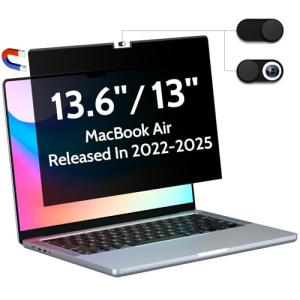
- The Peslv Magnetic Privacy Screen is an excellent choice for users who want a tool-free, magnetic attachment that feels integrated with the hardware.
RED FLAGS:
- Avoid filters that do not specify an ASPECT RATIO, as a standard 14-inch screen might be either 16:9 or 16:10, and the wrong fit will leave edges exposed.
- Be cautious of thick acrylic shields if the laptop needs to be closed frequently, as these can prevent the device from entering sleep mode.
- Low-quality adhesives can leave a sticky CHEMICAL RESIDUE on the display that is difficult to remove without damaging the screen's original coating.
🛡️ Build Quality & Performance
The construction of a high-quality privacy filter typically involves multiple layers of POLYETHYLENE TEREPHTHALATE (PET). This material is chosen for its balance of durability and optical clarity. When handling these products, there is a noticeable difference in flexibility; magnetic versions often feature a reinforced top strip that provides structural rigidity, while adhesive versions are thinner to maintain a low profile.
In terms of daily performance, the SightPro 16:10 Magnetic Filter demonstrates how modern manufacturing can achieve a 30-degree blackout angle without introducing significant blur. Higher-end models often include a 3H HARDNESS RATING, which acts as a sacrificial layer against keyboard marks or accidental scratches, effectively extending the lifespan of the laptop’s native display.
🏆 Top Recommendations
| Best For | Model Name | Key Feature | Why It Wins |
|---|---|---|---|
| MacBook Users | Peslv 16" Mac Pro | Seamless Magnet Fit | Uses internal Mac magnets for a perfect, adhesive-free alignment. |
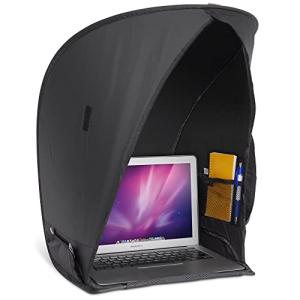
| Outdoor Work | Laptop Tent | 360° Physical Shield | Blocks 100% of side glare and protects against light rain outdoors. |
| Heavy Duty | J J-Dream Hanging | 9H Acrylic Hardness | Superior scratch protection and zero-residue hanging design. |
❓ Frequently Asked Questions
Will a privacy screen make my display look blurry?
If the filter is high-quality and flat against the screen, the image remains sharp for the user. However, an air gap can cause slight refraction, and a very dense MICROLOUVER pattern might be visible on 4K displays.
Can people behind me still see my screen?
Standard privacy filters only block horizontal viewing angles. This means someone standing directly behind the user or looking over their shoulder can still see the content, as the vertical viewing cone remains open.
Do these filters work on touchscreen laptops?
Most filters are compatible with touchscreens, but the extra layer of PET SUBSTRATE can slightly reduce sensitivity. Users may need to apply a bit more pressure than usual for the laptop to register the touch.