Digital whiteboards have transformed the way information is shared, moving beyond simple markers to interactive hubs for collaboration. Whether it is a classroom setting or a high-stakes corporate boardroom, these tools provide the bridge between physical handwriting and digital storage. Choosing the right unit involves balancing screen size, touch technology, and the specific software ecosystem required for a seamless workflow.
Digital Whiteboards
Transform your ideas into digital displays that make collaboration a breeze
Product List
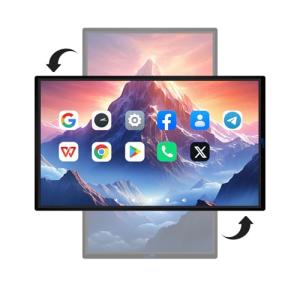
JYXCN Smart Live Streaming Board
Jyxcn
Product Review Score
4.97 out of 5 stars
43 reviews$1,000.00
💡 Practical Usage Tips
- A hardwired Ethernet connection is always preferable to wireless when streaming high-definition video content to ensure there is no stuttering or lag.
- Positioning the board away from direct sunlight helps prevent Infrared Interference, which can sometimes cause the sensors to register "ghost touches" that aren't actually happening.
- Regularly updating the firmware ensures the internal Android OS remains compatible with the latest versions of video conferencing and collaboration apps.
- Using a VESA-compliant wall mount that is rated for the specific weight of the board is essential to prevent the unit from sagging or becoming unstable over time.
✅ What to Look For & ⚠️ What to Avoid
Must-Have Features:
- High-capacity memory, such as the 8GB RAM found in the Eunivon 55-inch Smart Board, ensures that the interface remains snappy even when multiple applications are open.
- Look for Zero-Gap Bonding technology, which reduces the distance between the stylus and the screen for a more natural writing feel.
- Dual-system support allows users to switch between a simple tablet-like experience and a full Windows 11 environment for professional software.
Red Flags to Watch Out For:
- Be cautious of boards that do not include a Matte Anti-Glare coating, as overhead office lights can create distracting reflections.
- Avoid large-format units that do not specify their total weight, as installing an 86-inch board on a standard drywall without reinforcement can be dangerous.
- Watch out for "Board Only" listings if there is no existing mounting hardware available, as these units often require specialized, heavy-duty stands.
🛡️ Build Quality & Performance
The physical construction of a digital whiteboard dictates its longevity in high-traffic areas. Premium models typically utilize a metallic chassis that helps with Thermal Dissipation, ensuring the internal processors don't overheat during 24/7 operation. The screen surface is equally important; boards featuring Tempered Glass with a high hardness rating can withstand the daily rigors of classroom use without scratching.
Performance is often measured by how quickly the "digital ink" follows the pen. Low-latency systems provide a fluid experience that mimics writing on paper. For instance, the Shiarffe X5 Pro uses advanced bonding to ensure the stylus tip aligns perfectly with the lines on the screen. While entry-level plastic tablets are lightweight and portable, larger interactive displays offer the structural rigidity needed for professional presentations.
🏆 Top Recommendations
| Best For | Model Name | Key Feature | Why It Wins |
|---|---|---|---|
| Enterprise Security | Shiarffe X5 Pro | Google EDLA Certified | Native access to the Play Store with official security updates. |
| Large Auditoriums | JASZDOT 86" | Massive 86" 4K Panel | Unmatched visual scale for large groups and complex 3D modeling. |
| Quick Notes | Royalita 20" | Pressure-Sensitive LCD | Simple, battery-efficient, and perfect for household memos. |
| All-in-One Utility | JYXCN Hub | Dual Windows/Android | Offers the flexibility of a PC and a tablet in one metal frame. |
❓ Frequently Asked Questions
What is the difference between Infrared and Capacitive touch?
Infrared (IR) boards use a grid of light beams across the surface to detect input from any object, including fingers or gloved hands. Capacitive screens, similar to a smartphone, offer higher precision and a sleeker look but generally cost more and require a conductive stylus or bare skin.
Do these boards require a subscription to use?
Many modern boards, especially those with an "Open App" ecosystem, do not require a subscription. However, some enterprise-grade software for advanced collaboration may have optional monthly fees for cloud storage and specialized tools.
Can I use my existing Windows laptop with these boards?
Yes, most interactive boards feature HDMI-IN and USB ports that allow you to plug in a laptop and use the board as a massive touch-sensitive monitor.